MCP server · Email
Outlook Attachment Reader MCP server
by Zacccck
Let your AI open and read the files attached to your Outlook emails, and send local files as drafts.
This is a small helper that lets Claude read the actual contents of files attached to your Outlook emails, like PDFs, Word documents, Excel sheets, and slides. It runs on your own computer and talks to your Microsoft 365 account. It is handy if you often get reports, invoices, or resumes by email and want Claude to pull out the details for you.
What is an MCP server? The 30-second version
On its own, your AI can only chat with you. An MCP server is a small helper program that gives your AI a new skill or a connection to an app. This one connects your AI to your Outlook mailbox through Microsoft Graph, which is Microsoft's way for apps to reach your email. Once it is set up, your AI can look at your emails and open the files attached to them when you ask.
What this MCP server does
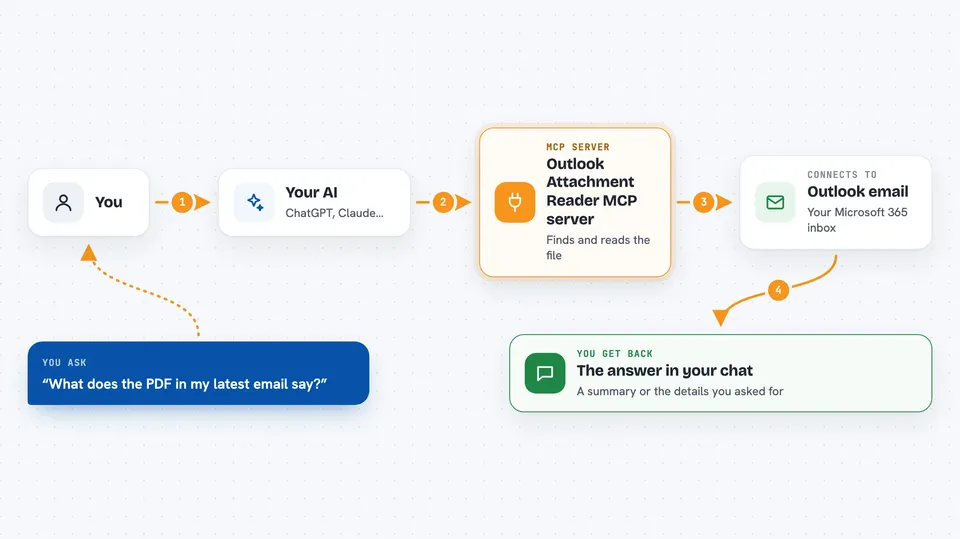
You ask your AI something like "what does the PDF in my latest email say?" The AI uses this helper, which logs in to your Microsoft 365 account and finds the email you mean. The helper downloads the attachment and reads inside it, pulling out text, tables, and images. Then it hands that content back to your AI, which explains it to you in the chat. It can also do the reverse: take a file on your computer and save it as an Outlook draft with that file attached.
 Click to zoom
What you can do with it
- List your recent Outlook emails and their attachments
- Read the text inside a PDF, Word, Excel, PowerPoint, or text attachment
- Read scanned PDFs using OCR and return page images
- Open ZIP and other archive attachments and read the files inside
- Read the full body text of a specific email
- Save a draft email with a local file attached for you to review
- Send an email with a local file attached right away when you ask
Try asking your AI
- “Show me my recent Outlook emails with attachments”
- “Summarize the contents of the attachments from the latest email”
- “Find the latest invoice email and extract the total amount and due date from the PDF”
- “Attach ~/Desktop/Daily Dash.pptx and save a draft to my manager”
What it gives back to you
You get back plain answers in the chat: lists of emails, summaries of what is inside an attachment, or specific numbers and dates you asked for. Images inside documents can come back as pictures your AI can look at. When you send or draft an email, it tells you it worked and gives you a link to open the draft in Outlook.
Before you start
What you need
- A Microsoft 365 or Outlook account
- The Claude Desktop app
- Node.js 20 or later installed on your computer
- A Microsoft Entra app registration with its client ID (the README walks you through creating one)
Good to know
It can read your emails and their attachments, and it can send email from your account, so only connect it if you are comfortable with that and review drafts before sending.
Install it with your AI
Add Outlook Attachment Reader MCP server to your AI, no technical skills needed
You don't install anything by hand. You copy one prompt, paste it into an AI that can work on your computer, and it checks, installs and connects the server for you, asking you when it needs something.
Sign in to get the install prompt
Members get a ready-made prompt that lets the Claude desktop app check Outlook Attachment Reader MCP server, install it and connect it for them, step by step. You don't need any technical skills: you copy, paste and answer a few questions. Your connected AI can also find and install any of the 4,361 MCP servers here for you.
Who it's for
Office workers who get a lot of files by email, like finance, HR, legal, and sales people who want quick summaries of attachments.