MCP server · Developer tools
Servonaut MCP server
by zb-ss
Let your AI look after your cloud servers: check health, read logs, run commands and block bad IPs.

Servonaut is a helper that connects your AI assistant to your servers, whether they live on AWS, Hetzner, OVH or just a plain SSH box. Once it is set up, you can ask your AI things like "which servers are running low on disk?" or "block this IP" and it will actually go and do it. It is handy if you look after a handful of servers and want less clicking around in dashboards.
What is an MCP server? The 30-second version
On its own, your AI can only chat. An MCP server is a small helper program that gives your AI a new skill or a connection to an app or service. This one connects your AI to your servers, so it can look things up and take actions there when you ask. You stay in charge: Servonaut has safety levels (read-only, standard, dangerous) and keeps a log of what was done.
What this MCP server does
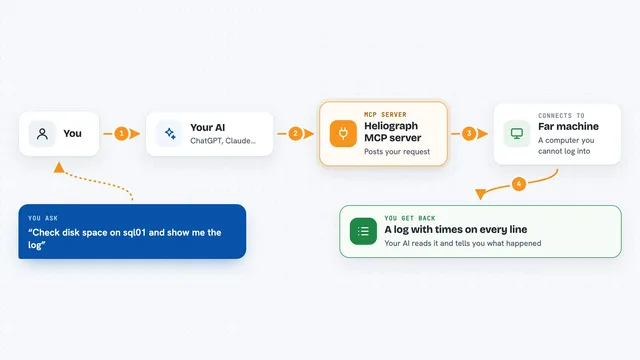
You ask your AI a question in plain words, for example "show me the logs from web-01" or "which instances are unhealthy?". The AI passes that request to Servonaut. Servonaut talks to your cloud provider or over SSH to the server, gathers what is needed, and hands the answer back. Your AI then shows you the result in the chat, as a list, a summary or a snippet of log lines. If you ask it to change something, like banning an IP, it does that too, within the safety level you allowed.
 Click to zoom
What you can do with it
- List all your servers across AWS, Hetzner, OVH and custom SSH boxes in one place
- Run a command on a server and see the output
- Read and search logs, including CloudWatch log groups
- Check server health: CPU, memory, disk, running services
- Ban or unban an IP address through a firewall rule
- Look up recent AWS CloudTrail events
- Inspect Docker containers on a server
Try asking your AI
- “Which of my servers have less than 10 percent disk space left?”
- “Show me the last 50 lines of the nginx error log on web-01.”
- “Ban the IP 203.0.113.45 on the production security group.”
- “What Docker containers are running on db-02?”
What it gives back to you
You get answers in the chat: lists of servers with their status, log lines, command output, health numbers, or a short summary of what changed. For actions like banning an IP, it tells you what it did and where. Everything is written in plain text, so you can copy it or ask follow-up questions.
Before you start
What you need
- Python 3.10 or newer
- pipx (a tool that installs Python apps cleanly)
- AWS CLI configured if you use AWS (with your access keys)
- An SSH client (already there on Linux and macOS; OpenSSH on Windows)
Good to know
It can change things on your servers, including stopping instances or changing firewall rules, so keep it on the read-only safety level until you trust it.
Install it with your AI
Add Servonaut MCP server to your AI, no technical skills needed
You don't install anything by hand. You copy one prompt, paste it into an AI that can work on your computer, and it checks, installs and connects the server for you, asking you when it needs something.
Sign in to get the install prompt
Members get a ready-made prompt that lets the Claude desktop app check Servonaut MCP server, install it and connect it for them, step by step. You don't need any technical skills: you copy, paste and answer a few questions. Your connected AI can also find and install any of the 4,361 MCP servers here for you.
Who it's for
Anyone who looks after a few cloud or SSH servers and wants to ask an AI for help instead of clicking through dashboards.