MCP server · Productivity
Markdownify MCP server
by zcaceres
Turn PDFs, Word files, images, audio, and web pages into tidy Markdown text your AI can read.

Markdownify is a small helper that changes many kinds of files and web pages into Markdown, which is plain text with simple formatting. Your AI can read Markdown easily, so this is handy when you have a PDF, a slide deck, or a video and want your AI to work with what is inside. It is made for anyone who deals with documents all day and wants them in a form the AI can actually use.
What is an MCP server? The 30-second version
On its own, your AI can only chat with you. An MCP server is a small helper program that gives your AI a new skill or a connection to an app or service. This one connects your AI to a file converter, so it can take a PDF, a Word file, an image, an audio clip, or a web page and turn it into Markdown. You just ask in plain words, and the AI uses this helper behind the scenes.
What this MCP server does
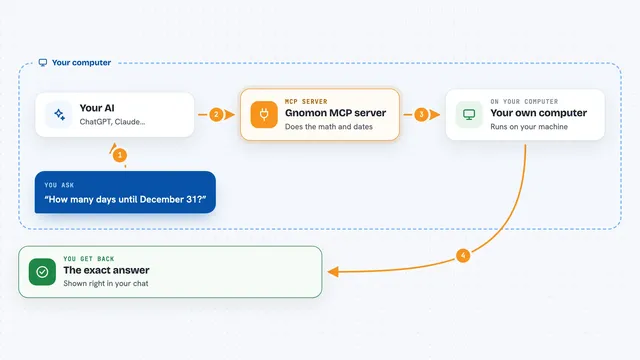
You point your AI at a file or a web link and ask it to convert that to Markdown. The AI passes the request to this helper, which runs a converter on your computer. The helper reads the PDF, image, audio, DOCX, XLSX, PPTX, YouTube video, Bing search, or web page and writes out Markdown text. The Markdown comes back into your chat, where you and the AI can read it, quote it, or summarize it.
 Click to zoom
What you can do with it
- Convert a PDF into Markdown text
- Turn a Word, Excel, or PowerPoint file into Markdown
- Pull the transcript from a YouTube video
- Turn a web page into clean Markdown
- Convert an image into Markdown with basic details
- Transcribe an audio file into Markdown
- Open an existing Markdown file and read it
Try asking your AI
- “Convert the PDF at /Users/me/Documents/report.pdf to Markdown and summarize it”
- “Turn this YouTube link into Markdown and give me the key points: https://youtube.com/watch?v=...”
- “Take the slides at /Users/me/Documents/pitch.pptx and turn them into Markdown”
- “Convert this web page to Markdown so I can quote it: https://example.com/article”
What it gives back to you
You get Markdown text back in the chat, which is the content of your file or page in plain readable form. For audio and video, you get a transcript. For images, you get Markdown with some basic details about the image. The AI can then summarize it, pull out quotes, or answer questions about it.
Before you start
What you need
- The Markdownify server installed on your computer (it is not a hosted service)
- Node.js and the bun tool to build and run it
- Python and the markitdown package, which the install step sets up for you
- A desktop AI app that supports MCP servers, like the Claude desktop app
Good to know
It reads files from your computer, so only point it at folders you are happy for the AI to see, and use MD_ALLOWED_PATHS to keep it inside a safe folder.
Install it with your AI
Add Markdownify MCP server to your AI, no technical skills needed
You don't install anything by hand. You copy one prompt, paste it into an AI that can work on your computer, and it checks, installs and connects the server for you, asking you when it needs something.
Sign in to get the install prompt
Members get a ready-made prompt that lets the Claude desktop app check Markdownify MCP server, install it and connect it for them, step by step. You don't need any technical skills: you copy, paste and answer a few questions. Your connected AI can also find and install any of the 4,361 MCP servers here for you.
Who it's for
Anyone who works with lots of documents, slides, PDFs, or videos and wants their AI to read and summarize them without copy-pasting by hand.