AI agent for medical practice managers
Annual Compliance Calendar Agent
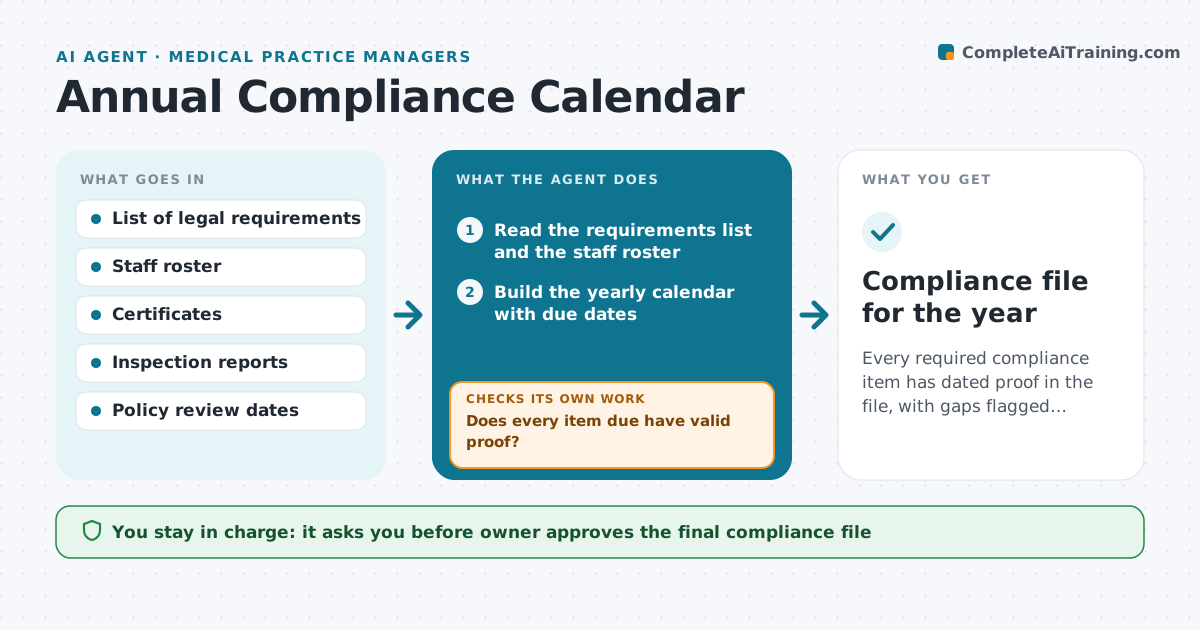
Every required compliance item has dated proof in the file, with gaps flagged long before due dates.
What it does
Yearly privacy training, fire checks, safety postings and policy reviews are scattered in different places and are discovered after a missed date. The agent builds one yearly calendar of required trainings, inspections, postings and policy reviews for the practice. It checks which are done, collects the proof, and chases missing evidence. When a certificate does not cover the required topic or date, it asks for the right one. It rebuilds the file at year end and lists open gaps. The owner approves the final compliance file. Edge case: a staff member's certificate dated just before the cut-off, where the agent checks the topic rather than only the date.
How it works
Follow the arrows from top to bottom. The orange dashed arrow is the loop: when a check fails, the agent goes back and tries again.
Read the steps as a list
- New compliance year starts
- Read the requirements list and the staff roster
- Build the yearly calendar with due dates
- Check folders for completed items and proof
- Does every item due have valid proof?If not: Request the missing or correct certificate from the person. Back to step 4.
- Check topic, name and date on each proof
- Does each proof cover the required topic and period?If not: Return it and ask for the correct certificate. Back to step 6.
- Update the calendar and the open item list
- Draft reminders for items due in 30 days
- Owner approves the final compliance fileThe agent waits here for your OK.
- Compliance file for the year
How it decides
It lists each requirement with a due date and accepts proof only when topic, person and date all match the requirement.
- Remind 30 days before each due date
- Accept a certificate only if topic and date fit
- Mark items overdue after the due date
- Re-review policies that changed in the year
Make it yours
Every agent is a starting point. You choose these settings for your own situation.
- Requirement list and due dates
- Reminder lead time (default 30 days)
- Who supplies proof for each item
- Review schedule (default weekly)
What keeps you in control
It always asks you first
- Owner approves the final compliance file
- Owner approves any notice sent in their name
Hard limits
- Never mark a requirement complete without proof
- Do not give legal advice
It stops when
- Done: all items proved and filed
- Stop: a legal requirement is unclear and the owner must confirm
Set it up
We guide you through the set-up, step by step
Members get the full set-up guide for this agent. No technical skills needed: you copy, paste and upload.
- One set of instructions to paste into your AI, with the clicks for ChatGPT, Claude, Microsoft 365 Copilot, Gemini and Grok
- The agent then walks you through connecting your own data, one source at a time
- A downloadable copy with the flow chart, the rules and the full guide