AI agent for software engineers
Dependency Update Safety Agent
Dependencies kept current and secure without breaking the build
What it does
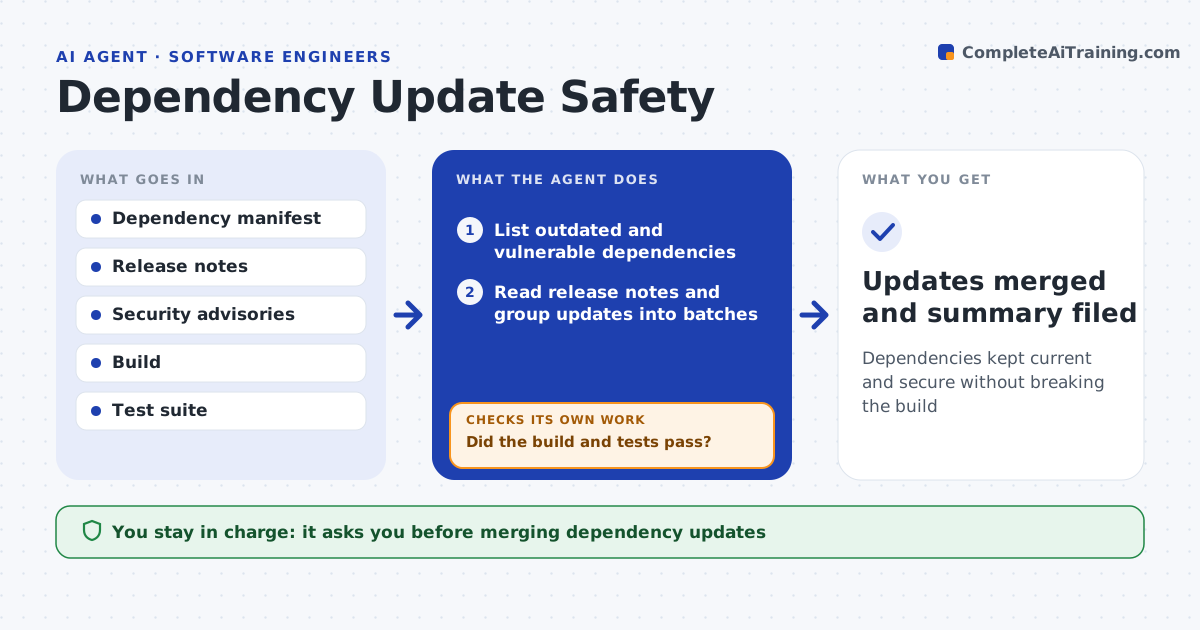
Projects fall behind on library versions, and catching up in bulk often breaks the build. Each week this agent lists outdated and vulnerable dependencies, reads each one's release notes for breaking changes and groups updates into safe batches, patch versions first. For each batch it updates in a branch, runs the build and tests, and reads the result. If tests fail, it reads the failure and tries the documented migration step. If it still fails, it splits the batch to isolate the library causing the problem and reruns. It drafts a summary of what updated cleanly and what needs manual work. You approve every merge. Edge case: a security fix that requires a major version jump is raised on its own with the migration effort noted.
How it works
Follow the arrows from top to bottom. The orange dashed arrow is the loop: when a check fails, the agent goes back and tries again.
Read the steps as a list
- Weekly dependency review
- List outdated and vulnerable dependencies
- Read release notes and group updates into batches
- Apply a batch in a branch and run build and tests
- Did the build and tests pass?If not: apply migration steps, or split the batch to find the culprit, then rerun. Back to step 4.
- Draft a summary with manual follow-ups
- Developer approves the mergeThe agent waits here for your OK.
- Updates merged and summary filed
How it decides
It batches updates by risk, applies them in a branch, and accepts a batch only when the build and tests pass.
- Patch and minor updates batched, majors handled alone
- Prioritize updates that fix a security issue
- Isolate a failing update by splitting the batch
Make it yours
Every agent is a starting point. You choose these settings for your own situation.
- Batch size and risk rules
- Whether to auto-apply known migrations
- Test suite to run
- Merge target branch
What keeps you in control
It always asks you first
- Merging dependency updates
Hard limits
- Never merges without approval
- Keeps all changes in a branch
It stops when
- Done: safe batches merged, risky ones listed
- Stop: the project does not build before any update
Set it up
We guide you through the set-up, step by step
Members get the full set-up guide for this agent. No technical skills needed: you copy, paste and upload.
- One set of instructions to paste into your AI, with the clicks for ChatGPT, Claude, Microsoft 365 Copilot, Gemini and Grok
- The agent then walks you through connecting your own data, one source at a time
- A downloadable copy with the flow chart, the rules and the full guide