
Learning path
Learning AI as a Radiographer
A clear, practical path for radiographers who want to use AI at work. Learn setup, safe prompting, and the skills that save time on imaging tasks.
Your path
Everything in the Radiographer AI kit, in the order that makes sense. Members tick off each step and see their progress.
Set up your AI
We guide you through each click.
Let skills do your everyday tasks
Connect your apps and pick your AI apps
Hand whole tasks to AI agents
Build your own tools
Everything for radiographers
All the courses, certifications, AI tools, MCP servers and apps for radiographers, most relevant first. Open any list to see more.
Take the prompt courses
A short framework course to learn how to ask, then 8 lessons with ready-to-use prompts for radiographers.
Start with this framework: how to talk to AI
CARE fits radiography because patient cases need context, action, result, and example, like documenting a chest X-ray for a suspected fracture.
Then your prompt course for radiographers- 1Patient Communication and Prep3 prompts
- 2Scheduling and Admin Support3 prompts
- 3Radiation Safety and ALARA3 prompts
- 4Patient Positioning and Technique3 prompts
- 5Image Quality Review3 prompts
- 6Equipment Troubleshooting3 prompts
- 7Documentation and Handover3 prompts
- 8Professional Learning and Protocol3 prompts
Watch the video courses or add them to your Favorites for later
64 video courses our AI picked for radiographers, most useful first. Save the ones you want to watch later with the heart.
Favorites are saved to your account: sign in or get your AI kit first.
Show all 64 video courses
Get certified, or add certifications to your Favorites
Every course ends in an exam and a certificate you can add to LinkedIn. Save the certifications you are aiming for with the heart.
Favorites are saved to your account: sign in or get your AI kit first.
More certifications for radiographersShow all 24 certifications
Try the AI tools for radiographers
2 AI tools our AI matched to the work of radiographers, best fit first. Each review shows what it does, its alternatives and the jobs it suits.
Favorites are saved to your account: sign in or get your AI kit first.
Connect your AI to the apps radiographers use
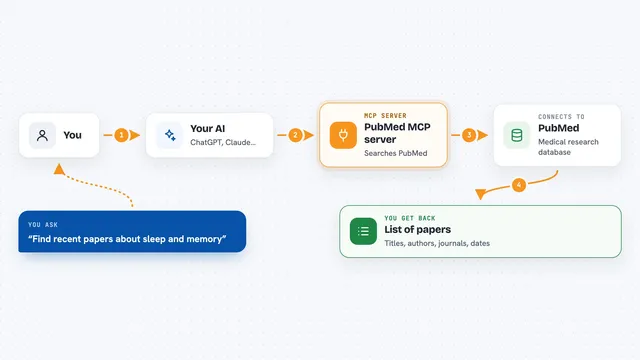
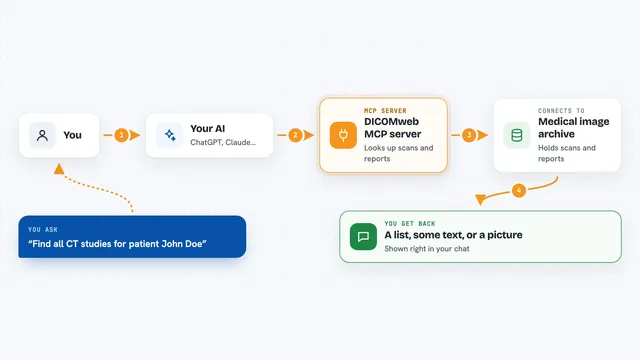
MCP servers let ChatGPT, Claude or Copilot look things up and get work done in other apps, like your email, calendar or bookkeeping software. These 2 fit the work of radiographers best, well-known apps first.































































About this learning path
6 topicsAI Skills for Radiographers, Step by Step
AI is already helping imaging teams write clearer patient messages, organize schedules, and draft handovers. You do not need to be technical. You just need to know where it fits and how to ask well.
This path walks you through setting up your AI tool, connecting it to your daily tasks, and using a prompt course made for radiographers. You also get video lessons picked for imaging work and the certifications that come with them.
Why AI Matters Now
Imaging departments are busy. You balance patients, equipment, safety rules, and paperwork. AI can take the first pass at writing and organizing so you can focus on the person in front of you.
It is not about replacing your judgment. It is about giving you a calm, quick assistant for the words and lists that fill your day.
What the Path Includes
You start with simple setup questions and a short guide to connecting your AI tool, whether that is ChatGPT, Claude, or Gemini. Then you move into skills for the job inside your AI, like patient prep and handover notes.
Next comes this prompt course, built around real radiographer tasks. You finish with video courses chosen for imaging work and the certifications that show what you learned.
How It Saves Time
Small tasks add up. A clear patient message, a schedule reminder, or a handover summary can take ten minutes of careful writing. AI gives you a solid draft in seconds, and you polish it.
That saved time goes back to patient care, equipment checks, or simply catching your breath between scans.
How It Protects Your Career
AI is changing how teams work. Radiographers who can use it well become the people who train others and improve workflows. This path helps you be that person.
You also learn safety and privacy habits, so you use AI in a way that respects patient information and professional rules.
How to Start
Begin with the setup questions. Pick one AI tool you can access at work or at home. Then work through the prompt course lesson by lesson, trying each prompt on a real task.
If you get stuck, the video courses and certifications give you a clear next step. Take it at your own pace.
Frequently asked questions
Do I need to be good with technology?
No. If you can send an email or use a patient record system, you can use these lessons. The setup questions walk you through the first steps slowly.Will AI make mistakes with medical information?
AI can sound confident even when it is wrong. The course teaches you to check every detail against your training and department rules before you use it.Is it safe to use patient details in AI?
You should never put identifiable patient information into a public AI tool. The path shows you how to work with general or de-identified details instead.How long does the path take?
Most people move through the lessons in a few short sittings. You can go faster or slower depending on your schedule. The video courses are broken into small parts.