
MCP server · Security
Unphurl URL safety MCP server
by 123Ergo
Lets your AI check any web link for redirects, fake brands, domain age, SSL and other risk signals.
Unphurl is a helper your AI can use to look at a web link and tell you what is behind it. It checks things like where a link really goes, whether the domain is new, and whether it pretends to be a well-known brand. It is handy if you deal with lots of links from emails, spreadsheets or lead lists and want a quick read on them.
What is an MCP server? The 30-second version
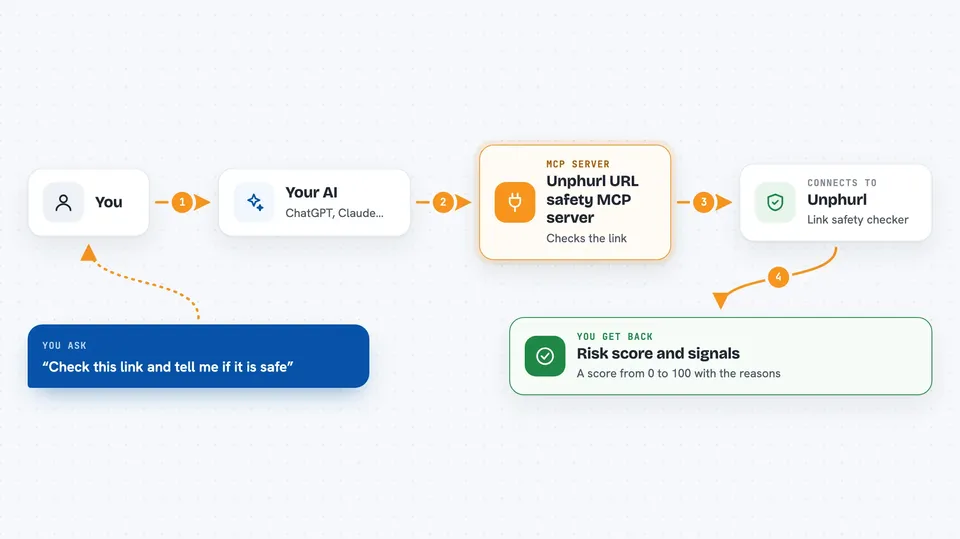
On its own, your AI can only chat with you. An MCP server is a small helper program that gives your AI a new skill or a connection to another service. This one connects your AI to Unphurl, a link-checking service. Once it is added, you can ask your AI to check a link and it will quietly ask Unphurl for the details, then explain the answer to you.
What this MCP server does
You paste a link and ask your AI to check it. Your AI sends that link to Unphurl through this helper. Unphurl looks at the link from several angles: where it redirects, whether the domain is new, whether it copies a famous brand name, whether it has a working security certificate, whether it looks parked or empty, how the link is built, and whether the domain can receive email. Unphurl sends back a list of signals and a risk score from 0 to 100. Your AI then reads those signals and tells you what it found.
 Click to zoom
What you can do with it
- Check a single link and get a risk score with the reasons behind it
- Check a whole list of links at once, up to 500 in one go
- Sort links into clean ones and flagged ones based on the score
- Create your own scoring profile so certain signals count more for your job
- Keep a trusted list of domains so they are not flagged
- See your usage history and how many check credits you have left
- Buy more credits when you run out
Try asking your AI
- “Check https://suspicious-domain.xyz and tell me what you find”
- “Batch check all the URLs in this spreadsheet and give me two lists: score under 25 and score 50 or higher”
- “Create a scoring profile called lead-qual that weights parked domains at 30 and no MX record at 20”
- “Check my Unphurl credit balance”
What it gives back to you
You get back a list of signals for each link, grouped into areas like redirects, brand impersonation, domain age, SSL, parked detection, link structure and DNS. Each link also gets a risk score from 0 to 100. Your AI can turn that into a short summary in the chat, or into two lists, or into a CSV file if you ask. For batch checks you get results for every link you sent.
Before you start
What you need
- An Unphurl account (your AI can create one for you if you ask it to sign up)
- An Unphurl API key, which is a kind of password for apps and looks like uph_your_key_here
- An MCP-compatible AI tool such as Claude Desktop, Claude Code, ChatGPT desktop, Cursor or Windsurf
- A positive credit balance, since even free lookups need one
Good to know
It costs money: unknown domains use credits, and the purchase tool can spend real money, so check your balance and prices before buying.
Install it with your AI
Add Unphurl URL safety MCP server to your AI, no technical skills needed
You don't install anything by hand. You copy one prompt, paste it into an AI that can work on your computer, and it checks, installs and connects the server for you, asking you when it needs something.
Sign in to get the install prompt
Members get a ready-made prompt that lets the Claude desktop app check Unphurl URL safety MCP server, install it and connect it for them, step by step. You don't need any technical skills: you copy, paste and answer a few questions. Your connected AI can also find and install any of the 4,609 MCP servers here for you.
Who it's for
People who handle lots of links, like sales teams checking lead lists, marketers auditing backlinks, and anyone doing quick due diligence on unknown websites.



