
MCP server · Analytics
Google Search Console MCP server
by acamolese
Lets your AI read your Google Search Console data and build SEO reports for you.
This is a helper that connects your AI assistant to Google Search Console, the free tool from Google that shows how your website performs in search. Once it is set up, you can ask your AI questions about your site's clicks, rankings and indexing in normal words. It is handy for anyone who looks after a website and does not want to click through Google's reports by hand.
What is an MCP server? The 30-second version
On its own, your AI can only chat. An MCP server is a small helper program that gives your AI a new skill or a connection to an app. This one connects your AI to Google Search Console, so the AI can look up your search data and answer questions about it. You just ask, and the helper fetches what is needed.
What this MCP server does
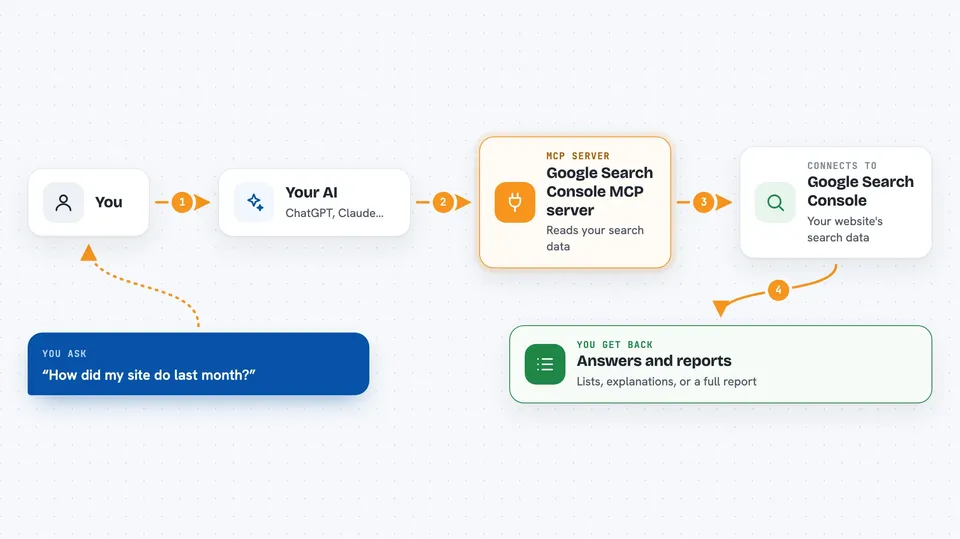
You ask your AI something about your website's search performance. The AI passes your question to this helper program. The helper talks to Google Search Console using your account details and pulls back the numbers. Then the AI turns those numbers into a plain answer, a list, or a full report. It can also build a ready-to-send HTML report you can hand to a client.
 Click to zoom
What you can do with it
- See which websites your Google account can read
- Check whether your site is up or down compared to last month
- Find queries that are close to the top and worth a push
- Spot pages that rank but get few clicks
- Find pages that are losing traffic over time
- Check whether specific pages are indexed by Google
- Generate a white-label HTML audit report with a 30/60/90-day roadmap
Try asking your AI
- “How did my site do last month compared to the month before?”
- “Which pages lost the most clicks in the last 28 days?”
- “Are these five URLs indexed by Google?”
- “Build me an SEO audit report for my client”
What it gives back to you
You get answers in the chat: lists of queries, pages, clicks and impressions, plus short explanations of what changed. It can also hand you a self-contained HTML report file you can open in a browser or send to a client. The report includes charts, findings and a 30/60/90-day action plan. Everything is read-only, so nothing in your Search Console gets changed.
Before you start
What you need
- A Google account with access to at least one Search Console property
- Google Cloud OAuth credentials (client ID, client secret and refresh token) for that account
- uv installed on your computer (a small tool that runs the server)
- An MCP client like Claude Desktop, Claude Code, Cursor, Codex, Gemini CLI or Zed
Good to know
It can only read your Search Console data, never change it, but it does need your Google credentials, so keep those private and only share the reports you are happy for others to see.
Install it with your AI
Add Google Search Console MCP server to your AI, no technical skills needed
You don't install anything by hand. You copy one prompt, paste it into an AI that can work on your computer, and it checks, installs and connects the server for you, asking you when it needs something.
Sign in to get the install prompt
Members get a ready-made prompt that lets the Claude desktop app check Google Search Console MCP server, install it and connect it for them, step by step. You don't need any technical skills: you copy, paste and answer a few questions. Your connected AI can also find and install any of the 4,361 MCP servers here for you.
Who it's for
SEO specialists, marketing teams, agency staff and website owners who want quick answers and client-ready reports without digging through Google Search Console by hand.





