
MCP server · Productivity
ShortURL MCP server
by AceDataCloud
Turn long web links into short surl.id links, one at a time or up to ten at once, right from your chat.
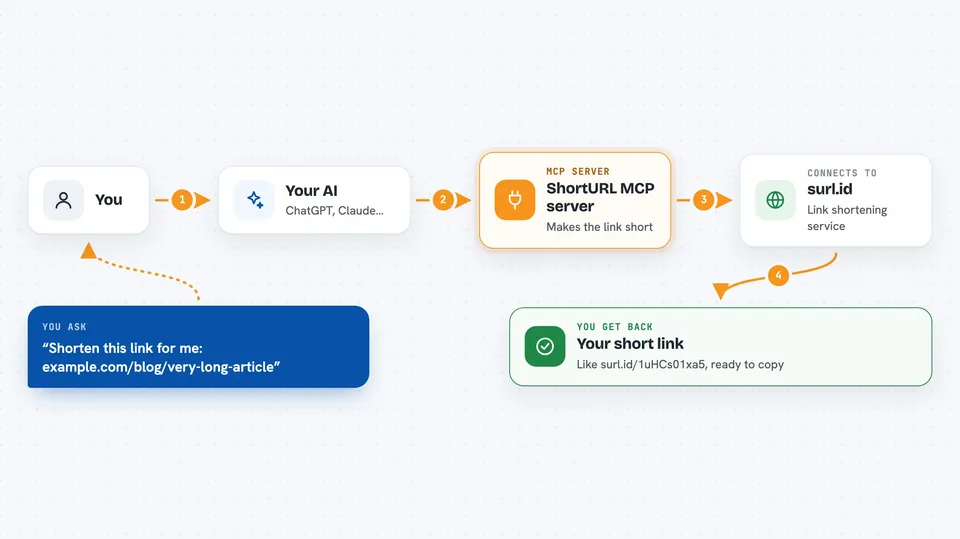
This is a small helper that lets your AI turn long, messy web addresses into short, tidy links. You just paste the long link into your chat and ask for a short one. It is handy for anyone who shares links in emails, documents, or social posts and wants them to look clean.
What is an MCP server? The 30-second version
On its own, your AI can only chat with you. An MCP server is a small helper program that gives your AI a new skill or a connection to another service. This one connects your AI to a URL shortening service, so when you ask for a short link, your AI can actually go and create one for you. You do not need to install anything on your computer, because this helper runs online.
What this MCP server does
You paste a long web address into your chat and ask your AI to shorten it. Your AI passes that address to this helper. The helper sends it to the AceDataCloud shortening service, which creates a short link on the surl.id domain. The short link comes back into your chat, ready to copy. You can also give it a list of up to ten links and get short versions of all of them in one go.
 Click to zoom
What you can do with it
- Shorten a single long web address into a short surl.id link
- Shorten up to ten links at once in a single request
- Create tidy links for a document's reference list
- Make short links for social media posts
- Ask for a usage guide if you are unsure how to phrase your request
- Ask for details about the shortening service, like error codes
Try asking your AI
- “Shorten this link for me: https://example.com/blog/very-long-article-title-about-ai”
- “I need short links for these three pages, please: https://example.com/page-one, https://example.com/page-two, https://example.com/page-three”
- “Make a short link I can put in my email signature”
- “Give me short versions of all the links in this list so I can paste them into my slides”
What it gives back to you
You get back the short link, something like https://surl.id/1uHCs01xa5, written right in the chat. If you asked for several links at once, you get a short link for each one. If something goes wrong, you get a short error message instead. The links are permanent, so they will not expire later.
Before you start
What you need
- An AceDataCloud account (free to sign up)
- An API token from AceDataCloud, which you get by clicking Acquire on their Short URL page (a token is like a password that lets apps use the service for you)
- If you use Claude.ai, you can connect with a simple login instead of a token
Good to know
Your API token is like a password, so keep it private and do not paste it into chats or documents you share with others.
Install it with your AI
Add ShortURL MCP server to your AI, no technical skills needed
You don't install anything by hand. You copy one prompt, paste it into an AI that can work on your computer, and it checks, installs and connects the server for you, asking you when it needs something.
Sign in to get the install prompt
Members get a ready-made prompt that lets the Claude desktop app check ShortURL MCP server, install it and connect it for them, step by step. You don't need any technical skills: you copy, paste and answer a few questions. Your connected AI can also find and install any of the 4,361 MCP servers here for you.
Who it's for
Anyone who shares links often, like marketers, writers, support staff, and anyone tidying up a document or email.





