MCP server · Developer tools
Cirdan MCP server
by adanb13
Let your AI check incidents and trigger repairs for the services you register with Cirdan.

Cirdan is a helper that watches your alerts and tries to fix the code behind them. This MCP server lets your AI assistant talk to Cirdan, so you can ask about incidents and repairs right from your chat. It is handy if your team already uses Cirdan and you want quick answers without opening another tool.
What is an MCP server? The 30-second version
On its own, your AI can only chat with you. An MCP server is a small helper program that gives your AI a new skill or a connection to an app or service. This one connects your AI to Cirdan, the on-call repair tool. Once it is connected, your AI can look up incidents and ask Cirdan to start a repair when you ask it to.
What this MCP server does
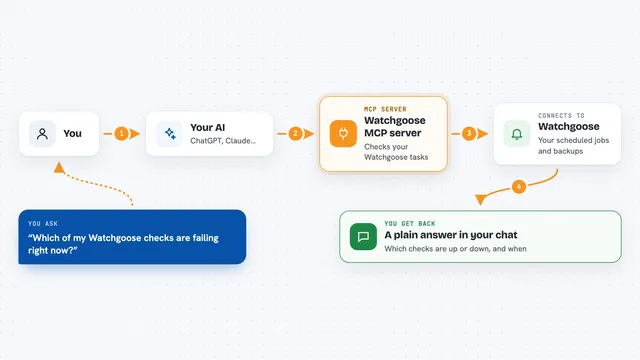
You ask your AI something like which incidents are open or what happened with a specific alert. Your AI sends that request to this MCP server. The server talks to your local Cirdan daemon, which keeps track of alerts and repairs. Cirdan sends back the details, and your AI shows them to you in plain language. If you ask for a repair, Cirdan can run the fix steps and report back what it did.
 Click to zoom
What you can do with it
- List current incidents Cirdan has detected
- Explain what happened in a specific incident
- Start a repair for an incident
- Check whether Cirdan is ready to repair anything
- See the status of the Cirdan daemon
- Watch the live stream of events and incidents
- Ask for the brief Cirdan would send to the responder
Try asking your AI
- “What incidents does Cirdan have open right now?”
- “Explain incident inc-1234 to me in plain words.”
- “Is Cirdan ready to repair anything, or is something missing?”
- “Start a repair for the checkout-api incident from this morning.”
What it gives back to you
You get answers in the chat: a list of incidents with their names and status, a short explanation of what happened, or a confirmation that a repair was started. For readiness checks, you get a table-like summary showing which steps are green and which need attention. If something fails, Cirdan tells you what went wrong and what to do next.
Before you start
What you need
- Cirdan installed and set up on your machine
- The Cirdan daemon running (cirdand serve)
- A cirdan.yaml file with at least one service registered
- An alert source connected, like Grafana or Slack
Good to know
This server can start repairs that change code and open pull requests, so only connect it if you are comfortable with Cirdan acting on your registered services.
Install it with your AI
Add Cirdan MCP server to your AI, no technical skills needed
You don't install anything by hand. You copy one prompt, paste it into an AI that can work on your computer, and it checks, installs and connects the server for you, asking you when it needs something.
Sign in to get the install prompt
Members get a ready-made prompt that lets the Claude desktop app check Cirdan MCP server, install it and connect it for them, step by step. You don't need any technical skills: you copy, paste and answer a few questions. Your connected AI can also find and install any of the 4,609 MCP servers here for you.
Who it's for
Developers and on-call engineers who already use Cirdan and want to check incidents or start repairs from their AI chat.