
MCP server · Security
AIM Guard MCP server
Gives your AI safety checks: it spots harmful text, hidden passwords, tricky prompts, and risky links.
AIM Guard is a small helper that adds a safety layer to your AI assistant. It checks text, links, and prompts for things that could be harmful or unsafe, and it hands your AI ready-made security rules to follow. It is handy if you use your AI for work tasks and want a second pair of eyes before you act on something.
What is an MCP server? The 30-second version
On its own, your AI can only chat with you. An MCP server is a small helper program that gives your AI a new skill or a connection to a service. This one connects your AI to AIM Guard, a set of security tools and checklists. Once it is added, your AI can run safety checks for you whenever you ask.
What this MCP server does
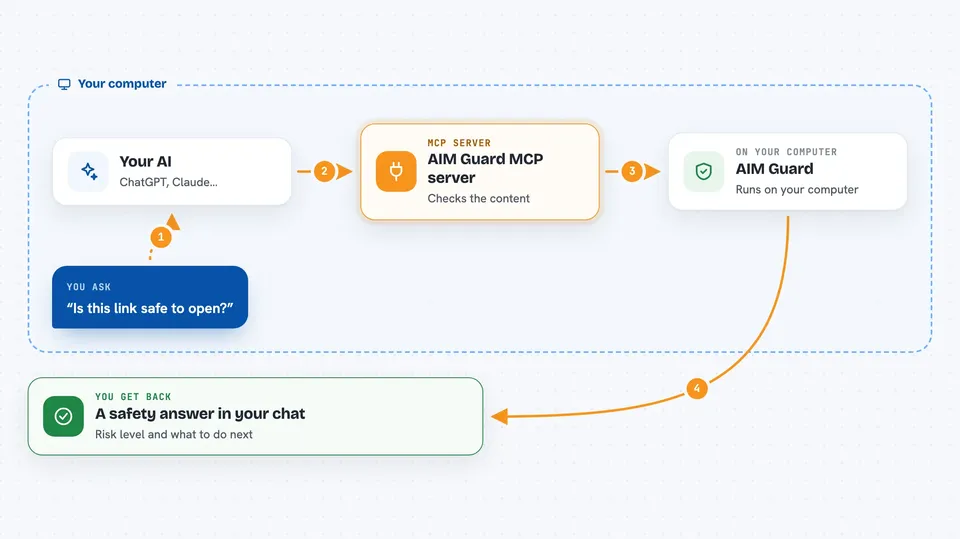
You ask your AI to check something, like a piece of text, a web address, or a prompt you plan to send. Your AI passes that to AIM Guard, which looks at it using built-in rules and the AIM Intelligence service. AIM Guard sends back a result: whether the content looks risky, what kind of risk it found, and what to do about it. Your AI then shows you that answer in plain words in the chat.
 Click to zoom
What you can do with it
- Check a piece of text for harmful or inappropriate content
- Scan text for exposed passwords, API keys, and tokens
- Spot prompt injection attempts that try to trick your AI
- Validate a web link for phishing or malware signs
- Get a security checklist before working with a database, email, or files
- Add a security layer to a prompt before you send it
- Run a full security review of code, data, or a configuration
Try asking your AI
- “Check this email text for anything harmful before I reply”
- “Scan this paragraph for exposed passwords or API keys”
- “Is this link safe to open: http://free-prize-login.example.com”
- “Does this prompt look like a prompt injection attempt”
What it gives back to you
You get a short answer in the chat, usually a risk level and a note about what was found. For some checks you also get a list of the specific items spotted, like which kind of secret or which pattern matched. The credential scanner can hide the sensitive parts so they are not shown in full. Security review and threat analysis prompts give you a summary table with findings grouped by severity.
Before you start
What you need
- The Claude desktop app or another AI app that supports MCP servers
- Node.js 18 or newer installed on your computer
- An AIM Intelligence API key for the text analysis feature (a kind of password for apps)
Good to know
The text analysis feature sends your text to the AIM Intelligence service, so do not paste anything private or confidential into it unless you are allowed to share it.
Install it with your AI
Add AIM Guard MCP server to your AI, no technical skills needed
You don't install anything by hand. You copy one prompt, paste it into an AI that can work on your computer, and it checks, installs and connects the server for you, asking you when it needs something.
Sign in to get the install prompt
Members get a ready-made prompt that lets the Claude desktop app check AIM Guard MCP server, install it and connect it for them, step by step. You don't need any technical skills: you copy, paste and answer a few questions. Your connected AI can also find and install any of the 4,609 MCP servers here for you.
Who it's for
Anyone who uses an AI assistant for work and wants a simple safety check before acting on text, links, or prompts.



