MCP server · Productivity
Redmine MCP server
Lets your AI look up, create and update Redmine issues, projects and time entries for you.
This is a small helper that connects your AI assistant to Redmine, the tool many teams use to track tasks and bugs. Once it is set up, you can ask your AI in plain words to find an issue, add a comment or log your hours, and it will do it in Redmine for you. It is handy for anyone who spends part of their day in Redmine and would rather just type a request in chat.
What is an MCP server? The 30-second version
On its own, your AI can only chat with you. An MCP server is a small helper program that gives your AI a new skill or a connection to an app, and here that app is your Redmine. You add this helper to your AI app once, and from then on your AI can look things up in Redmine or make changes there when you ask. It runs quietly on your own computer and talks to your Redmine account using a key you provide.
What this MCP server does
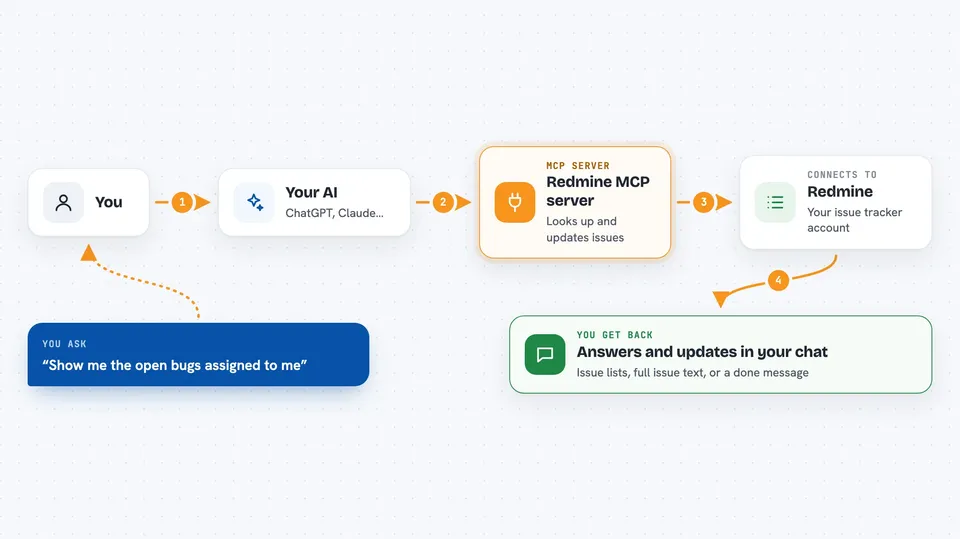
You type a request in your AI chat, like asking for the open bugs in a project or asking to add a note to an issue. Your AI passes that request to this helper program, which is running on your machine. The helper then talks to your Redmine account over the internet using your Redmine address and your personal API key. Redmine sends back the answer, and the helper hands it to your AI, which shows it to you in the chat. If you asked for a change, like creating an issue or logging time, the helper makes that change in Redmine and tells you it is done.
 Click to zoom
What you can do with it
- List and filter issues in a project, with paging
- Read one issue in full, including comments, history and attachments
- Create a new issue with subject, description, tracker, priority and assignee
- Update an issue, for example change its status, priority or assignee
- Add a comment (note) to an issue
- Log time on an issue or a project
- List time entries for a person or a date range
- Search Redmine for issues, wiki pages and news
Try asking your AI
- “Show me the open bugs assigned to me in the Website project”
- “Read issue 4821 and summarise the comments”
- “Create an issue in the Mobile project titled Login button broken, priority high, assign to Anna”
- “Log 2 hours on issue 4821 for today with the comment fixed the login form”
What it gives back to you
You get answers written in the chat: lists of issues with their ids, titles and statuses, or the full text of one issue with its comments and history. For time entries you get hours, dates and comments. When you ask for a change, like creating an issue or logging time, the helper tells you it worked and usually shows the new or updated item. Everything stays readable in the conversation, so you can ask follow-up questions right away.
Before you start
What you need
- A Redmine account with access to the projects you care about
- Your personal Redmine API key (found under My account, then API access key)
- An AI app that supports MCP servers, like Claude Desktop, Cursor or VS Code
- Node.js installed on your computer, because the helper is started with npx
Good to know
It can create and change things in your Redmine, like new issues, status changes and time entries, so check what your AI is about to do before you approve it, and keep your API key private.
Install it with your AI
Add Redmine MCP server to your AI, no technical skills needed
You don't install anything by hand. You copy one prompt, paste it into an AI that can work on your computer, and it checks, installs and connects the server for you, asking you when it needs something.
Sign in to get the install prompt
Members get a ready-made prompt that lets the Claude desktop app check Redmine MCP server, install it and connect it for them, step by step. You don't need any technical skills: you copy, paste and answer a few questions. Your connected AI can also find and install any of the 4,609 MCP servers here for you.
Who it's for
Project managers, developers, testers and support staff who already use Redmine every day and want to handle issues and time tracking from their AI chat instead of clicking around.