
MCP server · Research
New York Times search MCP server
by angheljf
Lets your AI search recent New York Times articles by keyword and bring back titles, summaries and links.
This is a small helper that connects your AI assistant to the New York Times article search. You type a topic, and your AI goes and finds recent articles about it. It is handy if you follow the news for work, write summaries, or just want to see what has been written lately about something.
What is an MCP server? The 30-second version
On its own, your AI can only chat with you using what it already knows. An MCP server is a small helper program that gives your AI a new skill or a connection to an app or service. This one connects your AI to the New York Times article search, so it can look up articles for you when you ask. You do not need to understand how it works inside; you just ask a question and the AI uses this helper behind the scenes.
What this MCP server does
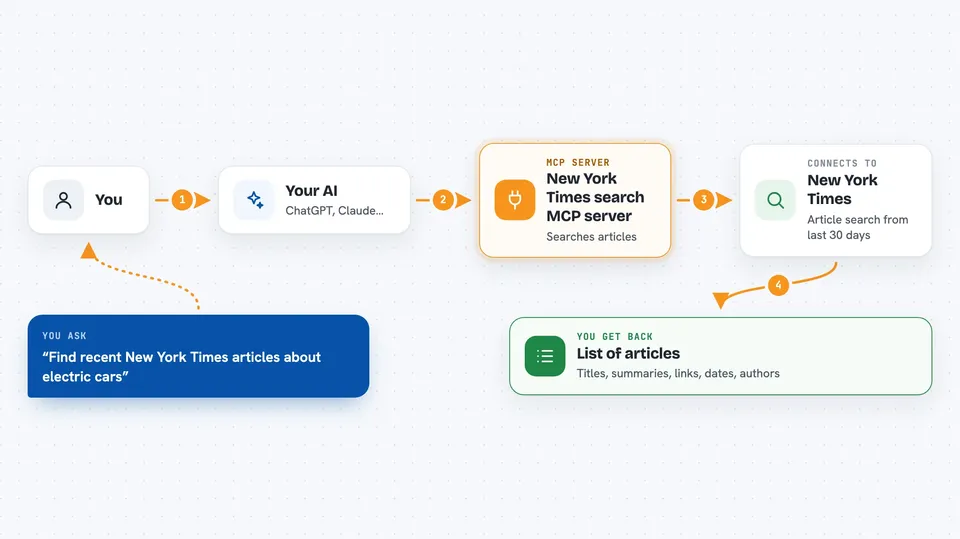
You ask your AI something like find recent articles about a topic. The AI passes your keyword to this helper program. The helper then asks the New York Times article search for matching stories from the last 30 days. The results come back and the AI shows them to you in the chat, with the title, a short summary, the link, the date and the author. You can then read them, copy the links, or ask follow-up questions.
 Click to zoom
What you can do with it
- Search New York Times articles from the last 30 days by keyword
- Get a list of matching articles with titles and short summaries
- See the published date and author for each article
- Get the direct link to each article so you can open it
- Ask follow-up questions about what came back
Try asking your AI
- “Find recent New York Times articles about electric cars”
- “What has the New York Times written about inflation in the last month?”
- “Show me NYT articles about the World Cup from the past 30 days”
- “Search the New York Times for stories about artificial intelligence”
What it gives back to you
You get back a list of articles in the chat. Each one usually shows the title, a short summary, the link, the date it was published, and the author. If nothing matches, you just get an empty result or a short note. You can then ask your AI to summarise them or pick the ones that matter to you.
Before you start
What you need
- A New York Times API key (a kind of password for apps; you get one for free from the NYT developer site)
- Node.js installed on your computer
- The Claude desktop app if you want to use it there
Good to know
It only reads public article information from the New York Times, so it will not change or delete anything, but you do need to keep your API key private.
Install it with your AI
Add New York Times search MCP server to your AI, no technical skills needed
You don't install anything by hand. You copy one prompt, paste it into an AI that can work on your computer, and it checks, installs and connects the server for you, asking you when it needs something.
Sign in to get the install prompt
Members get a ready-made prompt that lets the Claude desktop app check New York Times search MCP server, install it and connect it for them, step by step. You don't need any technical skills: you copy, paste and answer a few questions. Your connected AI can also find and install any of the 4,361 MCP servers here for you.
Who it's for
Anyone who follows the news for work, like researchers, writers, analysts, or people who need quick summaries of recent coverage on a topic.


