MCP server · Social media · official
YouTube Transcript MCP server
by artemchuikin · official
Let your AI read YouTube videos, pull transcripts, and search videos, channels, and playlists for you.
This is a helper that lets your AI read YouTube for you. It can pull the words spoken in a video, search YouTube, and look through channels and playlists. It is handy if you often work with talks, interviews, tutorials, or any video you would rather read than watch.
What is an MCP server? The 30-second version
On its own, your AI can only chat. It cannot open a YouTube link or watch a video. An MCP server is a small helper program that gives your AI a new skill, and this one connects it to YouTube. Once connected, you can paste a video link and ask for a summary, and the AI will go get the transcript itself.
What this MCP server does
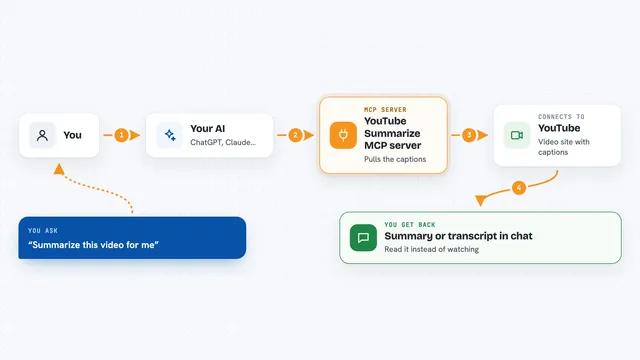
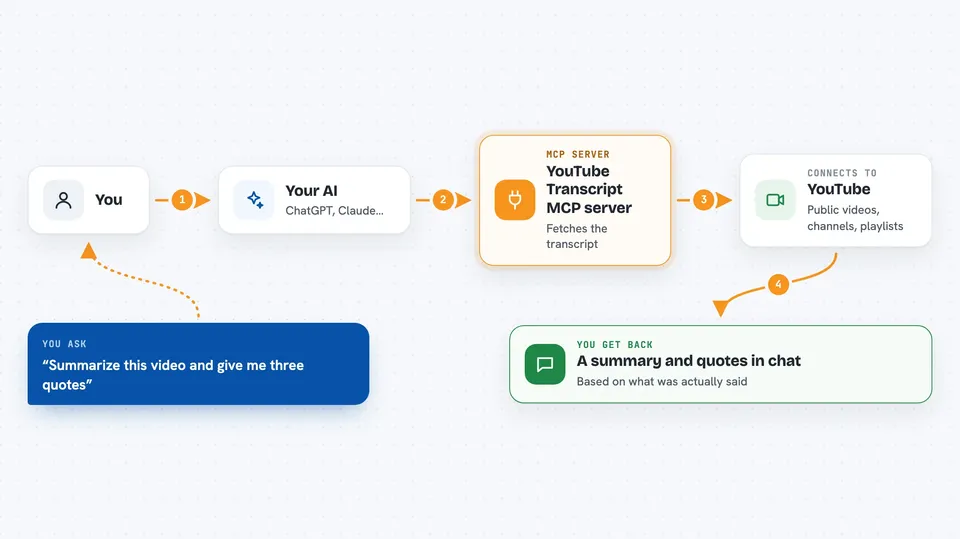
You ask your AI something about a YouTube video, like a summary or a list of quotes. The AI uses this helper to fetch the video's transcript, which is the written version of everything said in the video. The helper talks to YouTube, grabs the text, and hands it back to your AI. Your AI then reads it and answers you in the chat. You can also ask it to search YouTube, browse a channel, or go through a playlist.
 Click to zoom
What you can do with it
- Get the full transcript of any public YouTube video
- Summarize a video and pull out key quotes
- Search YouTube for videos or channels by keyword
- List the videos on a channel or in a playlist
- Find the most recent videos a channel published
- Fetch transcripts for many videos at once in the background
- Get video details like title, channel, duration, and views
Try asking your AI
- “Summarize this video and give me the three strongest quotes: https://www.youtube.com/watch?v=dQw4w9WgXcQ”
- “Find recent YouTube videos about beginner gardening and list the titles”
- “List the last 20 videos from the @veritasium channel”
- “Get the transcript of this video as a subtitle file I can save”
What it gives back to you
You get answers written in the chat, based on what was actually said in the video. It can also give you the raw transcript as plain text, timed segments, or a subtitle file you can save. For searches and channel listings, you get lists of video titles, links, and details. For big jobs, you get a job you can check on, and the transcripts come back as they finish.
Before you start
What you need
- A free account at transcriptout.com (new accounts get 100 free credits)
- An API key from your transcriptout dashboard (a kind of password that starts with sk_)
- A chat app that supports MCP servers, like Cursor or VS Code
Good to know
Most actions use credits from your account, so keep an eye on your balance, and batch jobs charge when you submit them.
Install it with your AI
Add YouTube Transcript MCP server to your AI, no technical skills needed
You don't install anything by hand. You copy one prompt, paste it into an AI that can work on your computer, and it checks, installs and connects the server for you, asking you when it needs something.
Sign in to get the install prompt
Members get a ready-made prompt that lets the Claude desktop app check YouTube Transcript MCP server, install it and connect it for them, step by step. You don't need any technical skills: you copy, paste and answer a few questions. Your connected AI can also find and install any of the 4,361 MCP servers here for you.
Who it's for
Anyone who works with video content, like researchers, writers, marketers, students, and podcast or YouTube fans who want to read instead of watch.