MCP server · Research
YouTube Summarize MCP server
by zlatkoc
Let your AI pull YouTube transcripts and summaries so you can read instead of watch.
This is a small helper that lets your AI read YouTube videos for you. You give it a video link, and it fetches the words spoken in the video so your AI can summarize them or answer questions about them. It is handy if you often deal with long talks, tutorials, or interviews and would rather skim the text.
What is an MCP server? The 30-second version
On its own, your AI can only chat with you. It cannot open a YouTube page or watch a video. An MCP server is a small helper program that gives your AI a new skill. This one connects your AI to YouTube, so it can look up a video's transcript and details when you ask.
What this MCP server does
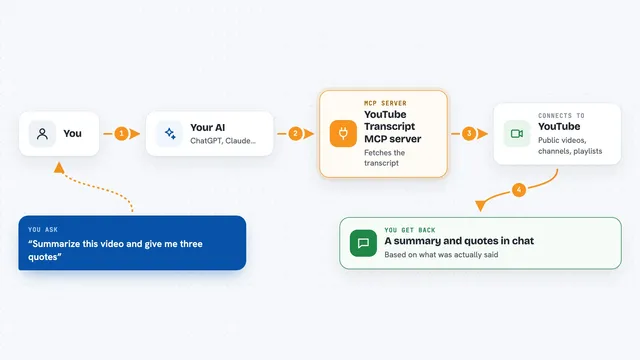
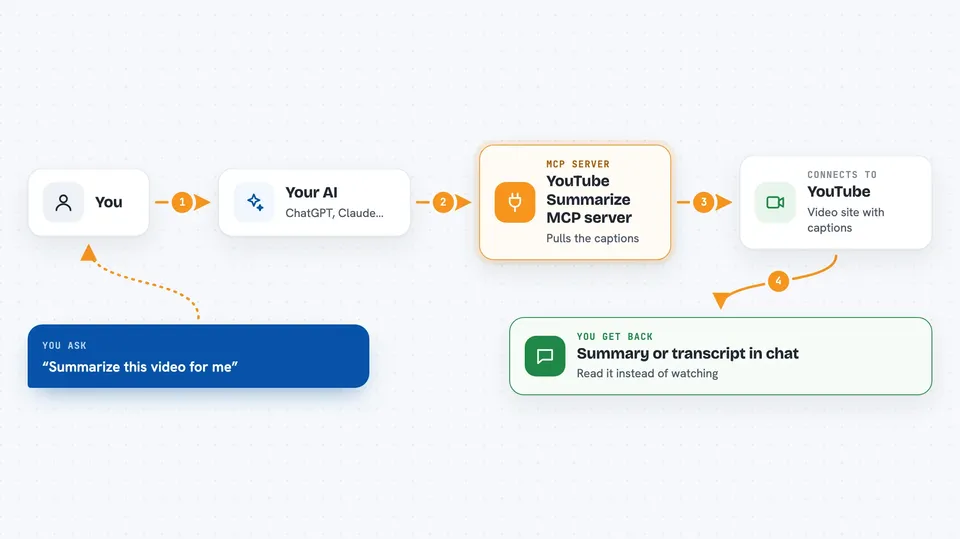
You paste a YouTube link into your chat and ask for a summary or the transcript. Your AI passes that link to this helper. The helper goes to YouTube, finds the captions for that video, and pulls them back as text. It can also grab basic facts like the title, channel, upload date, and view count. Then your AI reads all of that and gives you a summary or answers your questions in the chat.
 Click to zoom
What you can do with it
- Get the full transcript of a YouTube video as plain text
- Summarize a long video so you can skim it in a minute
- Fetch video details like title, channel, duration, and views
- List every video in a public playlist
- Search YouTube and get a clean list of results
- Check which caption languages are available for a video
- Get transcripts in a specific language, like Spanish or German
Try asking your AI
- “Summarize this YouTube video for me: https://youtu.be/dQw4w9WgXcQ”
- “Get the transcript of this talk with timestamps so I can find the part about pricing”
- “What are the main points of this tutorial video? Here is the link”
- “List the videos in this playlist and sort them by view count”
What it gives back to you
You get text back in the chat. For a transcript, that is the spoken words, sometimes with timestamps like [00:12:34] at the start of each line. For a summary, you get a short write-up your AI made from the transcript. For metadata, you get a small block with the title, channel, upload date, duration, and views.
Before you start
What you need
- Python 3.13 or newer
- The uv package manager (a free tool you install once; the README shows the command)
- An MCP client like the Claude desktop app or Claude Code
Good to know
It only reads public YouTube content, so it will not work on private or age-restricted videos, and it needs the video to have captions available.
Install it with your AI
Add YouTube Summarize MCP server to your AI, no technical skills needed
You don't install anything by hand. You copy one prompt, paste it into an AI that can work on your computer, and it checks, installs and connects the server for you, asking you when it needs something.
Sign in to get the install prompt
Members get a ready-made prompt that lets the Claude desktop app check YouTube Summarize MCP server, install it and connect it for them, step by step. You don't need any technical skills: you copy, paste and answer a few questions. Your connected AI can also find and install any of the 4,361 MCP servers here for you.
Who it's for
Anyone who watches or researches YouTube for work, like marketers, students, journalists, and analysts who want the gist of a video without sitting through it.