
MCP server · Security
DocSentinel MCP server
by arthurpanhku
Lets your AI review security documents and reports, then list risks, compliance gaps, and fixes.
DocSentinel is a security review helper for software teams. It reads your documents, forms, and reports and points out security risks, missing rules, and ways to fix them. It is handy if you deal with security paperwork but are not a security expert yourself.
What is an MCP server? The 30-second version
On its own, your AI can only chat with you. An MCP server is a small helper program that gives your AI a new skill or a connection to another service. This one connects your AI to DocSentinel, a security review platform. Once connected, your AI can send your documents to DocSentinel and bring back the findings for you.
What this MCP server does
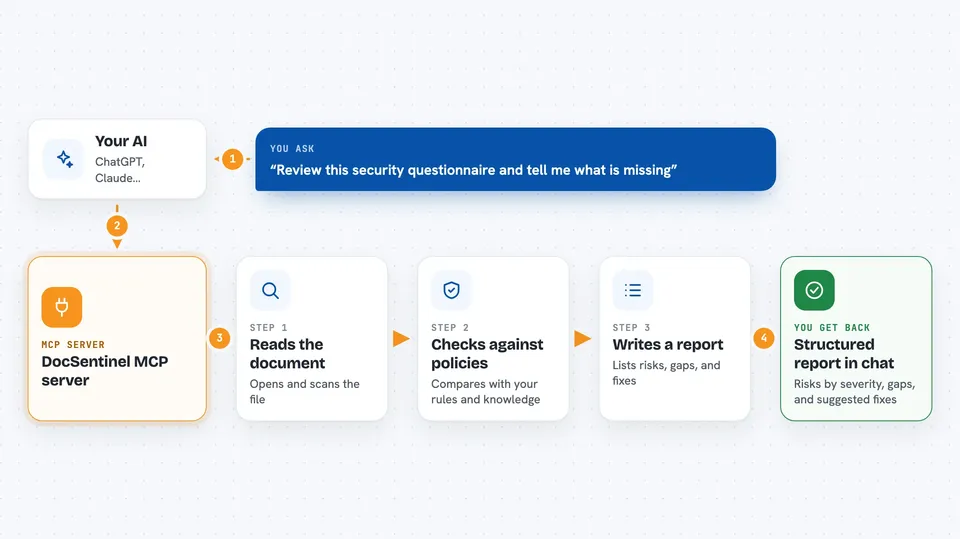
You ask your AI to review a security document, questionnaire, or report. Your AI passes it to DocSentinel through this helper. DocSentinel reads the file, compares it against your policies and knowledge base, and looks for risks and compliance gaps. It then writes a structured report with the problems it found and suggested fixes. Your AI shows you that report right in the chat.
 Click to zoom
What you can do with it
- Review a security questionnaire and list the gaps
- Check a design document for security risks
- Summarize a penetration test report
- Compare a document against a compliance framework like ISO 27001
- Suggest fixes for issues it finds
- Run a threat model on an architecture document
- Keep a knowledge base of your policies for future reviews
Try asking your AI
- “Review this security questionnaire and tell me what is missing”
- “Check this design document for risks and compliance gaps”
- “Summarize the main findings in this penetration test report”
- “Does this document meet ISO 27001 requirements?”
What it gives back to you
You get back a structured report in the chat. It lists risks by severity, compliance gaps, and suggested fixes. Some results may also come as a file or table you can save.
Before you start
What you need
- The DocSentinel platform running (local or cloud)
- Access details for DocSentinel, like a token or local address
- An API key for an AI model such as OpenAI, Claude, Qwen, DeepSeek, or Ollama
Good to know
It reads your documents and can suggest changes, so check its findings before acting on them.
Install it with your AI
Add DocSentinel MCP server to your AI, no technical skills needed
You don't install anything by hand. You copy one prompt, paste it into an AI that can work on your computer, and it checks, installs and connects the server for you, asking you when it needs something.
Sign in to get the install prompt
Members get a ready-made prompt that lets the Claude desktop app check DocSentinel MCP server, install it and connect it for them, step by step. You don't need any technical skills: you copy, paste and answer a few questions. Your connected AI can also find and install any of the 4,361 MCP servers here for you.
Who it's for
Security teams, compliance officers, and developers who handle security documents and reviews.





