
MCP server · Email
Atomic Mail MCP server
by Atomic-Mail
Give your AI its own email inbox so it can send, read, and reply to messages for you.
Atomic Mail is an email service made for AI agents. It lets your AI set up its own email address, then send and receive messages on its own. It is handy if you want an assistant to handle a shared inbox, collect newsletters, or run an email survey without you doing the setup.
What is an MCP server? The 30-second version
On its own, your AI can only chat with you. An MCP server is a small helper program that gives your AI a new skill or a connection to another service. This one connects your AI to Atomic Mail, an email service. Once it is connected, your AI can open its own inbox and send and read mail there when you ask.
What this MCP server does
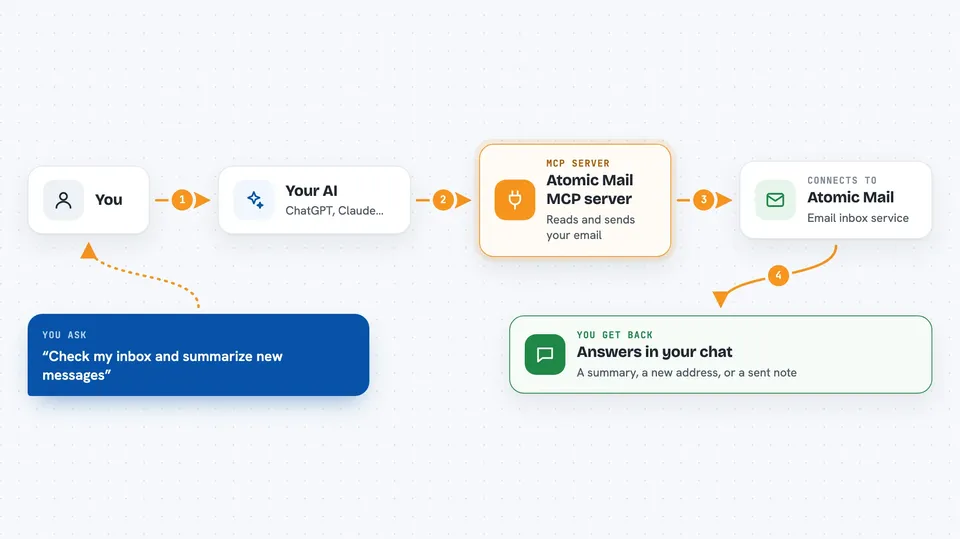
You ask your AI to do something with email, like set up an inbox or check for new messages. The AI uses this helper, which talks to Atomic Mail on your behalf. Atomic Mail creates the inbox or fetches the messages, and the helper hands the results back to your AI. Your AI then tells you what happened in plain words, right in the chat.
 Click to zoom
What you can do with it
- Create a brand new email inbox for your AI
- Send an email to someone
- Read the messages in the inbox
- Reply to a message and keep the conversation going
- Search through past emails
- Save a draft before sending
- Use your own company domain for the address
Try asking your AI
- “Create me an inbox called helper and tell me the address”
- “Check the inbox and summarize any new messages”
- “Send an email to the team saying the report is ready”
- “Reply to the last message and ask for a call next week”
What it gives back to you
You get answers in the chat. When it checks mail, it gives you a list or a short summary of the messages. When it sends or replies, it tells you that the message went out. When it creates an inbox, it gives you the new email address.
Before you start
What you need
- An AI tool that can use MCP servers, like Claude Desktop or Cursor
- Node.js installed on your computer (the free program that runs the helper)
- A free Atomic Mail account (the AI can create one for you)
Good to know
Your AI can send real emails and read everything in its inbox, so check what it plans to send before it goes out.
Install it with your AI
Add Atomic Mail MCP server to your AI, no technical skills needed
You don't install anything by hand. You copy one prompt, paste it into an AI that can work on your computer, and it checks, installs and connects the server for you, asking you when it needs something.
Sign in to get the install prompt
Members get a ready-made prompt that lets the Claude desktop app check Atomic Mail MCP server, install it and connect it for them, step by step. You don't need any technical skills: you copy, paste and answer a few questions. Your connected AI can also find and install any of the 4,609 MCP servers here for you.
Who it's for
Anyone who wants an AI assistant to handle email for them, like support teams, researchers, and people who collect newsletters.





