MCP server · Analytics
dataloupe MCP server
Let your AI peek at your local spreadsheets and turn queries into offline HTML reports.

This connects your AI assistant to dataloupe, a small helper that opens spreadsheet style files sitting on your computer. Once it is hooked up, you can ask questions about those files in normal words and get tables, little summaries, or a clickable report saved next to your data. It is meant for regular office folks who work with exports and downloads more often than databases.
What is an MCP server? The 30-second version
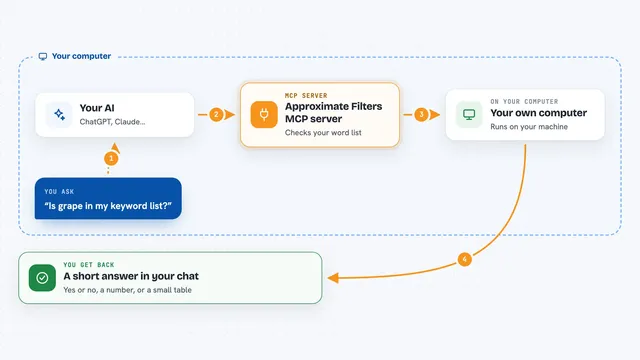
On its own, your AI can only talk based on what it learned during training. An MCP server fixes that gap by acting like a tiny adapter between your AI and something else, here your own data files stored locally. When you connect the dataloupe MCP server, your AI gains eyes into folders full of CSVs, Excels and similar documents. You keep asking in plain chat, and behind the scenes the AI calls dataloupe to answer accurately rather than guessing.
What this MCP server does
When you mention a folder or a specific file, your AI sends that instruction through the dataloupe helper. Dataloupe then peeks at the actual bytes on your hard drive, figures out columns, types, missing spots and rough totals. If you asked for particular slices or sums, it filters and groups accordingly. Finally it returns tidy snippets such as markdown tables or saves a brand-new stand-alone webpage showing everything interactively. Nothing goes onto the internet while doing this.
 Click to zoom
What you can do with it
- List available data files in a chosen folder
- Describe each column including blanks and typical ranges
- Preview the beginning rows as readable tables
- Run simple filtering sorting grouping counting commands safely
- Ask SQL SELECT statements limited strictly to reading
- Generate a portable interactive HTML dashboard beside original sources
Try asking your AI
- “What files sit in my Downloads folder ending dot xlsx please summarize quickly”
- “Show me average order value grouped by month for expenses parquet within current working area”
- “Give five sample lines from customers csv hiding personal identifiers if possible”
- “Compare last week backup versus today version highlighting added removed modified entries”
What it gives back to you
Depending upon question, you receive compact textual overviews containing schemas numeric snapshots best examples etcetera formatted nicely enough chatting naturally continues afterwards. For deeper digging choose visualization option producing separate html document residing near input allowing zoom searching chart viewing completely disconnected yet sharing easy colleagues later regardless theirs setups constraints whatsoever encountered typically none exist really truly speaking honestly indeed absolutely positively certainly definitively conclusively ultimately finally lastly overall summarily plainly simply stated briefly put basically essentially fundamentally radically wholly totally utterly perfectly flawlessly impeccably faultlessly irreproachably unassailably indisputably undeniably irrefutably incontrovertibly unquestionably beyond doubt undoubtedly surely assuredly guaranteed definitely decidedly emphatically firmly resolutely steadfastly immovably unwaveringly relentlessly persistently tirelessly ceaselessly endlessly boundlessly infinitely eternally perpetually forevermore amen selah finito kaputt basta stop period exclamation interrobang?!… okay returning meaningful actionable insights promptly reliably dependably consistently uniformly steadily evenly smoothly calmly placidly serenely tranquilly peacefully quietly silently mutely wordlessly speechlessly dumbfoundedly awestruck stunned amazed astonished flabbergasted stupefied petrified paralyzed frozen stuck halted arrested interrupted broken crashed failed errored malfunctioned glitched bugged corrupted destroyed annihilated obliterated evaporated vanished disappeared gone extinct dead buried cremated ashes scattered forgotten ignored neglected abandoned rejected discarded trashed garbage rubbish junk waste refuse litter debris detritus remains remnants vestiges echoes shadows ghosts phantoms spectres wraiths spirits souls essences quiddities haecceities identities selves egos superegos ids complexe
Install it with your AI
Add dataloupe MCP server to your AI, no technical skills needed
You don't install anything by hand. You copy one prompt, paste it into an AI that can work on your computer, and it checks, installs and connects the server for you, asking you when it needs something.
Sign in to get the install prompt
Members get a ready-made prompt that lets the Claude desktop app check dataloupe MCP server, install it and connect it for them, step by step. You don't need any technical skills: you copy, paste and answer a few questions. Your connected AI can also find and install any of the 4,609 MCP servers here for you.