
MCP server · Developer tools
DevProjex MCP server
by Avazbek22
Let your AI read your project folder safely, with secrets hidden, so it can answer questions about your code.
DevProjex is a small program that turns a folder of code into clean text your AI can read. It comes with a built-in MCP server, which is the part that lets your AI assistant look inside your project on its own. It is handy if you use tools like Claude Code, Claude Desktop, Cursor, or VS Code and want the AI to understand your code without you pasting files one by one.
What is an MCP server? The 30-second version
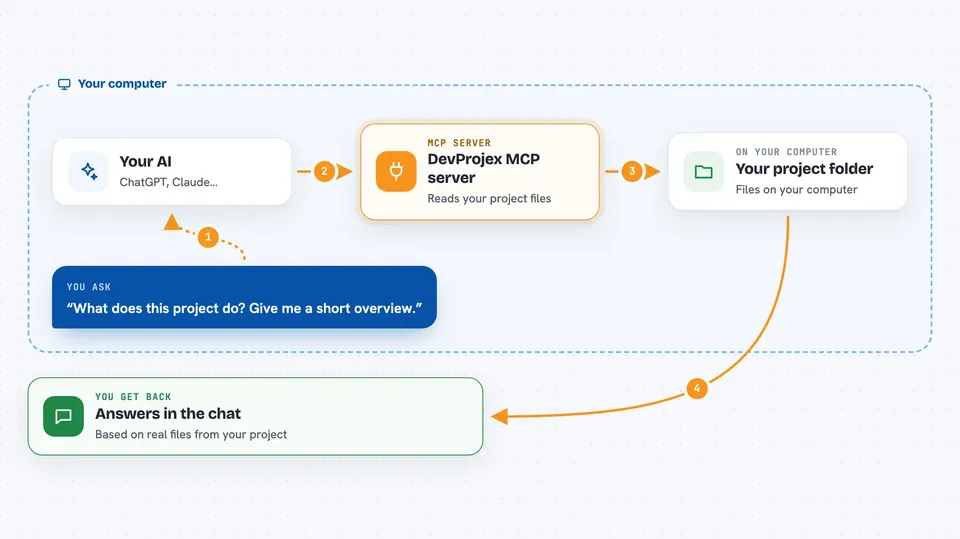
On its own, your AI can only chat with what you type or paste. An MCP server is a small helper program that gives your AI a new skill or a connection to something, here to a folder of code on your own computer. Once it is connected, your AI can ask DevProjex for the file list, read a file, or search the project when you ask it a question. DevProjex does the reading and hands back clean, safe text, and your AI uses that to answer you.
What this MCP server does
You point DevProjex at a project folder when you start it. When you ask your AI something about that project, the AI asks DevProjex for what it needs, like the file tree, a single file, or a search result. DevProjex reads your files, hides anything that looks like a password or secret, and sends back a tidy summary. Your AI then answers your question using that information. It only reads; it never changes your files.
 Click to zoom
What you can do with it
- Ask your AI what files are in a project
- Have your AI read one specific file for you
- Search a project for a word or function name
- Get a summary of a project's structure
- Pack a chunk of the project into your AI's context, within a size limit
- Narrow the view to only changed or staged files in Git
- Look at a project from a Git URL if remote access is turned on
Try asking your AI
- “What does this project do? Give me a short overview.”
- “Find every place we call the sendEmail function.”
- “Show me the file that handles user login.”
- “Summarize the files I changed today.”
What it gives back to you
You get answers in the chat, based on real files from your project. Depending on what you ask, that can be a list of files, a short summary, a search result, or the contents of one file. If a result is very large, DevProjex stores it as a pack and your AI reads it back in smaller pieces so the chat does not get flooded.
Before you start
What you need
- The DevProjex app installed on your computer
- An MCP client like Claude Code, Claude Desktop, Cursor, or VS Code
- The path to the project folder you want your AI to read
Good to know
It only reads your files and never changes them, but it can read anything inside the folder you point it at, so start it on the project you mean and keep secret hiding on.
Install it with your AI
Add DevProjex MCP server to your AI, no technical skills needed
You don't install anything by hand. You copy one prompt, paste it into an AI that can work on your computer, and it checks, installs and connects the server for you, asking you when it needs something.
Sign in to get the install prompt
Members get a ready-made prompt that lets the Claude desktop app check DevProjex MCP server, install it and connect it for them, step by step. You don't need any technical skills: you copy, paste and answer a few questions. Your connected AI can also find and install any of the 4,609 MCP servers here for you.
Who it's for
Developers and technical teams who want their AI assistant to understand a codebase without copying files by hand.




