MCP server · Productivity
QR for Agent
by benswel
Let your AI make QR codes whose destinations you can change later, and see how many times they were scanned.
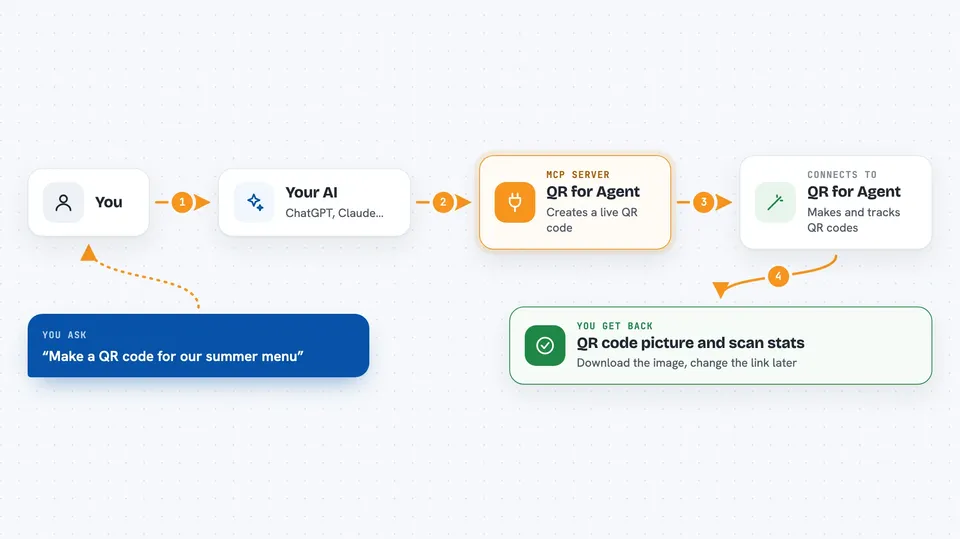
This connects your AI assistant to a QR code service called QR for Agent. Once it's set up, you can just describe the QR code you want and your AI makes it for you. It's handy if you print stickers, flyers or posters and don't want to reprint everything whenever a link changes.
What is an MCP server? The 30-second version
On its own, your AI can only talk. An MCP server is a little helper program that runs alongside it and adds a real ability. This particular helper plugs into QR for Agent, so instead of chatting about QR codes, your AI can actually create them, move them to new addresses and pull up scan counts while you sit in the same conversation window.
What this MCP server does
When you tell your AI something like "make me a QR code pointing to our summer menu", the AI sends those instructions through this helper to QR for Agent. There, a live address gets created behind the scenes along with a matching picture. You then download that picture wherever you keep your designs. Later, if the menu moves to a different page, you simply say so, and the same sticker keeps working because only the hidden address changed.
 Click to zoom
What you can do with it
- Make a QR code that opens a website, Wi-Fi login, business card, email draft or phone number
- Change where an already-printed QR code leads without making a new image
- See how many times each code was scanned and roughly where those scanners came from
- Build several QR codes in one go from a simple table of names and links
- Pick colours, round corners and drop in a company logo
- Set a date after which the code stops sending visitors anywhere
Try asking your AI
- “Create a blue QR code labelled Summer Menu that points to menulink.co.uk/summer, save the picture next to my poster artwork”
- “How many people have scanned the reception wifi code since Monday? Break it down by day please”
- “Move the trade-show standee QR to landingpage.io/new-demo-page and leave everything else unchanged”
- “Give me ten QR codes, one for each product sheet I listed below, styled the way we did last month”
What it gives back to you
Your AI replies in normal writing plus structured pieces such as the short link, the unique id of each code, and a ready-to-use picture saved locally. When you ask about performance, you receive totals together with tables showing daily figures and rough visitor locations. If two versions share similar labels, both come back clearly separated so you know which row belongs to whom.
Install it with your AI
Add QR for Agent to your AI, no technical skills needed
You don't install anything by hand. You copy one prompt, paste it into an AI that can work on your computer, and it checks, installs and connects the server for you, asking you when it needs something.
Sign in to get the install prompt
Members get a ready-made prompt that lets the Claude desktop app check QR for Agent, install it and connect it for them, step by step. You don't need any technical skills: you copy, paste and answer a few questions. Your connected AI can also find and install any of the 4,361 MCP servers here for you.
Who it's for
Marketing coordinators, designers, shop owners and anyone printing physical materials who wants flexible links inside static pictures.