
MCP server · Productivity · official
SignWell MCP server
by Bidsketch · official
Send documents for e-signature, track who signed, and download the signed PDFs, all from your AI chat.
This is a helper made by SignWell, the e-signature service. It lets your AI assistant create signing requests, send them out, check who has signed, and grab the finished PDF. It is handy if you deal with contracts, offers, or any paperwork that needs a signature.
What is an MCP server? The 30-second version
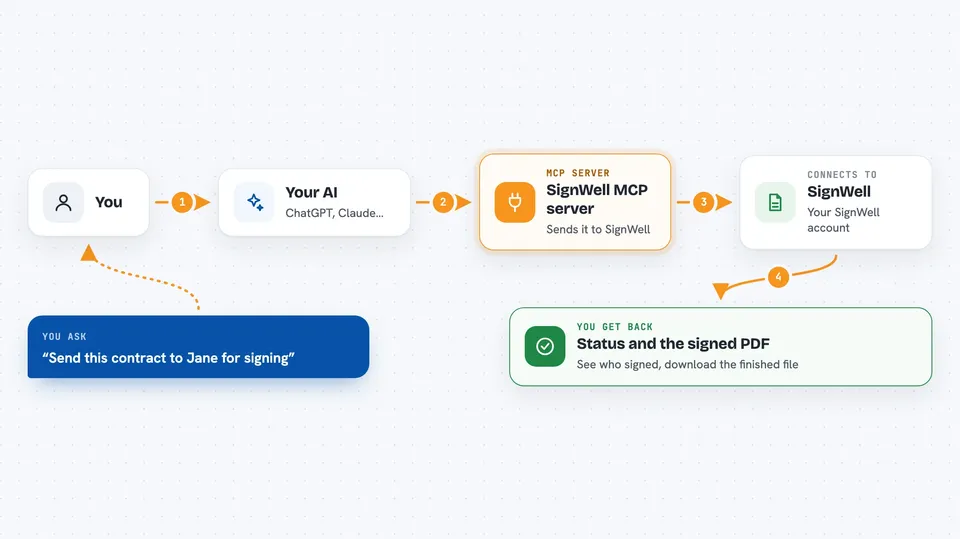
On its own, your AI can only chat. An MCP server is a small helper program that gives your AI a new skill or a connection to an app. This one connects your AI to SignWell, your e-signature account. So when you ask your AI to send a document for signing, it can actually do it through SignWell for you.
What this MCP server does
You ask your AI something like send this contract to Jane for signing. Your AI passes that request to this helper. The helper talks to SignWell using your SignWell account and your API key. SignWell creates the document as a draft first, so nothing goes out until you say send. Then you can ask your AI to send it, check the status, or download the signed PDF when it is done.
 Click to zoom
What you can do with it
- Create a signing document from a file or a template
- Send a draft out to your signers
- Check who has signed and who has not
- Send a reminder to someone who has not signed yet
- Download the finished, signed PDF
- Update a recipient's name or email before they start signing
- Cancel a document you sent by mistake
Try asking your AI
- “Create a signing document from my Sales Agreement template for alice@example.com”
- “Send that draft now so Alice gets the email”
- “Has Alice signed the agreement yet?”
- “Download the signed PDF for that document”
What it gives back to you
You get short, clear answers in the chat. For example, a status like draft, sent, or completed, and a list of recipients with who has signed. When a document is finished, you get a link to the signed PDF. If you ask for details, you get the document's ID, name, and current state.
Before you start
What you need
- A SignWell account
- A SignWell API key with document access (a kind of password for apps; SignWell gives you one in your account settings)
- Node.js version 18 or newer on your computer
- The Claude desktop app, Cursor, or another AI app that supports MCP servers
Good to know
Sending a document emails real people and using SignWell can cost money, so double-check names and emails before you tell your AI to send.
Install it with your AI
Add SignWell MCP server to your AI, no technical skills needed
You don't install anything by hand. You copy one prompt, paste it into an AI that can work on your computer, and it checks, installs and connects the server for you, asking you when it needs something.
Sign in to get the install prompt
Members get a ready-made prompt that lets the Claude desktop app check SignWell MCP server, install it and connect it for them, step by step. You don't need any technical skills: you copy, paste and answer a few questions. Your connected AI can also find and install any of the 4,361 MCP servers here for you.
Who it's for
Anyone who sends documents out for signature, like salespeople, small business owners, HR staff, and freelancers who handle contracts.





