MCP server · Research
Intercept MCP server
by bighippoman
Lets your AI read web pages, tweets, YouTube videos, PDFs and papers as clean text.
Intercept is a small helper that lets your AI actually read web pages instead of getting blocked or buried in messy code. You give it a link, and it comes back with clean, readable text. It is handy for anyone who wants their AI to look things up online, summarize articles, or pull details from a page.
What is an MCP server? The 30-second version
On its own, your AI can only chat with you using what it already knows. An MCP server is a small helper program that gives your AI a new skill or a connection to something outside the chat. This one connects your AI to the web, so it can go and read a page for you. You ask in plain words, and the helper quietly fetches the content and hands it back.
What this MCP server does
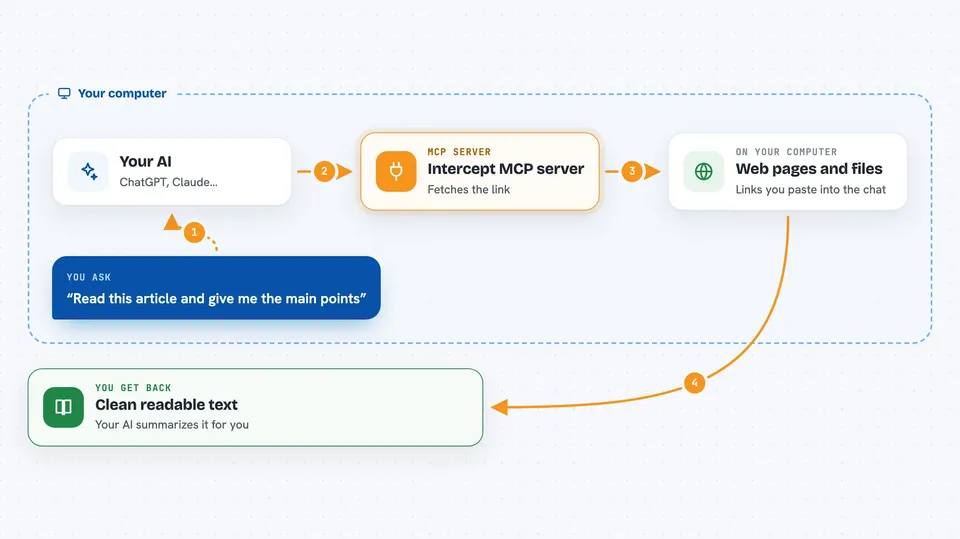
You paste a link and ask your AI to read it. Your AI passes the link to this helper. The helper tries the site directly, and if that fails it tries other ways, like a saved copy or a search engine cache, until it gets the content. It then turns that content into clean text with headings and links. Your AI reads that text and answers you or summarizes it.
 Click to zoom
What you can do with it
- Read an article or blog post and summarize it
- Pull the text of a tweet or X post
- Get a YouTube video's title, description and transcript
- Read an arXiv paper's abstract and authors
- Extract text from a PDF link
- Fetch several links at once and compare them
- Search the web and read the top results in one go
Try asking your AI
- “Read this article and give me the main points: https://example.com/article”
- “What does this tweet say? https://x.com/someone/status/12345”
- “Summarize this YouTube video for me: https://youtu.be/abc123”
- “Search the web for the latest news on electric cars and summarize the top three results”
What it gives back to you
You get back clean, readable text in the chat: the article body, a tweet's wording, a video's transcript, or a paper's abstract. For long pages, it gives you the first part and tells your AI how to get the rest. If you asked for a search, you get a short list of results with snippets. Your AI then turns all of that into an answer or summary for you.
Before you start
What you need
- An MCP client like Claude Desktop, Claude Code, Cursor or Windsurf
- Node.js installed on your computer (the install command uses it)
- No API keys needed for basic reading
Good to know
It reads public web pages, and some optional settings can try to get around site blocks, which may go against a site's rules, so use those at your own risk.
Install it with your AI
Add Intercept MCP server to your AI, no technical skills needed
You don't install anything by hand. You copy one prompt, paste it into an AI that can work on your computer, and it checks, installs and connects the server for you, asking you when it needs something.
Sign in to get the install prompt
Members get a ready-made prompt that lets the Claude desktop app check Intercept MCP server, install it and connect it for them, step by step. You don't need any technical skills: you copy, paste and answer a few questions. Your connected AI can also find and install any of the 4,361 MCP servers here for you.
Who it's for
Anyone who wants their AI to read web pages, articles, tweets, videos or papers for them, like researchers, writers, students and office workers doing quick research.