
MCP server · Research
arXiv MCP server
by blazickjp
Lets your AI search arXiv papers, read them section by section, and get BibTeX citations for you.
This is a helper that connects your AI assistant to arXiv, the big free website where researchers post their papers before they get published in journals. Once it is set up, you can ask your AI to find papers on a topic, read a specific section, or pull out the citation details, and it will do that for you. It is handy for students, researchers, and anyone who reads a lot of academic work.
What is an MCP server? The 30-second version
On its own, your AI can only chat with you using what it already knows. An MCP server is a small helper program that gives your AI a new skill or a connection to an app or service. This one connects your AI to arXiv, so it can look up papers and read them when you ask. You do not need to be technical to use it once someone has set it up for you.
What this MCP server does
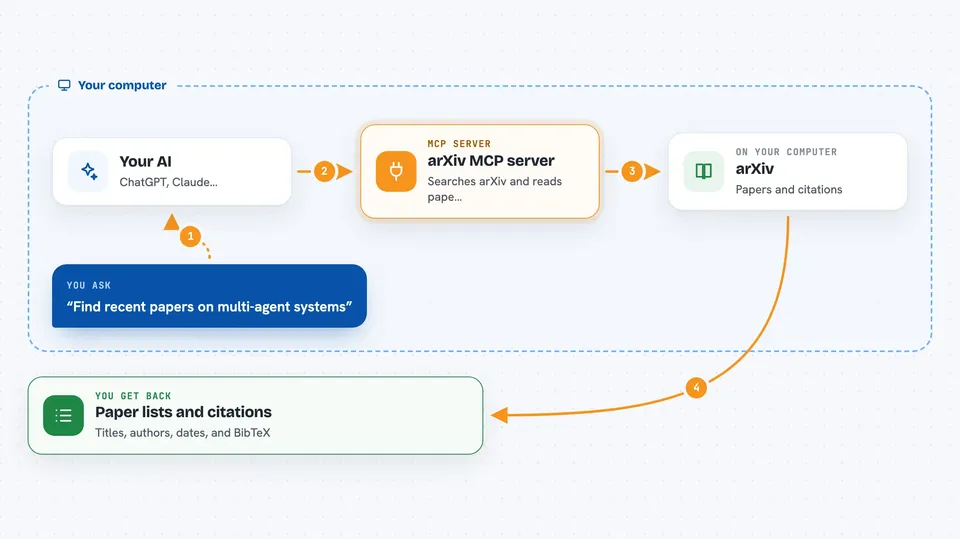
You ask your AI something like find recent papers on a topic, or read the methods section of this paper. Your AI passes that request to this helper program running quietly on your computer. The helper talks to arXiv and to the papers it has already saved on your disk. Then it hands the answer back to your AI, which shows it to you in the chat. Papers you download stay on your own machine, not on someone else's server.
 Click to zoom
What you can do with it
- Search arXiv for papers by topic, author, category, or date
- Download a paper and read it in chunks so it fits in the chat
- Read just one section of a paper instead of the whole thing
- Get the original LaTeX source of a paper, section by section
- Export BibTeX citations for one or more papers
- See which papers cite a paper, and what it references
- Save topic watches and check for new papers later
Try asking your AI
- “Find recent papers about Kolmogorov-Arnold Networks in machine learning”
- “Download paper 2404.19756 and give me the outline”
- “Read the introduction section of that paper”
- “Give me the BibTeX citation for 2404.19756”
- “Watch the topic multi-agent systems in cs.MA and tell me when new papers appear”
What it gives back to you
You get back lists of papers with titles, authors, dates, and short abstract snippets. When you read a paper, you get the text in chunks, plus notes telling you where to continue reading next. Citation requests give you ready-to-paste BibTeX entries. Topic watches return the new papers found since your last check.
Before you start
What you need
- The uv tool installed (a small free program that runs this server; the setup guide explains how)
- An MCP client that accepts the mcpServers JSON setup, such as Claude Desktop or Kiro
- A free Semantic Scholar API key if you want citation lookups to be more reliable (optional)
Good to know
It downloads papers and saves them on your computer, and it talks to outside services like arXiv and Semantic Scholar, so keep an eye on what it fetches.
Install it with your AI
Add arXiv MCP server to your AI, no technical skills needed
You don't install anything by hand. You copy one prompt, paste it into an AI that can work on your computer, and it checks, installs and connects the server for you, asking you when it needs something.
Sign in to get the install prompt
Members get a ready-made prompt that lets the Claude desktop app check arXiv MCP server, install it and connect it for them, step by step. You don't need any technical skills: you copy, paste and answer a few questions. Your connected AI can also find and install any of the 4,609 MCP servers here for you.
Who it's for
Students, researchers, and anyone who reads or writes academic papers and wants their AI to help find, read, and cite them.


