MCP server · Notes
ONES Wiki MCP server
by brianxiadong
Let your AI read ONES Wiki pages and turn them into clean, readable text for you.
This is a small helper that connects your AI assistant to ONES Wiki, the place where your team keeps its pages and notes. Once it is set up, you can ask your AI to fetch a Wiki page and it will hand you back the content in a tidy, readable form. It is handy for anyone who spends time digging through ONES Wiki pages and wishes they could just ask a question instead.
What is an MCP server? The 30-second version
On its own, your AI can only chat with you using what it already knows. An MCP server is a small helper program that gives your AI a new skill or a connection to an app or service. This one connects your AI to ONES Wiki, so it can go and look up a page for you when you ask. You stay in the chat, and the helper does the fetching behind the scenes.
What this MCP server does
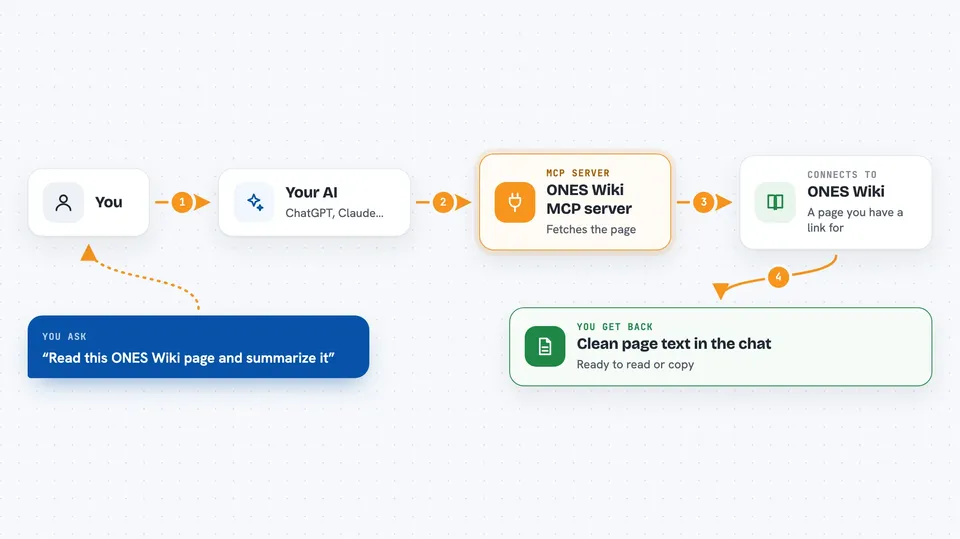
You give your AI a full ONES Wiki page link. The AI passes that link to this helper program. The helper logs in to your ONES platform, finds the page, and pulls out its content. It then turns the page into clean text with headings, lists, and tables. Finally, the AI shows you that text right in the chat, ready to read or copy.
 Click to zoom
What you can do with it
- Fetch the content of any ONES Wiki page you have a link for
- Turn a messy Wiki page into clean, readable text
- Keep headings, lists, and tables in the result
- Skip strikethrough text so you only see what still counts
- Show image descriptions and link details from the page
- Read a page for you so you do not have to open the browser
Try asking your AI
- “Please get the content of this Wiki page: https://your-ones-host.com/wiki/#/team/TEAM_UUID/space/SPACE_UUID/page/PAGE_UUID”
- “Can you pull up this ONES Wiki page and summarize it for me?”
- “Fetch this Wiki page and list the main points as bullet points.”
- “Read this ONES Wiki page and tell me what it says about the release plan.”
What it gives back to you
You get the page content back as clean text in the chat, with headings, paragraphs, lists, and tables kept in order. Image descriptions and link details are included too. Strikethrough text is left out. It is just the page content, ready to read or copy.
Before you start
What you need
- Java 17 or newer installed on your computer
- Maven 3.6 or newer if you want to build it yourself
- Access to your company's ONES platform
- Your ONES login details: host, email, and password
Good to know
It uses your ONES login details to read pages, so keep those credentials safe and only use it on pages you are allowed to access.
Install it with your AI
Add ONES Wiki MCP server to your AI, no technical skills needed
You don't install anything by hand. You copy one prompt, paste it into an AI that can work on your computer, and it checks, installs and connects the server for you, asking you when it needs something.
Sign in to get the install prompt
Members get a ready-made prompt that lets the Claude desktop app check ONES Wiki MCP server, install it and connect it for them, step by step. You don't need any technical skills: you copy, paste and answer a few questions. Your connected AI can also find and install any of the 4,609 MCP servers here for you.
Who it's for
Anyone who uses ONES Wiki at work and wants their AI to read and summarize pages for them.