MCP server · Video editing
Video Editing MCP server
by burningion
Let your AI find moments inside your videos and turn them into ready-to-watch edits.
This connects your AI assistant to Video Jungle, a cloud place where your videos live after they have been looked at closely by software. Once connected, you can drop links to videos, search across everything you uploaded, and ask your AI to stitch together clips around whatever moment you want. It is handy if you collect lots of footage and would rather describe the clip than scrub through hours yourself.
What is an MCP server? The 30-second version
By itself your AI can only talk. An MCP server is a little helper program that hands your AI a brand-new ability. This particular helper plugs your AI into Video Jungle, so instead of just chatting about editing ideas it can actually reach out to your Video Jungle account, pull in videos, hunt for specific bits, and hand you finished cuts. Think of it as giving your chatbot working eyes and scissors pointed at your own film shelf.
What this MCP server does
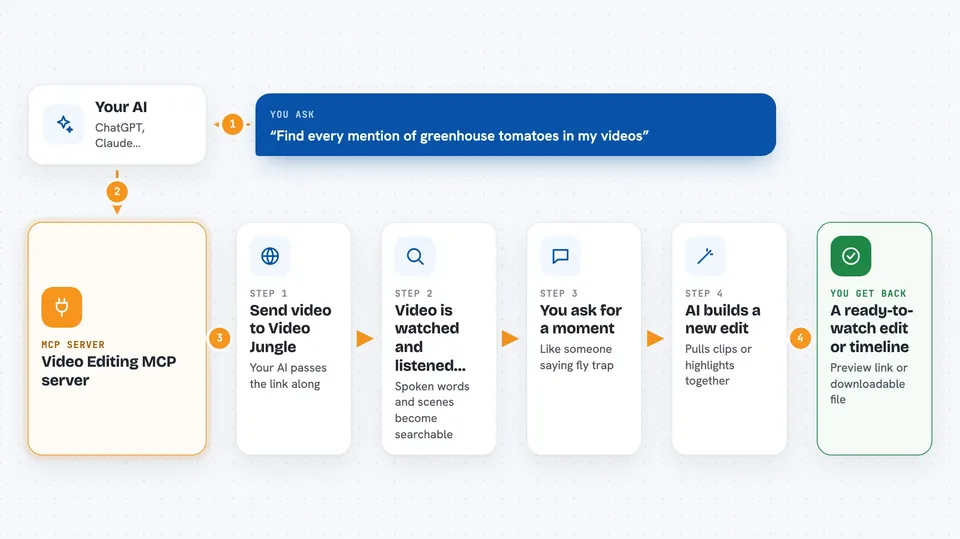
First you give your AI a link to a video, say a YouTube short or something sitting online. The helper sends that off to Video Jungle, which watches and listens to it so the content becomes searchable. Later you simply tell your AI what you remember seeing or hearing, such as someone saying 'fly trap', and it asks Video Jungle to locate those spots. From those hits your AI builds a fresh edited sequence, either pulling pieces from several videos or carving highlights out of one long recording. Some steps land right in your chat as descriptions or downloadable timeline files you can keep.
 Click to zoom
What you can do with it
- Add any public video straight from its web address
- Ask questions about what happens inside your saved videos
- Find every mention of a phrase spoken aloud
- Turn matching scenes into a rough-cut edit
- Create highlight reels from many separate recordings
- Download an editable timeline for DaVinci Resolve Studio
- Look through locally stored iPhone photos and movies too
Try asking your AI
- “Can you grab the video at youtube dot com slash shorts slash RumgYaH5XYw and call it garden tour?”
- “Please search my Video Jungle library for skateboarding tricks filmed last summer.”
- “Make me an edit containing each second somebody mentions greenhouse tomatoes.”
- “Pull three funny reactions from interview final.mp4 and put them end to end.”
What it gives back to you
Your AI replies mostly in normal conversation plus some structured extras. When adding a video you receive a tiny internal pointer string beginning vj colon double-slash that stands for wherever that movie now lives in Video Jungle. Searches come back as lists showing title, thumbnail perhaps, timestamps where the match occurs, and enough surrounding detail for the next request. Edit commands produce either a freshly generated preview clip available behind a share link or a downloadable .otio bundle waiting beside your documents folder.
Before you start
What you need
- A Video Jungle account created on their website
- That same account's personal API key copied from profile settings
- For searching your Mac photo library additionally switch on full disk style permission called Files and Folders when prompted
- DaVinci Resolve Studio installed and left open beforehand whenever asking for offline timelines
Install it with your AI
Add Video Editing MCP server to your AI, no technical skills needed
You don't install anything by hand. You copy one prompt, paste it into an AI that can work on your computer, and it checks, installs and connects the server for you, asking you when it needs something.
Sign in to get the install prompt
Members get a ready-made prompt that lets the Claude desktop app check Video Editing MCP server, install it and connect it for them, step by step. You don't need any technical skills: you copy, paste and answer a few questions. Your connected AI can also find and install any of the 4,361 MCP servers here for you.
Who it's for
Content creators, podcast editors, social media managers, documentary hobbyists, basically anyone drowning in raw camera rolls yet happy typing instructions instead of dragging sliders endlessly.