
MCP server · Security
Shodan MCP server
by BurtTheCoder
Lets your AI look up IP addresses, devices, DNS records and known security flaws using Shodan.
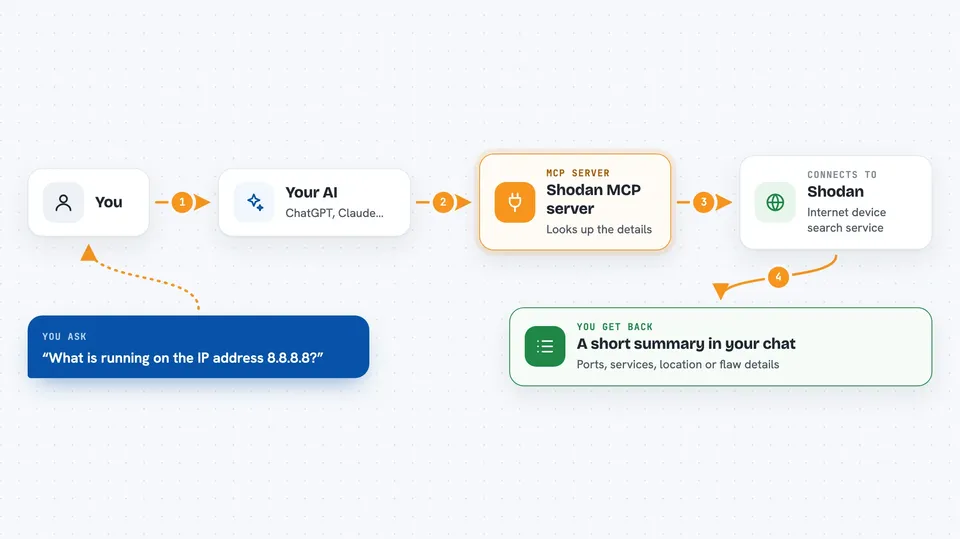
This is a small helper that connects your AI assistant to Shodan, a service that keeps a big public map of devices connected to the internet. Once it is set up, you can just ask your AI questions about an IP address, a domain, or a known security flaw, and it will go and fetch the answers for you. It is handy for anyone who deals with security questions at work, even if you are not a security expert.
What is an MCP server? The 30-second version
On its own, your AI can only chat with you using what it already knows. An MCP server is a little helper program that gives your AI one extra skill, in this case the ability to talk to Shodan. You plug this helper into your AI app once, and from then on, when you ask about an IP address or a vulnerability, your AI quietly asks Shodan for the facts and tells you what came back. You never have to open the Shodan website yourself.
What this MCP server does
You ask your AI something like what is running on this IP address, or which devices in a certain country use an old web server. Your AI passes that question to this helper, which sends it to Shodan over the internet using your Shodan account key. Shodan sends back the details it has, and the helper tidies them into a readable answer. Your AI then shows you the result in the chat, often as a list or a short summary. It can also look up known security flaws by their CVE number, and find which products are affected by them.
 Click to zoom
What you can do with it
- Look up details about an IP address, like open ports, services and location
- Search Shodan for internet-connected devices that match a query
- Resolve domain names to IP addresses and IP addresses back to hostnames
- Look up a known security flaw by its CVE number
- Find which products are affected by a security flaw
- Search for product entries in the CPE catalogue
- Check whether a flaw is known to be actively exploited
Try asking your AI
- “What can you tell me about the IP address 8.8.8.8?”
- “Search Shodan for webcams in the Netherlands and show me the first five results”
- “Look up CVE-2021-44228 and tell me how serious it is”
- “Which known vulnerabilities affect Apache httpd?”
What it gives back to you
You get back plain answers in the chat: lists of devices, IP details with ports and services, DNS results, or a summary of a security flaw with its severity scores. Longer results come as tidy lists or short tables you can read at a glance. Nothing is changed anywhere, it only reads information. If a lookup finds nothing, your AI will simply tell you that.
Before you start
What you need
- The Claude desktop app, or another AI app that supports MCP servers
- Node.js version 20 or newer installed on your computer
- A Shodan account and API key (a kind of password for apps; you get it free from your Shodan account page, though heavy use may need a paid plan)
Good to know
Every lookup uses your Shodan account credits, so heavy use can use them up or hit a paid limit, and the results describe devices that belong to other people, so treat them as sensitive.
Install it with your AI
Add Shodan MCP server to your AI, no technical skills needed
You don't install anything by hand. You copy one prompt, paste it into an AI that can work on your computer, and it checks, installs and connects the server for you, asking you when it needs something.
Sign in to get the install prompt
Members get a ready-made prompt that lets the Claude desktop app check Shodan MCP server, install it and connect it for them, step by step. You don't need any technical skills: you copy, paste and answer a few questions. Your connected AI can also find and install any of the 4,609 MCP servers here for you.
Who it's for
Anyone who needs quick answers about IP addresses, devices or known security flaws at work, such as IT support staff, system administrators or security-minded analysts.



