
MCP server · Security
VirusTotal MCP server
by BurtTheCoder
Lets your AI check links, files, IP addresses and domains for signs of malware or scams.
This is a small helper that connects your AI assistant to VirusTotal, a free service that checks whether a link, file, or web address looks dangerous. It is handy for anyone who gets suspicious emails or links and wants a quick second opinion before clicking. You just ask your AI in normal words, and it does the checking for you.
What is an MCP server? The 30-second version
On its own, your AI can only chat with you. It cannot look things up on other websites unless you give it a way in. An MCP server is a small helper program that gives your AI one new skill. This helper connects your AI to VirusTotal, so when you ask about a link or a file, the AI can go and check it and come back with an answer.
What this MCP server does
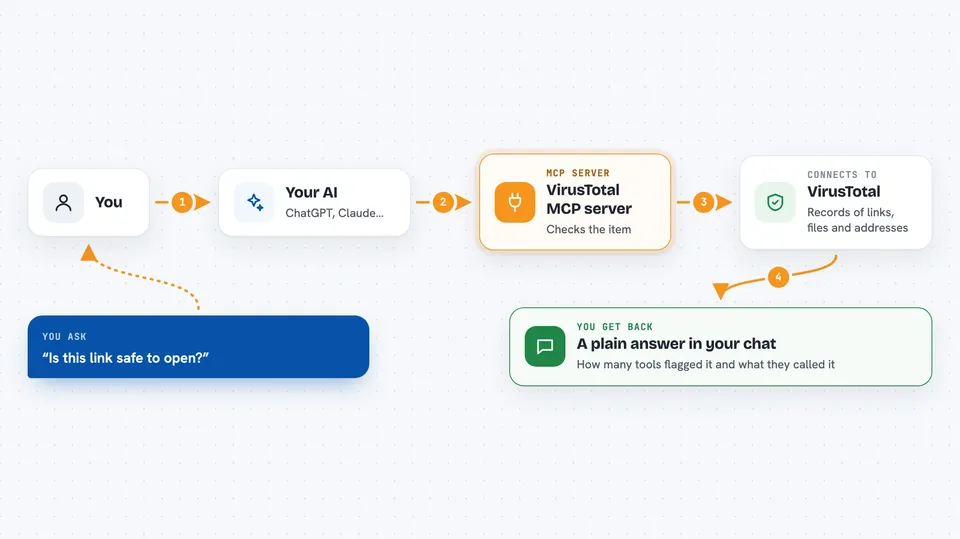
You ask your AI something like whether a link is safe. The AI passes your question to this helper program. The helper talks to VirusTotal, which keeps records of millions of links, files, and addresses and what security tools found in them. VirusTotal sends back a report, and the helper hands it to your AI. Your AI then explains the result to you in plain words in the chat.
 Click to zoom
What you can do with it
- Check whether a link or website looks safe before you click it
- Look up a file by its fingerprint to see if it is known malware
- Check an IP address to see where it is and whether it has a bad history
- Look up a domain to see who owns it and what it is connected to
- Search VirusTotal for anything matching a word, address, or file fingerprint
- See what a suspicious file did when it was run in a safe test environment
- Read background on known threat groups and malware families
Try asking your AI
- “Is this link safe to open: hxxp://example-suspicious.com/login”
- “Check this file hash and tell me if it is dangerous: 275a021bbfb6489e54d471899f7db9d1663fc695ec2fe2a2c4538aabf651fd0f”
- “What can you tell me about the IP address 8.8.8.8”
- “Look up the domain paypa1-secure.com and tell me if it looks like a phishing site”
What it gives back to you
You get a written answer in the chat, not a wall of raw data. Your AI usually gives you a short verdict, like how many security tools flagged the item and what they called it. It can also list related things it found, such as other files or addresses connected to the same item. If you want more detail, you can ask follow-up questions and it will dig further.
Before you start
What you need
- A VirusTotal account (the free tier is enough to start)
- A VirusTotal API key, which is a kind of password for apps that you copy from your VirusTotal account page
- Node.js version 20 or newer installed on your computer
- An AI app that supports MCP servers, such as the Claude desktop app
Good to know
The free VirusTotal tier allows only a few lookups per minute, so if you ask for many checks at once some may fail or slow down.
Install it with your AI
Add VirusTotal MCP server to your AI, no technical skills needed
You don't install anything by hand. You copy one prompt, paste it into an AI that can work on your computer, and it checks, installs and connects the server for you, asking you when it needs something.
Sign in to get the install prompt
Members get a ready-made prompt that lets the Claude desktop app check VirusTotal MCP server, install it and connect it for them, step by step. You don't need any technical skills: you copy, paste and answer a few questions. Your connected AI can also find and install any of the 4,361 MCP servers here for you.
Who it's for
Anyone who deals with suspicious emails, links, or files at work, like office staff, IT helpers, and security-minded admins.




