MCP server · Design tools
Excalidraw Architect MCP server
by BV-Venky
Turn a plain description of your system into an editable, hand-drawn Excalidraw diagram file.
This is a helper that lets your AI create real Excalidraw diagrams from a simple description. You say what the parts of your system are, and it builds the picture with everything laid out neatly, ready to open and keep editing. It is handy if you write design docs, runbooks, or onboarding notes and want a diagram without dragging boxes around by hand.
What is an MCP server? The 30-second version
On its own, your AI can only chat. An MCP server is a small helper program that gives your AI a new skill or a connection to another tool. This one gives your AI the skill of drawing Excalidraw diagrams: it takes your description, works out where every box and arrow should go, and writes a real .excalidraw file. You never have to place anything yourself, and the result opens in Excalidraw like any other drawing.
What this MCP server does
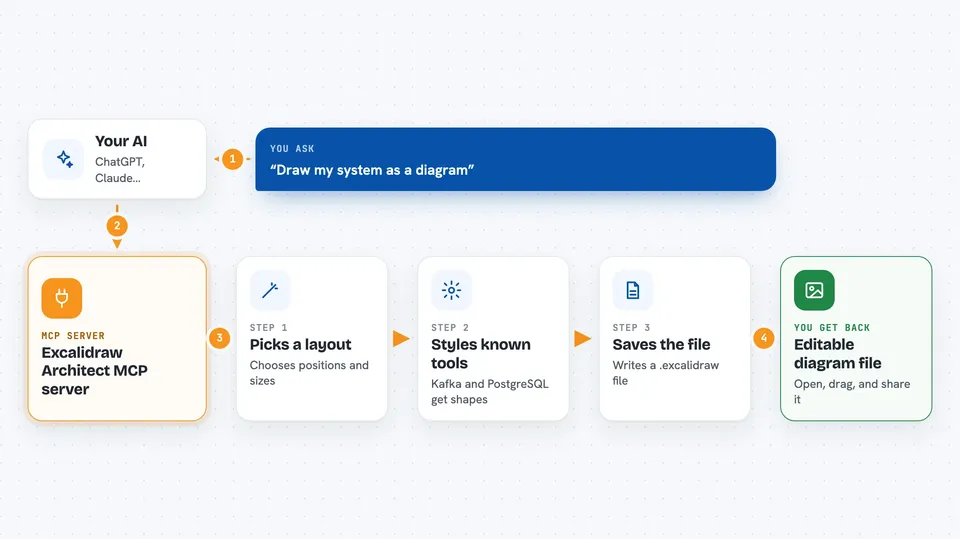
You tell your AI what you want to show, for example the services in your system or the steps in a process. The AI passes that description to this helper, which picks a layout for that kind of diagram and works out all the positions and sizes. It styles known technologies on its own, so saying Kafka or PostgreSQL gives you a fitting shape instead of a plain rectangle. Then it saves a .excalidraw file you can open, edit, and share. If you want changes later, you just ask in plain words and it updates the same file.
 Click to zoom
What you can do with it
- Draw an architecture diagram from a list of services and connections
- Create flowcharts, sequence diagrams, state machines, and ER models
- Make swimlanes, timelines, Gantt charts, quadrants, and funnels
- Produce hand-drawn bar, line, and scatter charts
- Style known tools like Kafka, PostgreSQL, and Redis automatically
- Revise an existing diagram by describing the change in plain words
- Export your diagram to SVG or PNG files
Try asking your AI
- “Create an architecture diagram for a microservices system with an API Gateway, Auth Service, User Service, Order Service, PostgreSQL, Redis cache, and Kafka event bus”
- “Draw the PR review flow as a swimlane”
- “Make a sequence diagram for the checkout authorization flow between the web app and the payment provider”
- “Add a caching layer to the Order Service in my high level architecture diagram”
What it gives back to you
You get a .excalidraw file saved where you asked, plus a short message in the chat telling you it was created and where it lives. Open that file in Excalidraw and you can drag, regroup, and annotate anything. If you asked for SVG or PNG, you get those image files too. When you edit a diagram, it updates the same file rather than making a new one.
Before you start
What you need
- Python installed on your computer
- The excalidraw-architect-mcp package installed
- An AI coding tool that supports MCP, such as Cursor, Claude Code, or Windsurf
Good to know
It writes files to your computer, so point it at a folder you are happy to have new diagram files in, and check the path before you run it.
Install it with your AI
Add Excalidraw Architect MCP server to your AI, no technical skills needed
You don't install anything by hand. You copy one prompt, paste it into an AI that can work on your computer, and it checks, installs and connects the server for you, asking you when it needs something.
Sign in to get the install prompt
Members get a ready-made prompt that lets the Claude desktop app check Excalidraw Architect MCP server, install it and connect it for them, step by step. You don't need any technical skills: you copy, paste and answer a few questions. Your connected AI can also find and install any of the 4,361 MCP servers here for you.
Who it's for
Engineers, technical writers, and anyone who documents systems and wants diagrams without manual drawing.