MCP server · Productivity
Keynote MCP server
by ByAxe
Let your AI make and edit Apple Keynote slideshows on your Mac just by asking.
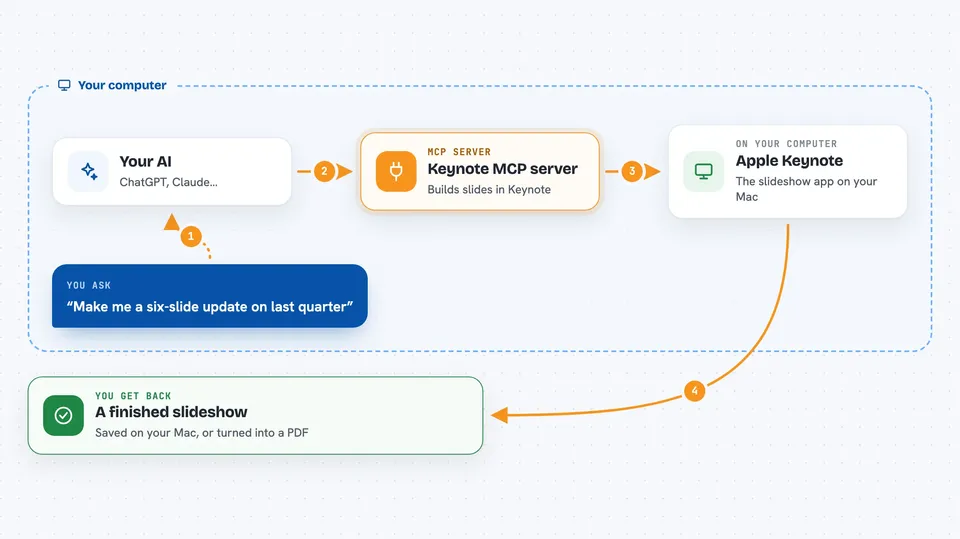
This connects your AI assistant to Apple Keynote on your Mac. You describe the deck you want in normal words, and the AI builds the slides, adds text and pictures, then saves or exports the finished file. It is meant for anyone who has to put together a presentation now and then and would rather talk than click around menus.
What is an MCP server? The 30-second version
On its own, your AI can only chat with you inside the conversation window. An MCP server is a little helper program running quietly on your computer that hands your AI a brand-new ability. This particular helper lets your AI drive Apple Keynote, so it can actually create slides, drop in your wording, place photos, and send the result to a file. Think of it as giving your AI a pair of robot hands that reach into Keynote while you watch.
What this MCP server does
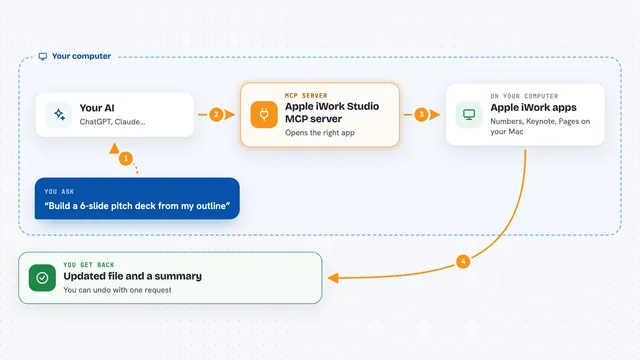
Once everything is hooked up, you tell your AI something like "make me a six-slide update on last quarter." Your AI sends those instructions to this helper, and the helper passes commands along to Apple Keynote sitting on your Mac. Keynote opens, makes the slides, writes the headings and body text, drops in any images you asked for, and shows each piece appearing live. Then the helper reports back whether it worked, and asks Keynote to save or turn the whole thing into a PDF whenever you say so. Nothing leaves your machine except optional picture searches sent to Unsplash.
 Click to zoom
What you can do with it
- Build a fresh presentation from scratch with however many slides you name
- Write title, subtitle, and bullet-list text onto specific slides
- Drop in colored code snippets, quote cards, and simple shape banners
- Search Unsplash and pull matching photos straight onto a slide
- Rearrange, rename, hide, or remove individual slides after they exist
- Take PNG snapshots of single slides or export the entire deck to PDF
Try asking your AI
- “Make a five-slide kickoff deck titled Our New Support Process, with three bullets on each middle slide”
- “Open my saved Sales Review.key document and replace the second slide's heading with Revenue Highlights”
- “Find two calm ocean photos on Unsplash and put one behind the cover slide title”
- “Turn whatever I have open in Keynote right now into a PDF called team-update.pdf next to my Downloads folder”
What it gives back to you
Mostly you get confirmation messages written in plain English saying what was created or changed, sometimes listing the current slide names and counts. If you request screenshots, actual PNG previews land wherever you told the AI to keep them. Exporting produces a regular PDF file at the path you choose. Anything unusual comes back described clearly enough that you know what went wrong and why.
Before you start
What you need
- A Mac running recent-enough system software plus Apple Keynote already installed
- Permission given to let programs automate Keynote in System Settings
- Optionally, a free Unsplash developer key pasted into a settings file for photo searching
Good to know
Because this controls real applications, careless phrasing might overwrite or rearrange genuine working files irreversibly, so always confirm intentions carefully beforehand.
Install it with your AI
Add Keynote MCP server to your AI, no technical skills needed
You don't install anything by hand. You copy one prompt, paste it into an AI that can work on your computer, and it checks, installs and connects the server for you, asking you when it needs something.
Sign in to get the install prompt
Members get a ready-made prompt that lets the Claude desktop app check Keynote MCP server, install it and connect it for them, step by step. You don't need any technical skills: you copy, paste and answer a few questions. Your connected AI can also find and install any of the 4,361 MCP servers here for you.
Who it's for
Anyone stuck building decks regularly, such as marketers drafting client pitches, teachers assembling lesson material, students prepping class projects, or managers writing weekly review updates.