MCP server · Productivity
Inkra MCP server
Lets your AI edit and navigate your open Markdown document in the Inkra app on your Mac.
This is a small helper that connects your AI assistant to Inkra, a Markdown editor for Mac. Once it is set up, you can ask your AI to open files, change text, jump around headings, and save, all inside the document you already have open. It is handy if you write notes, docs, or long Markdown files on a Mac and want your AI to do the fiddly edits for you.
What is an MCP server? The 30-second version
On its own, your AI can only chat. An MCP server is a small helper program that gives your AI a new skill or a connection to an app. This one connects your AI to Inkra, the Markdown editor running on your Mac, so the AI can look at and change your document when you ask. You still see everything happen live in the Inkra window.
What this MCP server does
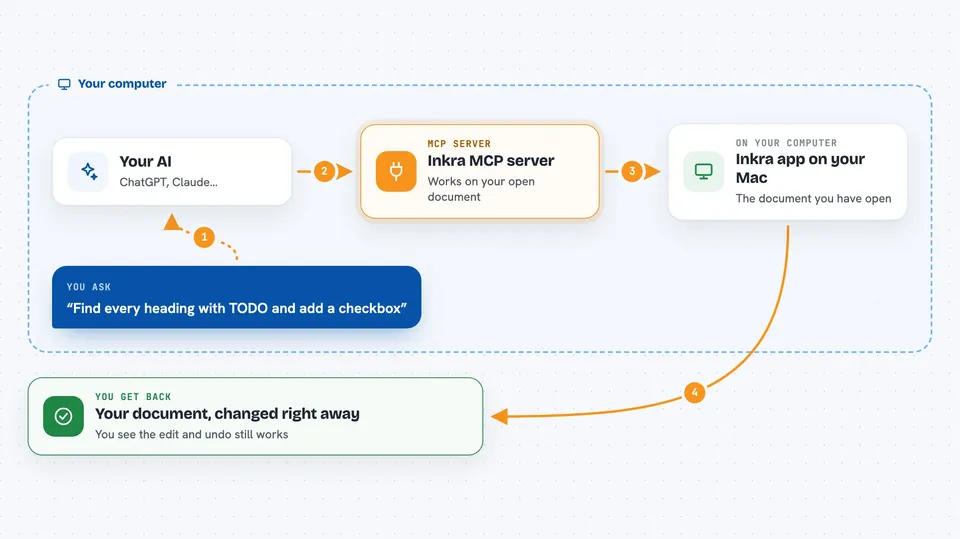
You ask your AI something in plain words, like finding a heading or adding a line. The AI sends that request to this helper, which passes it to the Inkra app on your Mac. Inkra then does the work on the document you have open, like editing text, adding a bookmark, or switching the view. The result comes back to your AI, which tells you what it did. Because Inkra owns the document, your edits show up right away and the normal undo still works.
 Click to zoom
What you can do with it
- Open a Markdown file from a folder on your Mac
- Read or replace the text in the open document
- Search inside the document for words or headings
- List the headings in the outline and add bookmarks
- Browse the files in a folder
- Read the YAML front matter at the top of a file
- Switch the theme or turn on focus mode
Try asking your AI
- “Open ~/Notes/2026-thesis.md and show me the outline.”
- “Find every heading that contains TODO and add a checkbox after it.”
- “List all files in the current folder.”
- “Bookmark the H2 Methodology and switch to focus mode.”
What it gives back to you
You get answers in the chat, like a list of headings, the matching lines from a search, or the files in a folder. When the AI changes the document, it tells you what it changed, and you see the edit appear in the Inkra window. It can also read the front matter and report it back as plain text.
Before you start
What you need
- A Mac running macOS 14 (Sonoma) or later
- The Inkra app installed and running
- A token from Inkra Settings, under API & Integrations
- Swift 5.9+ (Xcode 15+) only if you build it yourself
Good to know
The AI can change or save the document you have open, so check the edits before you rely on them.
Install it with your AI
Add Inkra MCP server to your AI, no technical skills needed
You don't install anything by hand. You copy one prompt, paste it into an AI that can work on your computer, and it checks, installs and connects the server for you, asking you when it needs something.
Sign in to get the install prompt
Members get a ready-made prompt that lets the Claude desktop app check Inkra MCP server, install it and connect it for them, step by step. You don't need any technical skills: you copy, paste and answer a few questions. Your connected AI can also find and install any of the 4,361 MCP servers here for you.
Who it's for
Mac users who write Markdown in Inkra and want their AI to help with editing, searching, and organising documents.