MCP server · Productivity
Apple iWork Studio MCP server
by Arkanji
Lets your AI create, edit, design and export Apple Numbers, Keynote and Pages files for you.
This is a helper that connects your AI to Apple's three office apps: Numbers (spreadsheets), Keynote (presentations) and Pages (documents). Once it is set up, you can just describe what you want in plain words and the AI does the clicking and typing for you. It is handy if you make decks, reports or spreadsheets on a Mac and would rather not do every step by hand.
What is an MCP server? The 30-second version
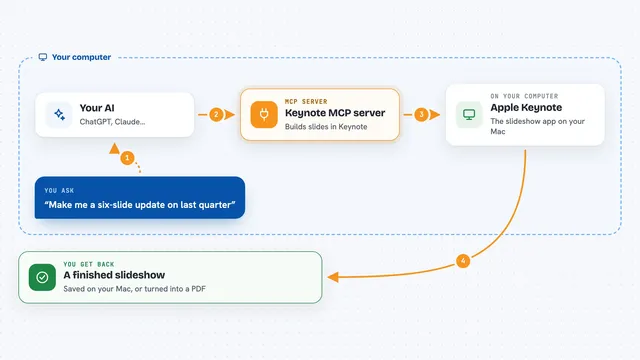
On its own, your AI can only chat. It cannot open a file on your computer or change anything in it. An MCP server is a small helper program that gives your AI a new skill, in this case a connection to Apple Numbers, Keynote and Pages. So when you ask for a slide deck or a tidy spreadsheet, the AI passes the job to this helper, and the helper works with the real apps on your Mac.
What this MCP server does
You ask your AI for something, like turning a spreadsheet into a board deck or fixing the fonts in a presentation. The AI uses this helper, which opens the right Apple app on your Mac and makes the change there. Before anything is written, the helper saves a backup and can show you a preview of exactly what would change. After the change, it re-opens the file and checks that only what you asked for happened. Then you get the result back in the chat, plus the option to undo with one request.
What you can do with it
- Build a designed Keynote deck from an outline, with chart and table slides
- Turn a Numbers spreadsheet or CSV into a polished table
- Apply a design kit or your own brand fonts and colours to a deck or table
- Review a Keynote deck and flag text that overflows, is too small or overlaps
- Fill placeholders in a Pages document and export it as a PDF
- Export any iWork file to PowerPoint, Excel, Word, PDF or images
- Undo the last change to a file with one request
Try asking your AI
- “Build a 6-slide pitch deck on programmable gift cards in the midnight kit, with speaker notes, and export it to PowerPoint”
- “Turn sales.numbers into a board deck: chart the quarters and add a table of the top regions”
- “Review pitch.key and fix anything that overflows or is too small to read”
- “Fill the Name and Date fields in offer-letter.pages, then export it as a password-protected PDF”
What it gives back to you
You get answers and results right in the chat: lists of files it found, summaries of what changed, previews of a change before it happens, and exported files like PDFs or PowerPoint decks saved where you asked. It can also hand back a slide as an image so you can see it. If something is not possible, it tells you why instead of guessing.
Before you start
What you need
- A Mac with Keynote, Pages and Numbers installed
- The Claude desktop app or another MCP client
- Permission for the helper to control those apps (macOS asks once)
Good to know
It can change and delete things in your files, so use the preview option first and remember you can undo with one request.
Install it with your AI
Add Apple iWork Studio MCP server to your AI, no technical skills needed
You don't install anything by hand. You copy one prompt, paste it into an AI that can work on your computer, and it checks, installs and connects the server for you, asking you when it needs something.
Sign in to get the install prompt
Members get a ready-made prompt that lets the Claude desktop app check Apple iWork Studio MCP server, install it and connect it for them, step by step. You don't need any technical skills: you copy, paste and answer a few questions. Your connected AI can also find and install any of the 4,610 MCP servers here for you.
Who it's for
Anyone on a Mac who regularly makes presentations, reports or spreadsheets and wants their AI to do the fiddly formatting and exporting for them.