MCP server · Notes
Bear Notes MCP server
by vasylenko
Let your AI search, read, and (if you allow it) update your Bear notes on your Mac.
This is a small helper that connects your AI assistant to Bear, the notes app for Mac. Once it is set up, you can ask your AI to find notes, read them, and even add or change text, all without leaving the chat. It is handy if you keep a lot of notes in Bear and want to search them by meaning, not just by exact words.
What is an MCP server? The 30-second version
On its own, your AI can only chat with you. An MCP server is a small helper program that gives your AI a new skill or a connection to an app, and here that app is Bear. This helper lets your AI look inside your Bear notes and, if you turn on Edit Mode, make changes there for you. You just ask in plain words, and the helper does the work behind the scenes.
What this MCP server does
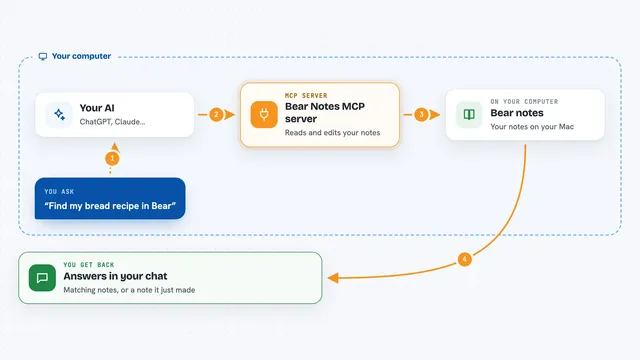
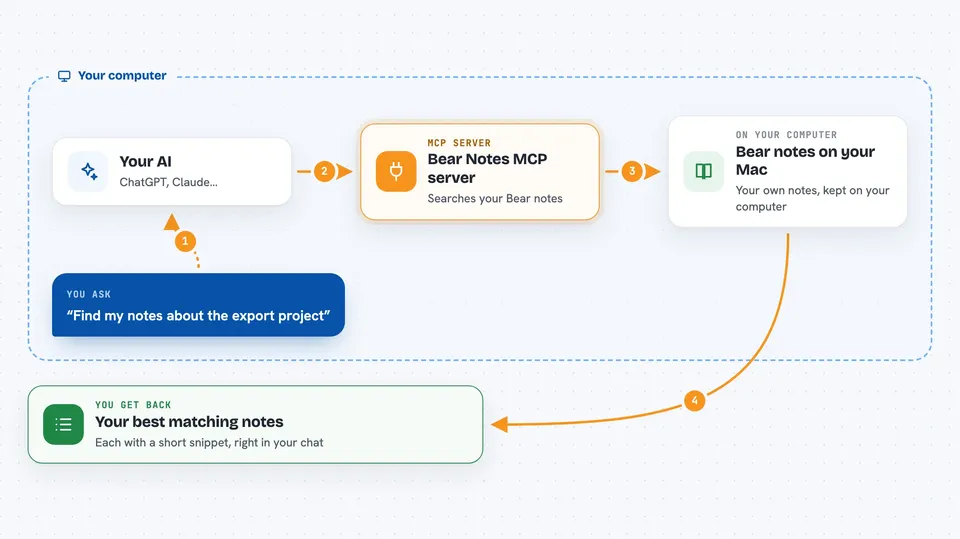
You ask your AI something like find my notes about the export project. Your AI passes that request to this helper, which searches your Bear library by relevance, not just exact word matches. It looks at titles, note bodies, and tags, and hands back the best matches with a short snippet from each. If you have turned on Edit Mode, it can also create notes, add or replace text, attach files, and manage tags. Everything happens on your Mac, and the helper makes no internet calls of its own.
 Click to zoom
What you can do with it
- Search your Bear notes by meaning and get the most relevant ones first
- Read the full text of a note, including text pulled from attached images and PDFs
- Filter notes by tag, by date, or show only pinned notes
- Browse all your tags as a tree with note counts
- Find notes that have no tags yet
- Create new notes with a title, content, and tags (Edit Mode)
- Append or replace text in a note, or just inside one section (Edit Mode)
- Attach a file to a note, or rename and delete tags across your library (Edit Mode)
Try asking your AI
- “Find the deep-dive I wrote on export pipelines, somewhere under #engineering/”
- “Append today's decisions to the 'Decisions' section of my Weekly Ops note”
- “Pull every note under #research/llm-evals into a survey outline”
- “Find my notes tagged #blog/drafts and draft this week's post outline”
What it gives back to you
You get back a ranked list of matching notes, each with a short snippet so you can see why it matched. When you open a note, you get its full text, including any text Bear pulled from attached images or PDFs. If you make a change, the helper tells you what it did, like which note was updated or which tag was renamed. Everything shows up right in your chat as normal text.
Before you start
What you need
- A Mac, because Bear only runs on macOS
- The Bear app installed
- The Claude desktop app for the one-click extension, or Node.js 24.13.0 or newer for the standalone version
Good to know
When Edit Mode is on, the AI can create, change, and archive notes and rename or delete tags across your whole library, so keep Edit Mode off until you are ready and check changes before trusting them.
Install it with your AI
Add Bear Notes MCP server to your AI, no technical skills needed
You don't install anything by hand. You copy one prompt, paste it into an AI that can work on your computer, and it checks, installs and connects the server for you, asking you when it needs something.
Sign in to get the install prompt
Members get a ready-made prompt that lets the Claude desktop app check Bear Notes MCP server, install it and connect it for them, step by step. You don't need any technical skills: you copy, paste and answer a few questions. Your connected AI can also find and install any of the 4,361 MCP servers here for you.
Who it's for
People who keep years of notes in Bear on a Mac and want to search and update them by talking to their AI.