
MCP server · Productivity
hubd project hub MCP server
by bzdOS
Let your AI join a shared project hub where it can read tasks, write journal entries, and pick up work.
hubd is a shared workspace for your projects that lives in plain files on your computer. It keeps a journal of what everyone did, a list of tasks, and queues that AI assistants can wait on. It is handy if you run several AI sessions across different projects and you are tired of being the one who copies context between them.
What is an MCP server? The 30-second version
On its own, your AI can only chat with you. An MCP server is a small helper program that gives your AI a new skill or a connection to something outside the chat. This server connects your AI to your hubd folder, so it can look up tasks, read the journal, and add entries when you ask. Think of it as giving your assistant a key to a shared noticeboard, not just a conversation.
What this MCP server does
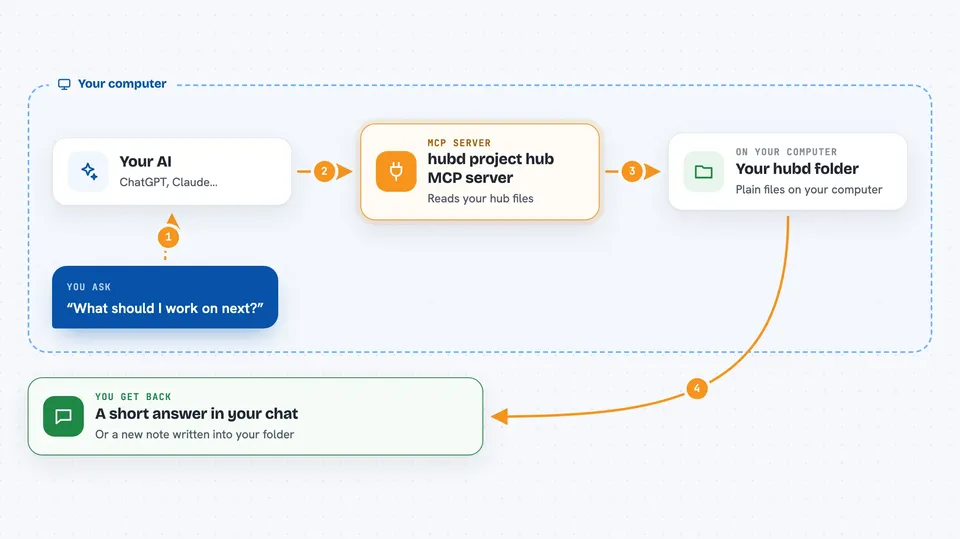
You ask your AI something about your projects, like what is next or what happened yesterday. The AI talks to this helper, which reads the plain files in your hubd folder. The helper finds the tasks, journal entries, or queue messages that match. Then the AI tells you what it found, or writes a new entry if you asked it to. Everything stays in files you own, so nothing is hidden.
 Click to zoom
What you can do with it
- See the one task you should do next and why it was chosen
- Read a morning brief of tasks, journal entries, and locks
- Add a journal entry to record what an AI session did
- Pick up a task from a queue and mark it done
- Search your past notes and get dated results
- Check which files are claimed by other people before editing
- Look at a read-only board of all your projects
Try asking your AI
- “What should I work on next?”
- “Show me the morning brief for today.”
- “Write a journal entry saying I finished the login page.”
- “Search my notes for anything about the database migration.”
What it gives back to you
You get answers in the chat, like a short list of tasks, a summary of recent journal entries, or a single recommended task with a reason. When you ask it to write, it confirms the entry was added and shows you what it wrote. Searches come back as ranked results, each with a date and a note if it might be old. Nothing is invented; if the hub cannot see something, it says so.
Before you start
What you need
- Node.js 18 or newer installed on your computer
- The hubd package installed, usually with npm
- A hubd folder for your team, created with hub init
- An MCP client like Claude Desktop or Claude Code
Good to know
It writes to files in your hubd folder, so anything you ask it to record stays there and is visible to others using the same hub.
Install it with your AI
Add hubd project hub MCP server to your AI, no technical skills needed
You don't install anything by hand. You copy one prompt, paste it into an AI that can work on your computer, and it checks, installs and connects the server for you, asking you when it needs something.
Sign in to get the install prompt
Members get a ready-made prompt that lets the Claude desktop app check hubd project hub MCP server, install it and connect it for them, step by step. You don't need any technical skills: you copy, paste and answer a few questions. Your connected AI can also find and install any of the 4,066 MCP servers here for you.
Who it's for
People who run several AI coding sessions across projects and want a simple shared place for tasks and notes without a heavy tool.





