
MCP server · Notes
AgentCairn memory server
by ccf
Give your AI a long-term memory it can save notes to and look things up in later.
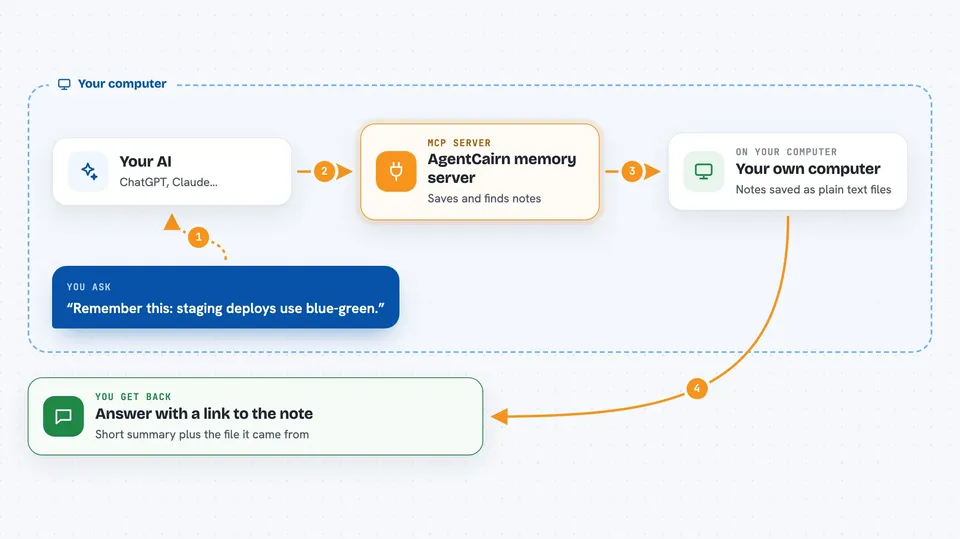
AgentCairn gives your AI helper a memory that lasts. It saves useful facts as plain Markdown notes in a folder on your computer, and later it can look those notes up when you ask. It is handy if you use a coding assistant and keep repeating the same project details over and over.
What is an MCP server? The 30-second version
On its own, your AI can only chat with what is in front of it. An MCP server is a small helper program that gives your AI a new skill or a connection to something else. This one connects your AI to a memory vault on your own machine, so it can write notes down and read them back when you ask. Nothing leaves your computer unless you turn on the optional cloud parts.
What this MCP server does
You tell your AI something worth keeping, like a project fact or a decision you made. The AI uses this helper to write a Markdown note into a folder and add it to a searchable index. Later, when you ask a question, the AI searches that index and pulls back only the few notes that matter. You see the answer in the chat, with a link back to the note it came from. Everything is stored as plain text files you can open and edit yourself.
 Click to zoom
What you can do with it
- Save a durable fact so your AI remembers it next time
- Ask your AI to recall how you solved a problem before
- Keep one shared memory across different coding assistants
- Read and edit the memory notes yourself in any text editor
- Rebuild the search index if it ever gets out of sync
- Import notes from Claude Code's own memory into the shared vault
- See a rough estimate of how much context the memory saved
Try asking your AI
- “Remember this durable fact: staging deploys use blue-green.”
- “Recall the staging deploy strategy.”
- “How did we fix the auth bug last month?”
- “What do you know about this project's database setup?”
What it gives back to you
You get an answer in the chat, usually a short summary of the relevant notes. Each result comes with a link back to the Markdown file it came from, plus which project it belongs to and whether it is still current. When you save something, you get a short confirmation that the note was written and indexed.
Before you start
What you need
- The uv tool installed (the setup guide walks you through it)
- Python 3.11 or newer if you install it on its own
- A coding assistant that supports MCP, like Claude Code, Codex, Cursor, or Claude Desktop
Good to know
Your memory vault is stored as plain text, so anyone who can read those files can read your notes; keep the folder private and do not save passwords or secrets in it.
Install it with your AI
Add AgentCairn memory server to your AI, no technical skills needed
You don't install anything by hand. You copy one prompt, paste it into an AI that can work on your computer, and it checks, installs and connects the server for you, asking you when it needs something.
Sign in to get the install prompt
Members get a ready-made prompt that lets the Claude desktop app check AgentCairn memory server, install it and connect it for them, step by step. You don't need any technical skills: you copy, paste and answer a few questions. Your connected AI can also find and install any of the 4,609 MCP servers here for you.
Who it's for
Developers and anyone who uses a coding assistant daily and is tired of repeating the same project context.





