MCP server · Analytics
nable FinOps MCP server
by chaandannn
Ask your AI about cloud and AI bills, find wasted spend, and get fixes as pull requests.
nable is a free helper that lets your AI look at what you spend on cloud services and AI tools, spot things you are paying for but not using, and suggest fixes. It runs on your own computer, so your billing data stays with you. It is handy if you get a cloud bill every month and are not sure where the money goes.
What is an MCP server? The 30-second version
On its own, your AI can only chat. An MCP server is a small helper program that gives your AI a new skill or a connection to an app or service. This one connects your AI to your cloud and AI spending information, so it can look things up and answer questions about your bills. You ask in normal words, and the helper does the digging.
What this MCP server does
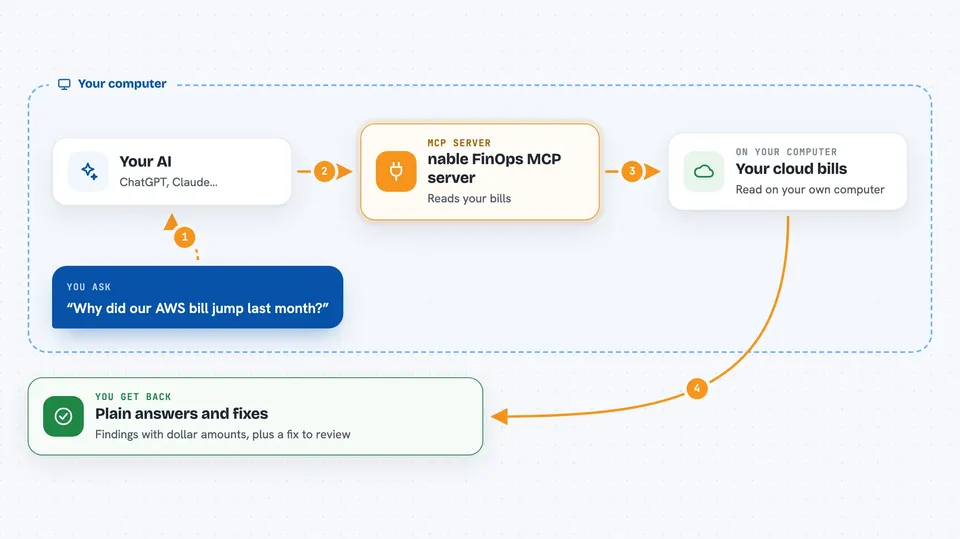
You ask your AI a question about your cloud or AI costs, like why a bill went up. Your AI sends that question to this helper running on your machine. The helper reads your billing and usage information using free, read-only tools, and works out where the money is going and what looks wasteful. It sends the answer back to your AI, which explains it to you in plain words. If you want, it can also open a pull request with a suggested fix for you to review.
 Click to zoom
What you can do with it
- Find out why your cloud bill jumped last month
- See how much you spend on OpenAI, Anthropic and other AI tools
- Spot idle servers, unattached storage and oversized databases wasting money
- Get a dollar figure for each piece of waste it finds
- Open a pull request with a suggested fix for waste you approve
- Check a budget and get warned before a change pushes you over it
- Ask which instances you could downsize
Try asking your AI
- “Why did our AWS bill jump last month?”
- “How much are we spending on OpenAI and Anthropic?”
- “Which instances should we downsize?”
- “What are we wasting money on right now?”
What it gives back to you
You get answers in the chat, usually as a short summary plus a list of findings with dollar amounts, like idle servers or unused storage and what each one costs per month. It can also give you spend breakdowns by provider, project, team or user. If you ask for a fix, it shows the change it wants to make and opens a pull request for you to review.
Before you start
What you need
- A computer with Python and uv installed (uv is a small tool that runs Python programs)
- Cloud credentials already set up on your machine if you want it to read your real bills (the demo mode works without any account)
- The Claude, Cursor or VS Code app if you want to use it inside your editor
Good to know
The scan and pricing parts are read-only and safe, but the guard can block commands and the fix feature opens pull requests, so review anything it proposes before you approve it.
Install it with your AI
Add nable FinOps MCP server to your AI, no technical skills needed
You don't install anything by hand. You copy one prompt, paste it into an AI that can work on your computer, and it checks, installs and connects the server for you, asking you when it needs something.
Sign in to get the install prompt
Members get a ready-made prompt that lets the Claude desktop app check nable FinOps MCP server, install it and connect it for them, step by step. You don't need any technical skills: you copy, paste and answer a few questions. Your connected AI can also find and install any of the 4,609 MCP servers here for you.
Who it's for
Anyone who pays a cloud or AI bill and wants to understand it, especially engineers, team leads and finance-minded people at small companies.