
MCP server · Developer tools
Docker MCP server
by ckreiling
Lets your AI start, inspect and clean up Docker containers, images, volumes and networks for you.
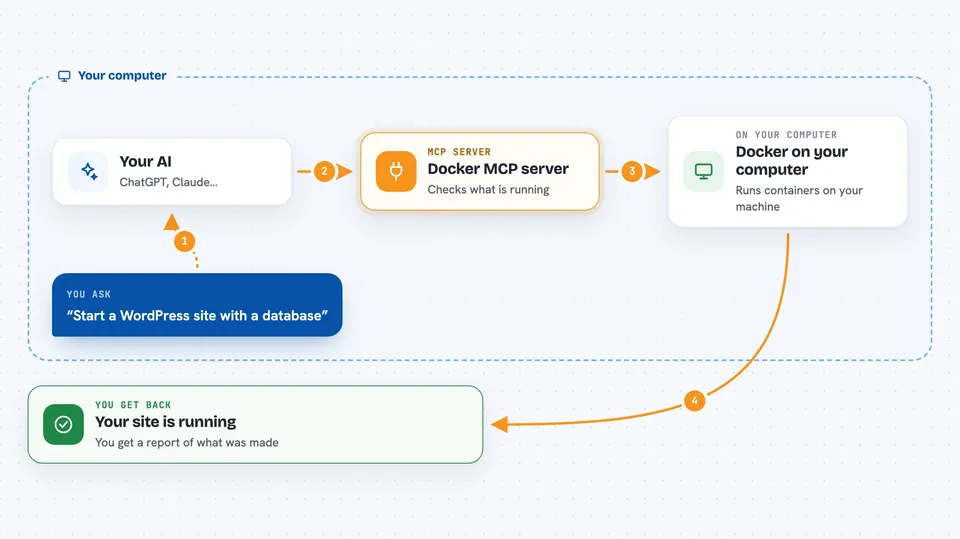
This is a helper that connects your AI assistant to Docker, the tool many people use to run apps in small sealed boxes called containers. Once it is set up, you can describe what you want in normal words and the AI will do the clicking and typing in Docker for you. It is handy if you already tinker with Docker, or if you run a website or a small server and want less fiddling.
What is an MCP server? The 30-second version
On its own, your AI can only chat. An MCP server is a small helper program that gives your AI a new skill or a connection to another app. This one connects your AI to Docker on your machine, so the AI can look at your containers and images and also create, start, stop or remove them when you ask. You stay in charge: the AI tells you what it plans to do, and you say yes.
What this MCP server does
You tell your AI what you want, for example to bring up a WordPress site with a database. The AI uses this helper to look at what is already running on your Docker, then writes a short plan in plain words and shows it to you. You either approve the plan or ask for changes. When you approve, the helper tells Docker to create and start the containers, and you get a short report of what was made.
 Click to zoom
What you can do with it
- List your containers, images, volumes and networks
- Create and start a new container from an image
- Pull an image from a registry, or build one from a Dockerfile
- Read the logs and live stats of a running container
- Stop, recreate or remove a container
- Create or remove networks and volumes
- Compose a small stack from a plain description, like a website plus its database
Try asking your AI
- “Deploy an nginx container and expose it on port 9000”
- “Show me the logs of my wordpress container from the last few minutes”
- “What containers are running right now, and how much memory are they using”
- “Clean up the containers and volumes from the project called wordpress”
What it gives back to you
You get answers in the chat: lists of containers, images, volumes or networks, short summaries of what is running, and log or stats text when you ask for it. When the AI makes a change, it tells you what it created, started, stopped or removed. For bigger jobs it first shows a plan and waits for your go-ahead.
Before you start
What you need
- Docker installed and running on your machine
- The Claude desktop app, or another AI app that supports MCP servers
- uv installed (the README links to the install page), if you use the uvx method
Good to know
This helper can create, stop and delete containers, images, volumes and networks on your Docker, so read the plan before you approve it and never put passwords or API keys into the containers you ask it to make.
Install it with your AI
Add Docker MCP server to your AI, no technical skills needed
You don't install anything by hand. You copy one prompt, paste it into an AI that can work on your computer, and it checks, installs and connects the server for you, asking you when it needs something.
Sign in to get the install prompt
Members get a ready-made prompt that lets the Claude desktop app check Docker MCP server, install it and connect it for them, step by step. You don't need any technical skills: you copy, paste and answer a few questions. Your connected AI can also find and install any of the 4,609 MCP servers here for you.
Who it's for
People who already use Docker a bit, like tinkerers, server admins and anyone running a small website or self-hosted app.



