MCP server · Text to speech
Sats4AI MCP server
by cnghockey
Let your AI make calls, send texts and faxes, translate, and generate images, audio, and video, paid per use with Bitcoin Lightning.
Sats4AI is a remote helper that gives your AI a large set of paid skills: phone calls, SMS, fax, translation, voice, audiobooks, image and video generation, and document reading. You do not sign up and you do not need an API key. It is handy if you want your AI to actually do things like send a message or make a picture, and you are okay paying a small amount each time with Bitcoin Lightning.
What is an MCP server? The 30-second version
On its own, your AI can only chat with you. An MCP server is a small helper program that gives your AI a new skill or a connection to another service. This one connects your AI to Sats4AI, a service that runs phone calls, texts, translations, and media generation. Once it is connected, your AI can ask Sats4AI to do those jobs for you when you ask.
What this MCP server does
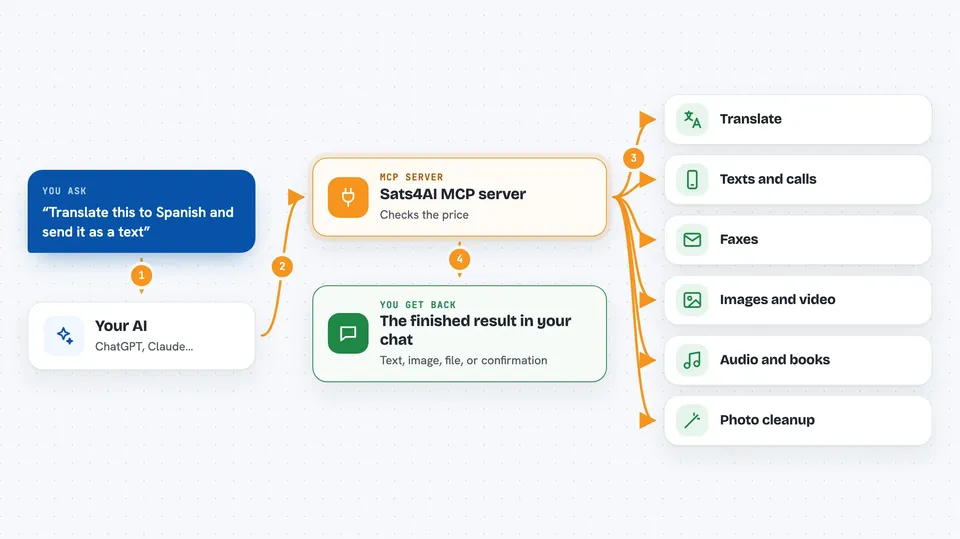
You ask your AI for something, like translating a paragraph or sending a text. Your AI uses this helper to ask Sats4AI what the job costs and gets a payment request. The payment is made with Bitcoin Lightning, either by you or by a wallet helper your AI can use. Then your AI runs the job, and the result comes back to you in the chat, such as translated text, an image, or a call transcript.
 Click to zoom
What you can do with it
- Translate text into 119 languages, plus rare languages most AI models do not cover
- Send SMS messages and place automated or two-way AI phone calls
- Send and receive faxes worldwide
- Turn text into speech or turn an EPUB book into an audiobook
- Generate images, videos, music, and 3D models from a description
- Clean up photos, like removing backgrounds, upscaling, colorizing, and restoring faces
- Read text out of PDFs and images, and pull receipt details into a structured list
Try asking your AI
- “Translate this paragraph to Spanish with Sats4AI, create the payment, pay the invoice, then run the translation”
- “Check what an SMS to +33612345678 costs, then send it: Your appointment is confirmed for 3pm tomorrow”
- “Generate an image of a lighthouse in a thunderstorm, pay the invoice, and show me the result”
- “Turn this EPUB into an audiobook, create the payment, then keep checking the job until it is done”
What it gives back to you
You get the finished result right in the chat. That can be translated text, a generated image or video, a transcript, a summary of a document, or a confirmation that a message or call was made. For longer jobs like videos or audiobooks, your AI checks the job status and then shows you the file or link when it is ready. If a paid job fails, the reply includes refund details you can claim.
Before you start
What you need
- An MCP client that supports remote servers, such as the Claude desktop app, Claude Code, Cursor, or Windsurf
- A Bitcoin Lightning wallet to pay for each use, or a Lightning wallet MCP server if you want your AI to pay on its own
- Internet access, since this is a remote server with nothing to install
Good to know
Every job costs real Bitcoin, so check the price before you pay, and remember that sending messages, making calls, or sending faxes reaches real people and cannot be taken back.
Install it with your AI
Add Sats4AI MCP server to your AI, no technical skills needed
You don't install anything by hand. You copy one prompt, paste it into an AI that can work on your computer, and it checks, installs and connects the server for you, asking you when it needs something.
Sign in to get the install prompt
Members get a ready-made prompt that lets the Claude desktop app check Sats4AI MCP server, install it and connect it for them, step by step. You don't need any technical skills: you copy, paste and answer a few questions. Your connected AI can also find and install any of the 4,361 MCP servers here for you.
Who it's for
People who want their AI to handle real tasks like calls, texts, translation, and media creation, and who are comfortable paying small amounts with Bitcoin Lightning.