
MCP server · Research
Crawleo MCP server
by Crawleo
Lets your AI search the live web and pull the content out of any page you point it at.
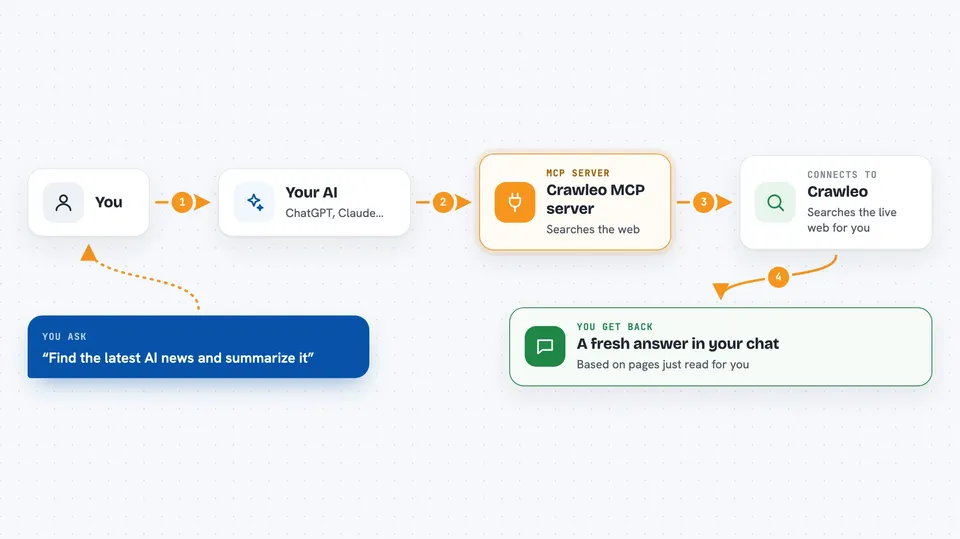
Crawleo is a helper that gives your AI assistant a live connection to the web. Normally your AI only knows what it was trained on, which can be months or years out of date. With Crawleo connected, you can ask it to search for something current or read a specific page for you.
What is an MCP server? The 30-second version
On its own, your AI can only chat with you using what it already learned. An MCP server is a small helper program that gives your AI one new skill. This one connects your AI to Crawleo, a web search and page reading service. Once it is set up, your AI can go look things up on the live web and bring the answers back into your chat.
What this MCP server does
You type a request like you always do, for example asking for the latest news on something. Your AI passes that request to Crawleo through this helper. Crawleo searches the web in real time, or opens the exact pages you named and reads them. It sends the results back, and your AI writes them up for you in the chat. You can ask for the results as plain text, as Markdown, or as raw page code if you need it.
 Click to zoom
What you can do with it
- Search the web in real time and get current results
- Read the full content of any web page you give it
- Limit searches to a specific country or language
- Get results as Markdown, plain text, or raw HTML
- See results as they would appear on desktop, mobile, or tablet
- Ask it to automatically open and read the pages it finds
- Take a screenshot of a page (optional feature)
Try asking your AI
- “Search for the latest AI news and summarize the top 5 articles”
- “Find Python web scraping tutorials and extract the code examples”
- “Crawl https://example.com and give me the main content in Markdown”
- “Search for today's news about artificial intelligence from US sources”
What it gives back to you
You get answers written by your AI, based on fresh web pages it just read. Depending on what you asked for, that can be a summary, a list of links, the full text of a page, or the page in Markdown format. It all shows up right in your chat, like a normal reply. If you asked it to crawl a page, you get that page's content back.
Before you start
What you need
- A Crawleo account (free to sign up at crawleo.dev)
- A Crawleo API key, which starts with sk_ (the site gives you one in your dashboard)
- An AI app that supports MCP servers, like Claude Desktop, Cursor, Windsurf, or GitHub Copilot
Good to know
Searches and crawls use up credits on your Crawleo account, which cost money after the free allowance, so keep an eye on your usage.
Install it with your AI
Add Crawleo MCP server to your AI, no technical skills needed
You don't install anything by hand. You copy one prompt, paste it into an AI that can work on your computer, and it checks, installs and connects the server for you, asking you when it needs something.
Sign in to get the install prompt
Members get a ready-made prompt that lets the Claude desktop app check Crawleo MCP server, install it and connect it for them, step by step. You don't need any technical skills: you copy, paste and answer a few questions. Your connected AI can also find and install any of the 4,361 MCP servers here for you.
Who it's for
Anyone who wants their AI to answer with current information instead of old training data, like researchers, writers, marketers, and developers.


