MCP server · Generative art
Creative Claw MCP server
Make images, videos and voiceovers with your AI, using top media models through one account.
Creative Claw is a helper that lets your AI assistant create pictures, videos and spoken audio for you. You describe what you want in plain words, and it picks a media model, makes the file, and hands you a link. It is handy for anyone who needs marketing visuals, product photos, short ads or voiceovers without learning a design tool.
What is an MCP server? The 30-second version
On its own, your AI can only chat. An MCP server is a small helper program that gives your AI a new skill or a connection to another service. This one connects your AI to Creative Claw, a media studio that runs image, video and voice models. So when you ask for a picture or a clip, your AI can actually go and make it for you instead of just describing it.
What this MCP server does
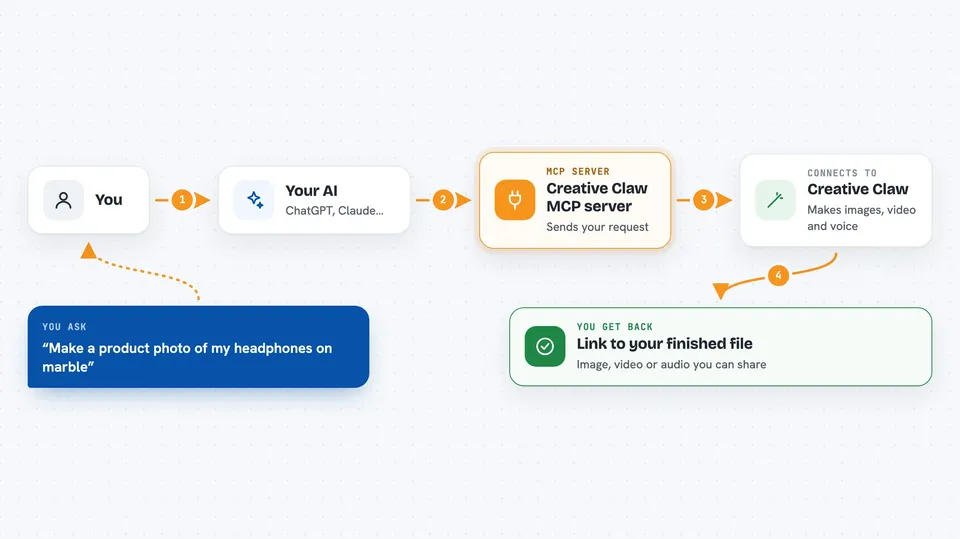
You ask your AI for something like a product photo or a short video. Your AI passes that request to the Creative Claw helper. The helper talks to Creative Claw's servers, which run the media models and store the results. When it is done, you get a link to your finished image, video or audio right in the chat. You can also set up your brand colors and fonts, save reusable characters, and put several clips together into a longer film.
 Click to zoom
What you can do with it
- Generate images from a text description
- Edit a photo, like swapping the background
- Create short videos, including from a still image
- Make voiceovers and clone your own voice
- Save your brand colors, fonts and logos as a theme
- Remove backgrounds and upscale media
- Add subtitles and trim or reframe video
Try asking your AI
- “Generate a product photo of my headphones on a marble surface with golden hour lighting”
- “Make a 15-second video of coffee being poured in slow motion”
- “Edit this image, change the background to a beach sunset but keep the person unchanged”
- “Set up our brand using our website and save it as a theme”
What it gives back to you
You get back a link to the finished file, whether that is an image, a video or an audio clip. The link stays permanent, so you can share it or download it later. For some tasks you also get a short summary of what was made and which model was used. If a video is still rendering, you can check on the job and get the link when it is ready.
Before you start
What you need
- A Creative Claw account (sign in with the browser when asked)
- The AI app you use, like Claude Desktop, ChatGPT or Cursor
- Credits on your Creative Claw account (pay as you go)
Good to know
Making media uses credits, which cost real money, so check the estimate before you generate something big.
Install it with your AI
Add Creative Claw MCP server to your AI, no technical skills needed
You don't install anything by hand. You copy one prompt, paste it into an AI that can work on your computer, and it checks, installs and connects the server for you, asking you when it needs something.
Sign in to get the install prompt
Members get a ready-made prompt that lets the Claude desktop app check Creative Claw MCP server, install it and connect it for them, step by step. You don't need any technical skills: you copy, paste and answer a few questions. Your connected AI can also find and install any of the 4,361 MCP servers here for you.
Who it's for
Marketers, small business owners, content creators and anyone who needs quick visuals or voiceovers without design skills.