MCP server · Generative art
PromptPilot MCP server
by doctorm333
Let your AI make images, video, and audio for you, right inside the chat.
PromptPilot is a helper that lets your AI create pictures, short videos, and audio clips when you ask for them. You describe what you want in plain words, and the AI sends the request off and hands you back a link to the finished file. It is handy for anyone who needs quick visuals or voice clips without opening a design app.
What is an MCP server? The 30-second version
On its own, your AI can only chat. An MCP server is a small helper program that gives your AI a new skill or a connection to another service. This one connects your AI to PromptPilot, which in turn talks to image, video, and audio models like Flux, GPT-Image-1, Imagen 4, and ElevenLabs. Once it is set up, you just ask for what you want and the AI does the back and forth for you.
What this MCP server does
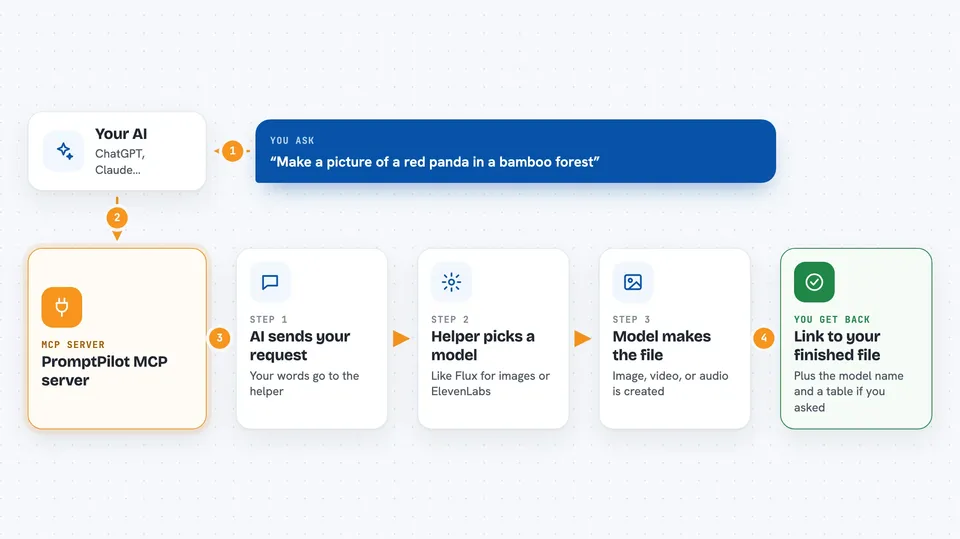
You type a request like "make me a picture of a red panda in a bamboo forest." Your AI passes that request to the PromptPilot helper. The helper sends it to the model you picked, such as Flux for images or ElevenLabs for speech. When the model finishes, the helper sends the result back, and your AI shows you a link to the image, video, or audio file. Some models are free, and the paid ones use a Pollinations key you add once.
 Click to zoom
What you can do with it
- Generate images from a text description
- Generate short videos from a text description
- Create speech or music clips
- Build a polished prompt from simple choices like lighting and mood
- Make up to 10 images in one go
- List the available models and their prices
- Check how much credit is left on your Pollinations account
Try asking your AI
- “Generate a cyberpunk cityscape at night using the flux model”
- “Make 5 product photos with different backgrounds”
- “Build me a portrait prompt with dramatic lighting and golden hour mood, then generate it”
- “What video models do you have and what do they cost?”
What it gives back to you
You get a link to the finished image, video, or audio file, plus the name of the model that made it. For lists, you get a simple table of models, styles, or prices in the chat. For batch jobs, you get several links at once. If you ask about your balance, you get a number.
Before you start
What you need
- The Claude desktop app, Claude Code, Cursor, Windsurf, or VS Code with Copilot
- Node.js installed on your computer (the free models work without any key)
- A Pollinations API key if you want to use the paid models (you get one from pollinations.ai)
Good to know
Paid models spend credit from your Pollinations account, so keep an eye on your balance when you run batches.
Install it with your AI
Add PromptPilot MCP server to your AI, no technical skills needed
You don't install anything by hand. You copy one prompt, paste it into an AI that can work on your computer, and it checks, installs and connects the server for you, asking you when it needs something.
Sign in to get the install prompt
Members get a ready-made prompt that lets the Claude desktop app check PromptPilot MCP server, install it and connect it for them, step by step. You don't need any technical skills: you copy, paste and answer a few questions. Your connected AI can also find and install any of the 4,361 MCP servers here for you.
Who it's for
Designers, marketers, writers, and anyone who needs quick images, video clips, or voiceovers without leaving their AI chat.