MCP server · Generative art
Fal.ai MCP server
by raveenb
Lets your AI make images, videos, and music using Fal.ai models like FLUX and MusicGen.
This is a helper that connects your AI assistant to Fal.ai, a service that creates images, videos, and music from text you type. You ask for what you want in normal words, and the AI sends the request to Fal.ai and brings the result back. It is handy for anyone who needs quick visuals, short clips, or background music without learning design software.
What is an MCP server? The 30-second version
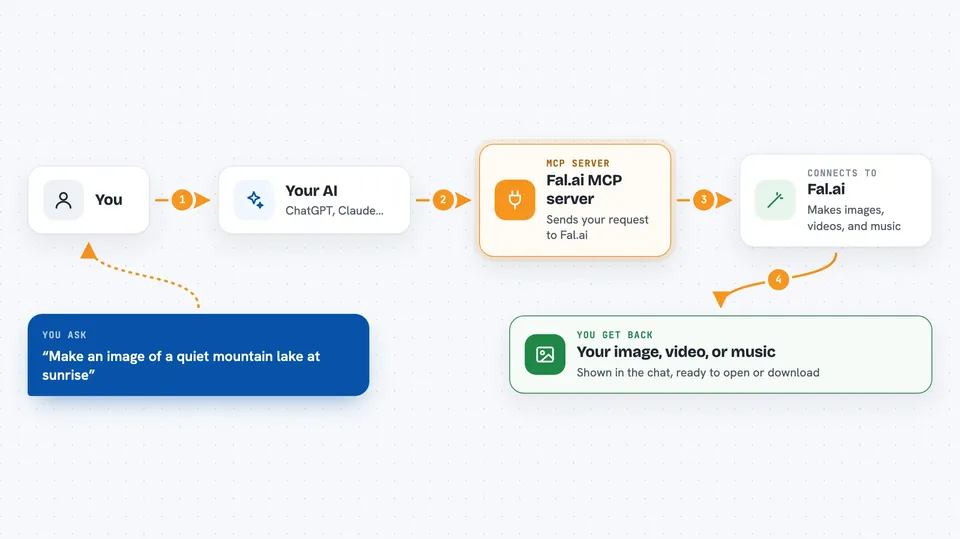
On its own, your AI can only chat. An MCP server is a small helper program that gives your AI a new skill or a connection to another service. This one connects your AI to Fal.ai, so when you ask for a picture or a song, the AI can send that request to Fal.ai and show you what comes back.
What this MCP server does
You type a request in plain words, like asking for an image of a sunset or a short video from a photo. Your AI passes that request to this helper, which talks to Fal.ai and picks a suitable model. Fal.ai creates the image, video, or audio and sends it back. The helper then hands the result to your AI, which shows it to you in the chat. Longer jobs like video and music may take a few minutes, and the helper keeps track of progress.
 Click to zoom
What you can do with it
- Generate images from text prompts using models like FLUX or Stable Diffusion
- Turn an existing image into a new style or animate it into a short video
- Remove backgrounds, upscale images, or resize them for social media
- Create instrumental music or songs with vocals
- Check model prices and your spending before generating
- Browse or search over 600 available Fal.ai models
- Upload a local file so it can be used in a generation
Try asking your AI
- “Generate an image of a quiet mountain lake at sunrise”
- “Turn this photo into a short animated video”
- “Create 30 seconds of calm ambient music”
- “Remove the background from this product photo”
What it gives back to you
You get the finished image, video, or audio file shown in the chat, often with a link to open or download it. For utility tools, you get lists of models, price estimates, or a summary of your recent spending. The chat may also show short progress notes while a longer job is running.
Before you start
What you need
- A Fal.ai account and API key (a kind of password for apps; the site gives you one)
- Python 3.10 or newer, or Docker, depending on how you install it
- The Claude desktop app or another app that supports MCP servers
Good to know
Generating images, videos, and music uses your Fal.ai account and can cost money, so check prices with the pricing tool before running large or repeated jobs.
Install it with your AI
Add Fal.ai MCP server to your AI, no technical skills needed
You don't install anything by hand. You copy one prompt, paste it into an AI that can work on your computer, and it checks, installs and connects the server for you, asking you when it needs something.
Sign in to get the install prompt
Members get a ready-made prompt that lets the Claude desktop app check Fal.ai MCP server, install it and connect it for them, step by step. You don't need any technical skills: you copy, paste and answer a few questions. Your connected AI can also find and install any of the 4,361 MCP servers here for you.
Who it's for
People who need quick images, short videos, or music for work or side projects, like marketers, teachers, small business owners, and content creators.