
MCP server · Email
DoubleTick email tracking server
by cseguinlz
Send emails from your AI and see whether they were opened, plus when and on what device.
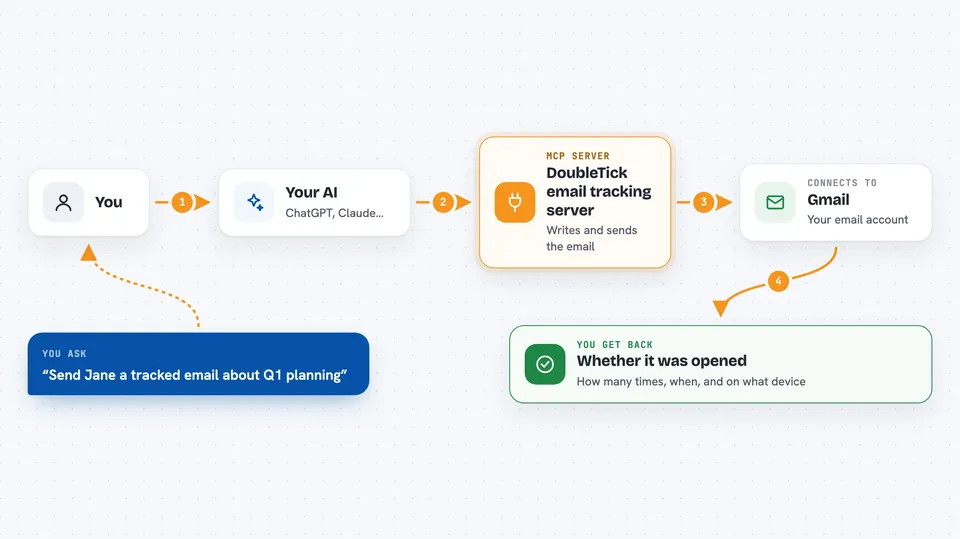
DoubleTick is a small helper that lets your AI send emails through your Gmail account and then tell you whether the person opened them. It is handy if you write to clients, candidates or partners and want to know if your message actually landed. You use it from the same chat where you already talk to your AI.
What is an MCP server? The 30-second version
On its own, your AI can only chat with you. An MCP server is a small helper program that gives your AI one new skill. This one connects your AI to your Gmail and to DoubleTick, a service that tracks email opens. Once it is connected, you can ask your AI to send an email and later ask whether it was read.
What this MCP server does
You tell your AI who to write to and what to say. The AI passes that to this helper, which turns your text into a proper email, adds a tiny invisible tracking image, and sends it through your Gmail. DoubleTick then notes that the email went out. When the other person opens it, that little image loads and the open gets recorded. Later you ask your AI about that email, and it comes back with whether it was opened, how many times, and roughly when.
 Click to zoom
What you can do with it
- Send an email through your Gmail with read tracking turned on
- Check whether your most recent tracked email was opened
- Look up a tracked email by the recipient's address
- See how many times an email was opened and on what kind of device
- List your recent tracked emails with open rates
- Write the email body in plain text or markdown and let it be converted for you
Try asking your AI
- “Send a tracked email to jane@company.com with the subject Q1 Planning and a short friendly note asking if she has time this week”
- “Did Jane open the email I sent her earlier today?”
- “Show me my last ten tracked emails and which ones were opened”
- “How many times was my proposal email opened, and on what device?”
What it gives back to you
You get answers in plain chat text. For a status check it tells you whether the email was opened, how many times, when, and on what kind of device. For a list it gives you a short rundown of recent emails with their open counts. When you send, it confirms the email went out and gives you something to refer to it later.
Before you start
What you need
- A Gmail account
- A DoubleTick account (the free tier allows 5 tracked emails per week)
- Node.js 18 or newer on your computer
- A one-time login by running doubletick login, which opens your browser for Google sign-in
Good to know
It sends real emails from your Gmail account, so check the recipient and wording before you let your AI send anything.
Install it with your AI
Add DoubleTick email tracking server to your AI, no technical skills needed
You don't install anything by hand. You copy one prompt, paste it into an AI that can work on your computer, and it checks, installs and connects the server for you, asking you when it needs something.
Sign in to get the install prompt
Members get a ready-made prompt that lets the Claude desktop app check DoubleTick email tracking server, install it and connect it for them, step by step. You don't need any technical skills: you copy, paste and answer a few questions. Your connected AI can also find and install any of the 4,361 MCP servers here for you.
Who it's for
People who write a lot of one-to-one emails, like sales reps, recruiters, freelancers and account managers, and want to know if their messages were read.





