
MCP server · Notes
UseCortex MCP server
by darktw
Let your AI save notes to an online knowledge base and look them up later whenever you ask.
This connects your AI assistant to UseCortex, an online place where you keep notes and facts. Once connected, your AI can search those notes, add new ones while you work, and bring useful details back into the conversation. It is handy if you find yourself repeating instructions or background info to your AI again and again.
What is an MCP server? The 30-second version
On its own, your AI can only talk with you inside the chat box. It forgets almost everything between conversations. An MCP server is a little helper program that plugs a new ability into your AI. This particular helper links your AI to UseCortex, your personal knowledge storage space. So instead of retyping your rules, plans, or client details each time, your AI just asks UseCortex and gets them right away.
What this MCP server does
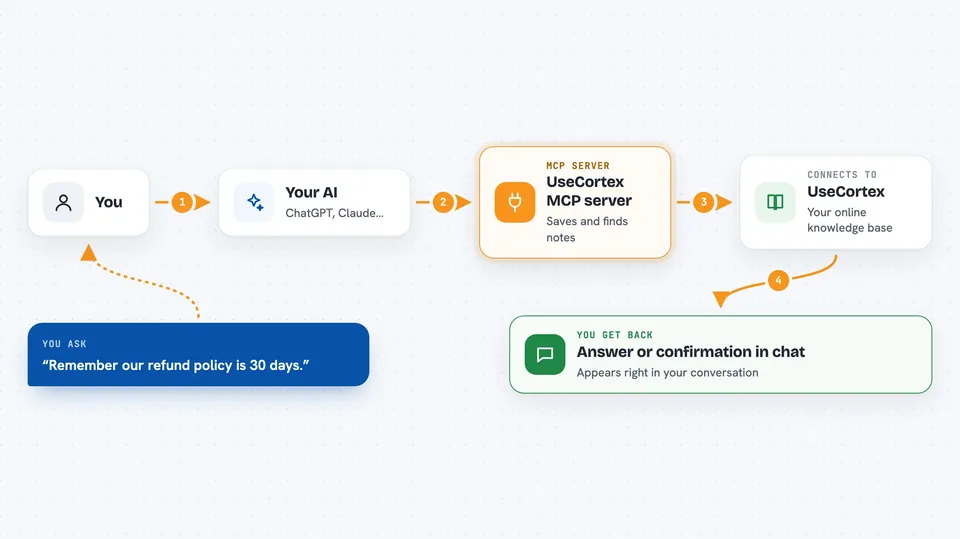
When you want something remembered or looked up, you simply tell your AI in normal words. Your AI sends that request to the UseCortex helper behind the scenes. That helper reaches out to your UseCortex account, searches or saves information there, and hands the result straight back to your AI. You see the outcome in the same chat window within seconds. Nothing extra opens, and you never touch the website during daily chats.
 Click to zoom
What you can do with it
- Save a fact, decision, or note into your knowledge base directly from chat
- Look up how your team handles returns policy without leaving the conversation
- Get a quick overview listing all the subjects currently saved
- Pull up everything filed under one subject, such as onboarding steps
- Add several related pieces of knowledge in different chats and let Cortex group them together
Try asking your AI
- “What did I decide last month about our refund process?”
- “Remember that our main supplier delivers orders within five working days.”
- “Show me my full customer complaint handling procedure.”
- “Which clients asked us for discounts above ten percent?”
What it gives back to you
Mostly you get clear written answers pulled from your own saved material. When searching broadly, your AI shows matching snippets along with the names they belong to. After adding something new, it confirms briefly that the entry was stored. Everything appears as regular chat messages, easy to scroll and reread anytime.
Before you start
What you need
- A free UseCortex account created at usecortex.net
- An API key copied from Settings, since it acts like a secret passcode connecting your AI to your account
- Any AI assistant set up to accept outside helpers via configuration settings
Good to know
Anything added lands permanently until removed separately, therefore avoid saving confidential passwords or regulated sensitive records carelessly.
Install it with your AI
Add UseCortex MCP server to your AI, no technical skills needed
You don't install anything by hand. You copy one prompt, paste it into an AI that can work on your computer, and it checks, installs and connects the server for you, asking you when it needs something.
Sign in to get the install prompt
Members get a ready-made prompt that lets the Claude desktop app check UseCortex MCP server, install it and connect it for them, step by step. You don't need any technical skills: you copy, paste and answer a few questions. Your connected AI can also find and install any of the 4,361 MCP servers here for you.
Who it's for
Anyone whose job involves repeated explanations or shared reference documents, especially developers documenting code choices, support staff answering customers repeatedly, salespeople tracking accounts, HR folks managing onboarding guides, and individuals building a second digital brain.





