
MCP server · Notes
Prism Coder MCP server
by dcostenco
Give your AI long-term memory that survives restarts, plus a local dashboard and a savings report.
Prism Coder is a small helper program that gives your AI a lasting memory. It runs on your own computer, keeps track of your sessions in a local database, and shows you a dashboard you can open in your browser. It is handy if you use Claude, Cursor, or similar tools and you are tired of re-explaining your project every time you start a new chat.
What is an MCP server? The 30-second version
On its own, your AI can only chat. It forgets everything the moment you close the window. An MCP server is a small helper program that gives your AI a new skill or a connection to something outside the chat. Prism Coder is that helper here: it gives your AI a memory that lives on your machine, so it can pick up where you left off and look back at earlier work when you ask.
What this MCP server does
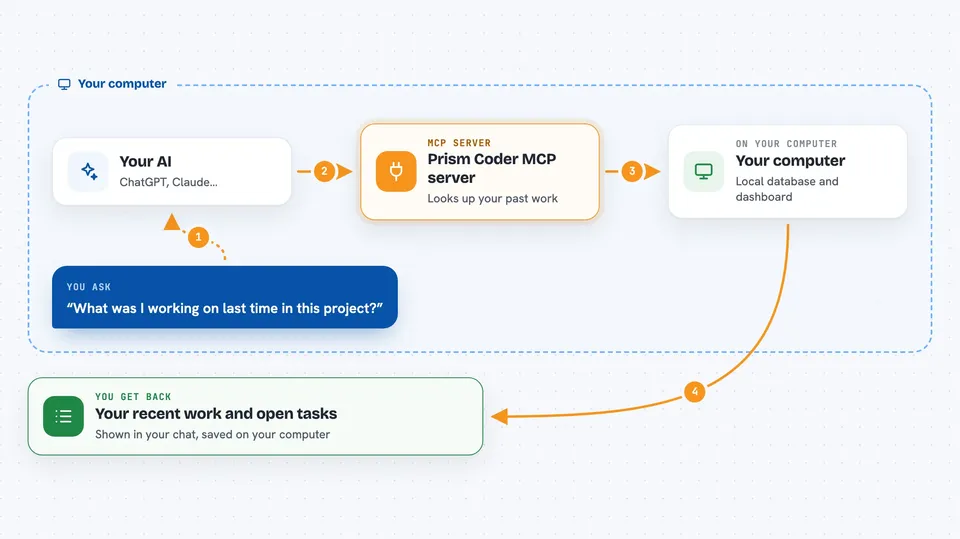
You install Prism Coder once and run a short setup command that connects it to your AI tool. From then on, when you ask your AI something, the AI can ask Prism Coder for context: what you worked on recently, what notes you saved, what is still open. Prism Coder looks those up in its local database on your computer and hands the answer back to the AI. You see the result in your normal chat, and your project details are still there tomorrow.
 Click to zoom
What you can do with it
- Resume a project with handoff notes and recent work
- See your open TODOs from earlier sessions
- Choose how much context to load: quick, standard, or deep
- Open a local dashboard to browse your saved sessions
- Rewind and replay a past session
- Share memory between different AI tools you use
- Check how many tokens were served locally instead of in the cloud
Try asking your AI
- “What was I working on last time in this project?”
- “Give me a quick summary of my recent sessions and open TODOs.”
- “Load deep context for this project before we start.”
- “Show me my local savings for the last month.”
What it gives back to you
You get back short summaries, lists of recent work, handoff notes, and open TODOs, all shown right in your chat. The dashboard gives you a browsable view of your sessions and knowledge graph. The savings report shows token counts, like how many tokens were served locally and what share that was, with the assumptions printed so you can check them.
Before you start
What you need
- Node.js 18 or newer on your computer
- An AI tool that supports MCP, such as Claude Code, Claude Desktop, Cursor, Gemini CLI, or Codex
- Ollama if you want the local model routing to work (optional but recommended)
Good to know
Prism Coder stores your session memory in a local database and can change settings in your AI tools when you run prism connect, so review the dry-run output before applying it.
Install it with your AI
Add Prism Coder MCP server to your AI, no technical skills needed
You don't install anything by hand. You copy one prompt, paste it into an AI that can work on your computer, and it checks, installs and connects the server for you, asking you when it needs something.
Sign in to get the install prompt
Members get a ready-made prompt that lets the Claude desktop app check Prism Coder MCP server, install it and connect it for them, step by step. You don't need any technical skills: you copy, paste and answer a few questions. Your connected AI can also find and install any of the 4,609 MCP servers here for you.
Who it's for
People who use AI coding or writing tools daily and want their assistant to remember past sessions without sending everything to the cloud.





