MCP server · Productivity
Polarion MCP server
by devemberx
Lets your AI read, search, and update Polarion documents, work items, and test runs for you.
This is a helper for people who work in Polarion ALM, the tool many teams use to manage requirements, specs, and test runs. Once it is connected, your AI assistant can look things up in Polarion and make changes there when you ask. It is handy if you spend your day reading documents, chasing links between requirements and tests, or updating work items.
What is an MCP server? The 30-second version
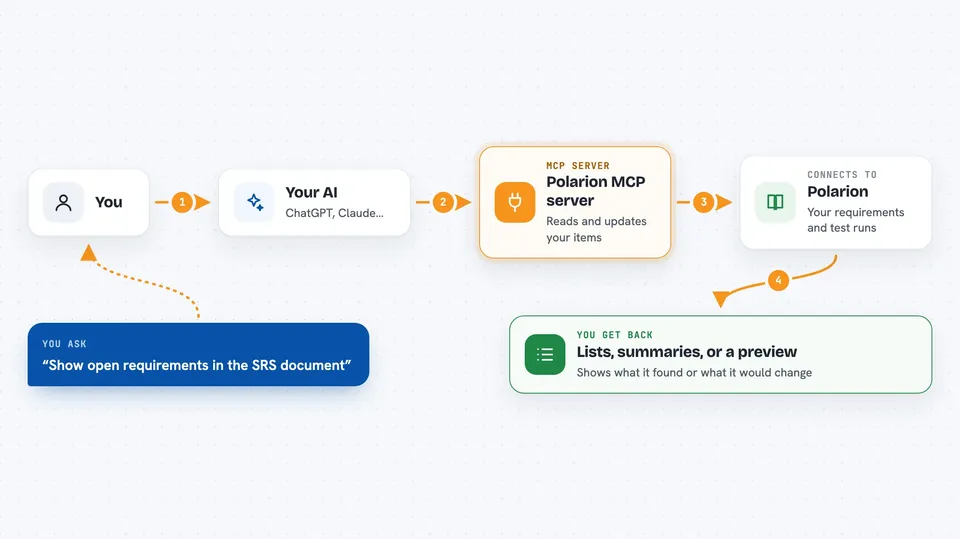
On its own, your AI can only chat with you. An MCP server is a small helper program that gives your AI a new skill, in this case a connection to your Polarion instance. You ask a question in plain words, the AI passes it to this helper, and the helper talks to Polarion and brings the answer back. So your AI can read your documents, search work items, and even make changes, all from the same chat window.
What this MCP server does
You type a request, like asking for the open requirements in a document or for a work item's details. The AI sends that request to this helper, which talks to your Polarion server using your account. Polarion sends back the information, and the helper hands it to the AI, which explains it to you or shows it as a list. If you ask for a change, like creating a task or updating a status, the helper can do that too, and it can show you a preview first so nothing happens by surprise.
 Click to zoom
What you can do with it
- List the projects and documents you can access
- Read a document and get a summary of each requirement
- Search work items with a query, like all approved requirements starting with a certain word
- Show the links between a work item and its related tasks or test cases
- Create new work items, documents, or test runs
- Update fields, descriptions, or workflow status on existing items
- Add comments or replies to documents and work items
Try asking your AI
- “List the projects I can access, then show the documents in project MCPT with their types.”
- “Read the SRS document of project MCPT and summarize each open requirement.”
- “Create a task in project MCPT titled Refactor authentication module and link it to MCPT-042 as relates_to.”
- “List the valid status values for a defect in project MCPT, then move MCPT-077 to in_review.”
What it gives back to you
You get back answers in the chat: lists of projects, documents, or work items, summaries of what a document says, or the details of a single item. When you ask for a change, the helper can show you a preview of what it would do before it actually does it. After a real change, it tells you what was updated and where. It can also fetch images attached to documents or work items so you can see them.
Before you start
What you need
- A Polarion instance running version 2506 or newer
- A Personal Access Token from your Polarion account (you create it under My Account, then Personal Access Tokens)
- The uv tool installed on your computer (the README shows a one-line install command)
- A supported AI client like Claude Desktop, Claude Code, VS Code, or Cursor
Good to know
This helper can change real data in Polarion, so use the dry-run preview before any write and double-check what the AI is about to do.
Install it with your AI
Add Polarion MCP server to your AI, no technical skills needed
You don't install anything by hand. You copy one prompt, paste it into an AI that can work on your computer, and it checks, installs and connects the server for you, asking you when it needs something.
Sign in to get the install prompt
Members get a ready-made prompt that lets the Claude desktop app check Polarion MCP server, install it and connect it for them, step by step. You don't need any technical skills: you copy, paste and answer a few questions. Your connected AI can also find and install any of the 4,609 MCP servers here for you.
Who it's for
Product managers, systems engineers, QA leads, and anyone who works with requirements, specs, and test runs in Polarion.