
MCP server · Notes
agentic-recall memory server
Give your AI a long-term memory folder it can search, and it tells you when the answer is not there.
This is a helper for Claude Desktop and Claude Code that lets your AI remember things between chats. You keep your notes as ordinary Markdown files in one folder you choose, and the AI can look things up in that folder when you ask. It is handy if you keep project notes, decisions, or handover documents and want your AI to use them without pasting them in every time.
What is an MCP server? The 30-second version
On its own, your AI can only chat with what is in front of it. An MCP server is a small helper program that gives your AI a new skill or a connection to something. This helper connects your AI to a folder of Markdown notes on your own computer, so it can search those notes and answer from them. Nothing is sent anywhere; the search runs on your machine.
What this MCP server does
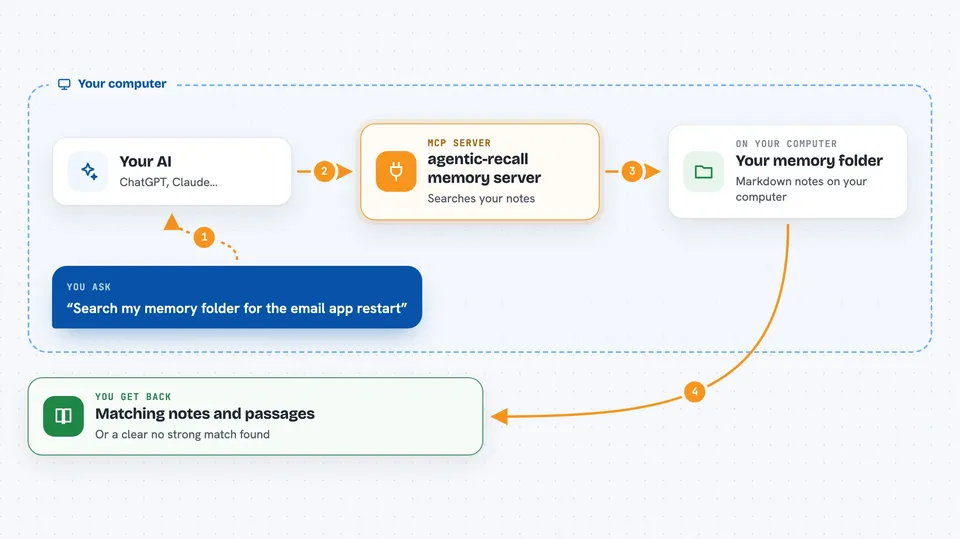
You point the helper at one folder of Markdown files, and it builds a search index of what is inside. When you ask your AI a question, the AI sends that question to this helper. The helper searches your notes in three ways at once: by exact words, by meaning, and by nearby phrases. It hands back the most relevant passages, and if nothing matches well it says so instead of guessing. If you ask it to, it can also write a new note into the folder, but only through a separate write action.
 Click to zoom
What you can do with it
- Search your notes by exact words, like file names or part numbers
- Search by meaning, so a question about restarting something finds a note that never uses that word
- Get a clear answer when your notes do not contain what you asked
- See which passages matched and how they were found
- Write a new memory into your folder when you ask the AI to save something
- Check whether a commit reference in a note is a real commit, if you point it at your repositories
- Keep your notes private, since everything stays on your machine
Try asking your AI
- “Search my memory folder for how we handled the email app restart”
- “What did I write about the pricing change last month”
- “Save a note that we decided to drop the old scraper”
- “Is there anything in my notes about wheel truing”
What it gives back to you
You get back a short list of matching notes with the relevant passage shown, plus a note about how each one was found. If nothing matched well, you get an empty result and a plain message saying no strong match was found, with the closest weak candidates listed separately. When you ask it to save something, it tells you the file it wrote. Every response also shows which version of the helper answered.
Before you start
What you need
- Node.js version 20 or newer on your computer
- A folder of Markdown files you want your AI to remember
- Claude Desktop or Claude Code, with its config file open for editing
Good to know
The write action can add files to your memory folder, so only use it when you mean to save something.
Install it with your AI
Add agentic-recall memory server to your AI, no technical skills needed
You don't install anything by hand. You copy one prompt, paste it into an AI that can work on your computer, and it checks, installs and connects the server for you, asking you when it needs something.
Sign in to get the install prompt
Members get a ready-made prompt that lets the Claude desktop app check agentic-recall memory server, install it and connect it for them, step by step. You don't need any technical skills: you copy, paste and answer a few questions. Your connected AI can also find and install any of the 4,609 MCP servers here for you.
Who it's for
People who keep project notes, decisions, or handover documents in Markdown and want their AI to search them without pasting everything in.





