
MCP server · Generative art
VAP AI media MCP server
Let your AI make images, video and music through VAP AI, with a price quote before it spends anything.
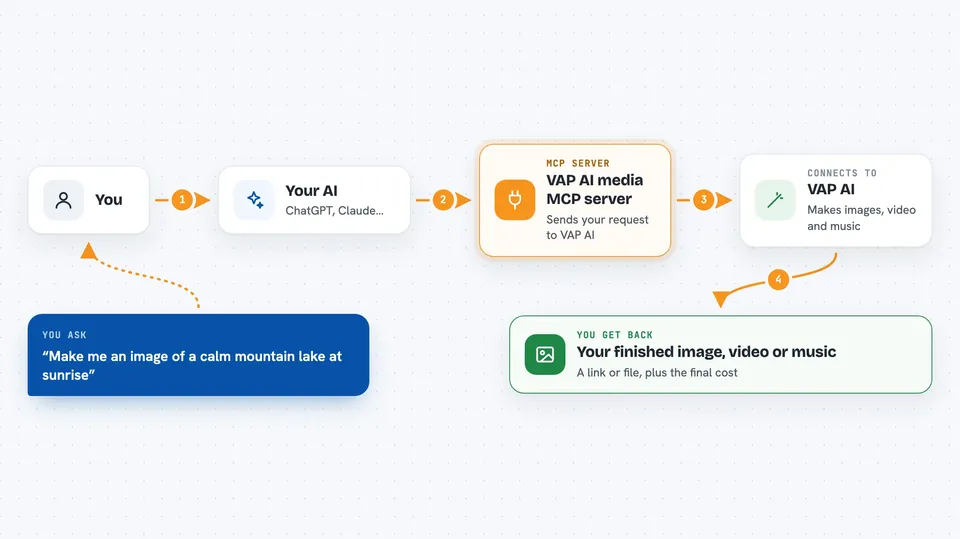
This is a helper that connects your AI assistant to VAP AI, an online service that makes pictures, videos, voices and music for you. You describe what you want in plain words, and your AI sends the request to VAP AI and brings the result back. It is handy if you create media for work but do not want to learn a new tool or worry about surprise costs.
What is an MCP server? The 30-second version
On its own, your AI can only chat. An MCP server is a small helper program that gives your AI a new skill or a connection to another service. This one connects your AI to VAP AI, so it can ask VAP AI to generate an image, a video or a piece of music for you. You stay in your normal chat window, and the helper does the talking behind the scenes.
What this MCP server does
You tell your AI what you want, for example a picture of a neon city at night. Your AI passes that request to this helper, and the helper sends it to VAP AI. VAP AI works out a price for the job first, so you see what it will cost before anything runs. If you agree, VAP AI creates the media and the helper brings the result back into your chat. The listing also mentions budget limits and a reserve, burn and refund way of charging, which means money is set aside, used for the actual work, and any leftover is returned.
 Click to zoom
What you can do with it
- Generate an image from a written description
- Create a short video from a prompt
- Make music or voice audio from a description
- Get a price quote before a job starts
- Set a spending limit so jobs stay inside your budget
- Check the status of a job you started earlier
- Use the same account for coding help through the Coding Plan API
Try asking your AI
- “Make me an image of a calm mountain lake at sunrise”
- “How much would a 10 second video of a flying drone cost?”
- “Create a short upbeat music clip for a product video”
- “Show me the status of my last generation job”
What it gives back to you
You get the finished media back, usually as a link or a file you can open, plus a short note about what was made. Before a job runs you get a price quote, and after it finishes you get the final cost. If something fails or costs less than expected, the leftover amount is returned to your balance. Everything shows up as normal messages in your chat.
Before you start
What you need
- A VAP AI account
- A Media API key from the VAP AI developer page (a kind of password your AI uses to talk to VAP AI)
- An MCP-capable app such as Claude Desktop, Claude Code or a Cursor-compatible client
- A payment method or credit balance on your VAP AI account, since generations cost money
Good to know
Generating media costs real money, so check the price quote before you approve a job and set a budget limit if you can.
Install it with your AI
Add VAP AI media MCP server to your AI, no technical skills needed
You don't install anything by hand. You copy one prompt, paste it into an AI that can work on your computer, and it checks, installs and connects the server for you, asking you when it needs something.
Sign in to get the install prompt
Members get a ready-made prompt that lets the Claude desktop app check VAP AI media MCP server, install it and connect it for them, step by step. You don't need any technical skills: you copy, paste and answer a few questions. Your connected AI can also find and install any of the 4,361 MCP servers here for you.
Who it's for
People who make images, video or audio for work, such as marketers, content creators, designers and small teams, and anyone who wants media made without leaving their chat window.




