
MCP server · Productivity
ellmos FileCommander MCP server
by ellmos-ai
Lets your AI read, search, edit and safely delete files on your computer, and run commands for you.
This is a helper that gives your AI assistant hands-on access to the files on your own computer. It can look inside folders, search for text, edit files, run programs and move things to the Recycle Bin instead of deleting them for good. It is handy if you work with lots of documents or code and want your AI to do the boring file hunting for you.
What is an MCP server? The 30-second version
On its own, your AI can only chat. It cannot see your files or open your folders. An MCP server is a small helper program that gives your AI a new skill, and this one connects it to the files and programs on your machine. Once it is running, you can just ask your AI to find a file, read it, or tidy things up, and it will do it through this helper.
What this MCP server does
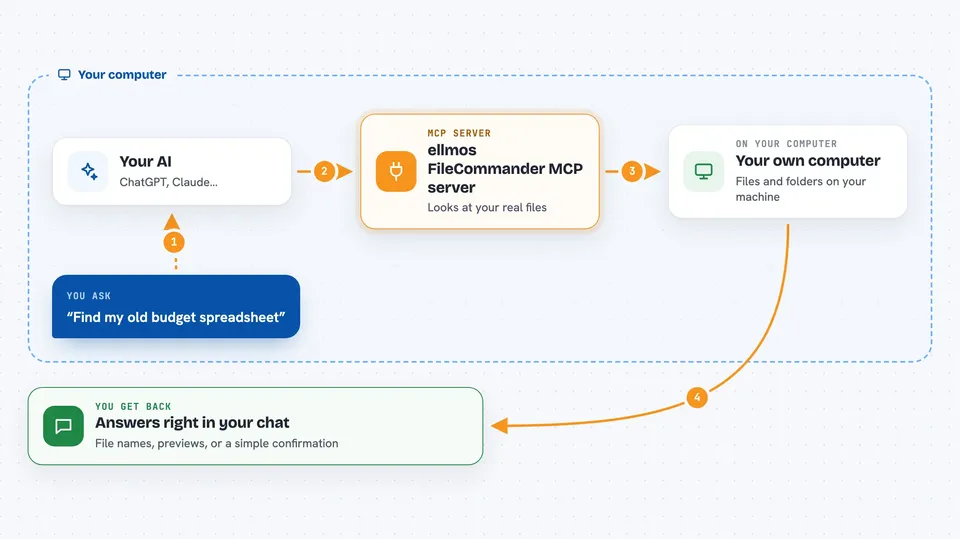
You ask your AI something like find my old budget spreadsheet or search these notes for the word invoice. Your AI passes that request to this helper, which looks at the real files on your computer. The helper reads, searches, edits, moves or runs things as needed. Then it sends the answer back, and your AI shows it to you in plain language in the chat.
 Click to zoom
What you can do with it
- Read and preview files without opening them yourself
- Search for text across a set of files you choose
- Edit a file by replacing an exact piece of text
- Move or rename files, and create ZIP archives
- Delete files safely by sending them to the Recycle Bin or Trash
- Run a command or start a program on your computer
- Convert files between formats like JSON, CSV, YAML and XML
Try asking your AI
- “Find every file in my Documents folder that mentions the word invoice”
- “Read the file notes.txt and summarise it for me”
- “Move report.pdf from Downloads to my Reports folder”
- “Delete the old draft files in this folder, but put them in the Recycle Bin”
What it gives back to you
You get answers in the chat: lists of file names, short previews of file contents, search matches with a bit of surrounding text, or a simple confirmation that a change was made. For example, it might say it found 12 files and show you the names and sizes. If it edited or moved something, it tells you what it did.
Before you start
What you need
- Node.js installed on your computer (the free program that runs it)
- The Claude desktop app or another AI app that supports MCP servers
- A folder or project you are happy for your AI to work in
Good to know
This helper can change, move and delete real files on your computer, so keep safe mode on and check what your AI is about to do before letting it run.
Install it with your AI
Add ellmos FileCommander MCP server to your AI, no technical skills needed
You don't install anything by hand. You copy one prompt, paste it into an AI that can work on your computer, and it checks, installs and connects the server for you, asking you when it needs something.
Sign in to get the install prompt
Members get a ready-made prompt that lets the Claude desktop app check ellmos FileCommander MCP server, install it and connect it for them, step by step. You don't need any technical skills: you copy, paste and answer a few questions. Your connected AI can also find and install any of the 4,609 MCP servers here for you.
Who it's for
People who work with lots of files or code on their computer, like developers, writers, analysts and anyone who wants their AI to handle file chores.




