
MCP server · Productivity
eSignatures MCP server
Lets your AI draft, edit, send and track contracts and templates on eSignatures.com for you.
This is a helper that connects your AI assistant to your eSignatures.com account. Once it is set up, you can ask your AI in plain words to draft a contract, send it for signing, or tweak the wording of a template. It is handy for anyone who deals with agreements, NDAs, or contractor paperwork and would rather not click through a website.
What is an MCP server? The 30-second version
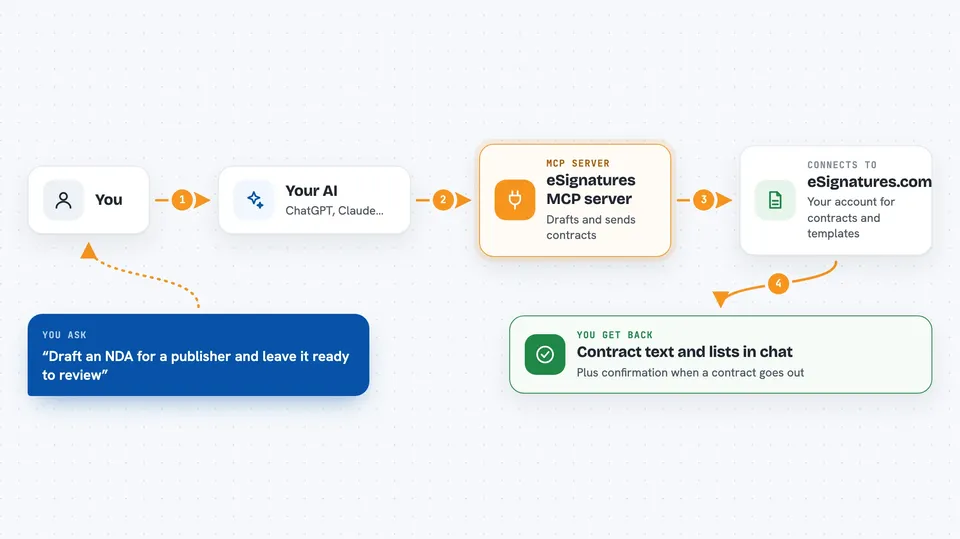
On its own, your AI can only chat. It cannot log into your eSignatures.com account or see your contracts. An MCP server is a small helper program that gives your AI a new skill, in this case a connection to eSignatures.com. When you ask for something, the AI passes the request to this helper, the helper talks to eSignatures.com, and the answer comes back to you in the chat.
What this MCP server does
You type a request in plain words, like asking for a draft NDA or a list of contracts waiting for signatures. Your AI reads that request and uses this helper to call the right action on eSignatures.com. The helper sends your request to your eSignatures.com account and waits for the reply. Then it hands the result back to your AI, which explains it to you in the chat, or shows you the contract text it just changed.
 Click to zoom
What you can do with it
- Draft a new contract and leave it ready for you to review
- Send a contract from one of your templates to a signer
- Add, update, or remove signers on a contract
- Edit the wording of an active contract with a find and replace
- List your recent contracts and see which ones are waiting for signatures
- Create and update contract templates in Markdown
- Invite someone to edit a template as a collaborator
Try asking your AI
- “Create a draft NDA for a publisher, ready for me to review and send. Signer: John Doe, ACME Corp, john@acme.com.”
- “Send an NDA based on my template to John Doe from ACME Corp at john@acme.com. Set the term to 2 years.”
- “On the NDA, change the rental term to 24 months and remove the jurisdiction section.”
- “Show me the recent contracts that are waiting for signatures.”
What it gives back to you
You get answers in the chat: lists of contracts or templates, contract details, signer information, or the Markdown text of a contract or template. When you ask for a change, the AI tells you what it changed and shows the new wording. When you send a contract, you get confirmation that the request went out.
Before you start
What you need
- A free eSignatures.com account (you can create one at esignatures.com)
- Your eSignatures.com API secret token (a kind of password for apps; you get it from your account)
- The Claude desktop app or another AI app that supports MCP servers
Good to know
This helper can send real contracts to real people and change or delete contracts and templates, so check with your AI before it sends or deletes anything important.
Install it with your AI
Add eSignatures MCP server to your AI, no technical skills needed
You don't install anything by hand. You copy one prompt, paste it into an AI that can work on your computer, and it checks, installs and connects the server for you, asking you when it needs something.
Sign in to get the install prompt
Members get a ready-made prompt that lets the Claude desktop app check eSignatures MCP server, install it and connect it for them, step by step. You don't need any technical skills: you copy, paste and answer a few questions. Your connected AI can also find and install any of the 4,361 MCP servers here for you.
Who it's for
People who handle contracts, NDAs, or agreements at work, like founders, ops staff, HR, legal assistants, and freelancers.





