
MCP server · Research
Search1API MCP server
by fatwang2
Lets your AI search the web, read pages, and check trending topics for you.
This is a helper that connects your AI assistant to Search1API, a service that searches the web and reads pages. Once it is connected, you can just ask your AI a question and it will go look things up online for you. It is handy for anyone who wants fresh information in their chat without copying and pasting links all day.
What is an MCP server? The 30-second version
On its own, your AI can only chat with what it already knows. An MCP server is a small helper program that gives your AI a new skill or a connection to an outside service. This one connects your AI to Search1API, so it can search the web, read pages, and check what is trending. You stay in your chat window; the helper does the running around.
What this MCP server does
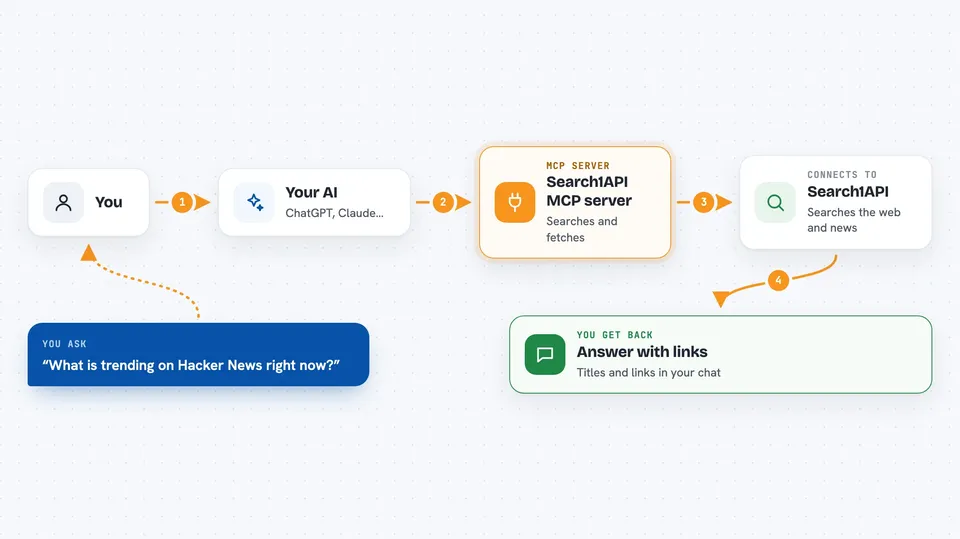
You ask your AI a question, like what happened in the news today. Your AI sends that request to this helper, which passes it to Search1API. Search1API searches the web or news sources and sends back a list of results with titles and links. Your AI reads that list and writes you a plain answer in the chat. If you want the full text of a page, the helper can fetch that too.
 Click to zoom
What you can do with it
- Search the web for a topic and get a list of results with links
- Search recent news articles on a subject
- Read the full text of a web page you point it to
- List all the links found on a website
- Check what is trending on GitHub or Hacker News
- Limit searches to certain sites or exclude ones you do not want
- Filter results by time, like the last day, month, or year
Try asking your AI
- “What are the latest news stories about electric cars?”
- “Search the web for beginner guides to spreadsheets and give me the top five links”
- “Read this page and summarize it for me: https://example.com/article”
- “What is trending on Hacker News right now?”
What it gives back to you
You get back a short written answer in your chat, usually with a list of titles and links. For a page you asked it to read, you get a summary or the main text. For trending topics, you get a list of what is popular right now. Everything shows up as normal chat text, so you can read it or ask follow-up questions.
Before you start
What you need
- A Search1API account and an API key from the Search1API dashboard (an API key is like a password that lets apps use the service for you)
- An AI app that supports MCP servers, like Claude Desktop, Claude.ai, Cursor, VS Code, or Windsurf
- For the local option: Node.js 20 or newer
Good to know
Each search or page read uses credits on your Search1API account, and crawling extra pages costs more, so keep an eye on your usage.
Install it with your AI
Add Search1API MCP server to your AI, no technical skills needed
You don't install anything by hand. You copy one prompt, paste it into an AI that can work on your computer, and it checks, installs and connects the server for you, asking you when it needs something.
Sign in to get the install prompt
Members get a ready-made prompt that lets the Claude desktop app check Search1API MCP server, install it and connect it for them, step by step. You don't need any technical skills: you copy, paste and answer a few questions. Your connected AI can also find and install any of the 4,361 MCP servers here for you.
Who it's for
Anyone who wants their AI to look things up online, like researchers, writers, analysts, and office workers who need current information in their chat.


